- 17 -
2. Setting Daylight Saving Time
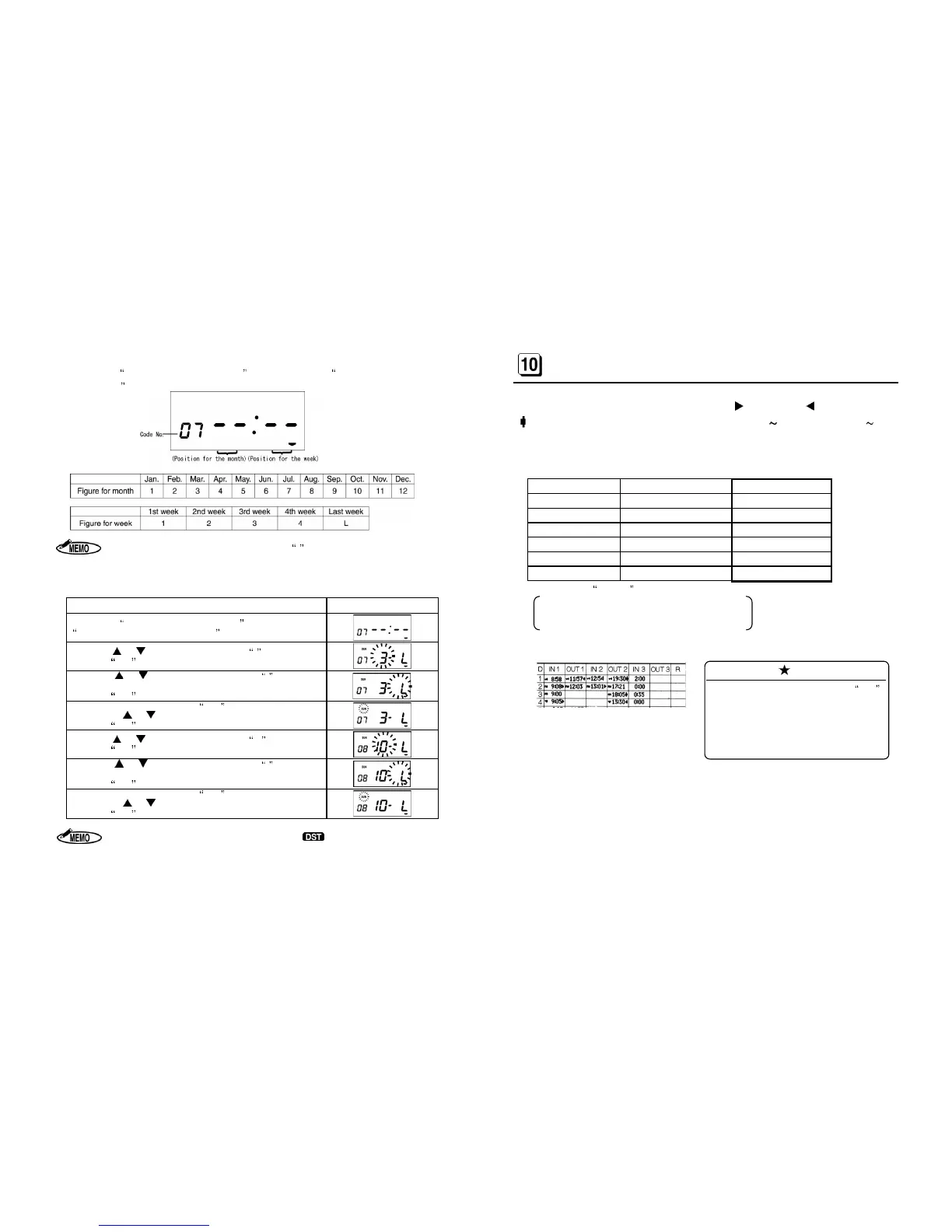
After setting Starting time of Overtime work, the display moves to Starting Date of Daylight
Saving Time.
When setting the last week of the month, set L
for the last week even if the last
week is the 4th week.
[Example] Starting Date of Daylight Saving Time : Sunday of the last week in March.
Ending Date of Daylight Saving Time : Sunday of the last week in October.
Procedure [MODE 3] Display
After setting Starting time of Overtime Work,
Starting Date of Daylight Saving Time.
Press the or key until the display shows 3 for March.
Press the SET key to register the Month.
Press the or key until the display shows L
week.
Press the SET key to register the Week.
Move the cursor to the position of SUN
for the day of the week by
pressing the or key.
Press the SET key to register the day of the week.
Press the or key until the display shows 10 for October.
Press the SET key to register the Month.
Press the or key until the display shows L
week.
Press the SET key to register the Week.
Move the cursor to the position of
for the day of the week by
pressing the or key.
Press the SET key to register the day of the week.
1. During the period of Daylight Saving Time, the
2. Once set, Daylight Saving Time will be adjusted automatically from the following
year, in accordance with the set data.
- 18 -
OUT, OVERTIME WORKING AND NEXT
DAY OVERTIME SYMBOLS
ER-1600 can automatically print the symbols Late-In ( ), Early-Out ( ), Overtime Work
( ) at the right position, in accordance with the set time of IN1 OUT2 (Code No. 02 05)
and the start time of Overtime Work (Code No. 06).
[Example of using the following data for MODE 3]
Items (MODE 3)
Data to be used Code No.
LST
04 : 00 01
IN 1
09 : 00 02
OUT 1 12 : 00 03
IN 2
13 : 00 04
OUT 2
17 : 00 05
OST
17 : 30 06
(The data used in MODE 1 )
Printing Style of the Time = Regular minutes (1/60)
Daily Total Time = Regular minutes (1/60)
Style of Daily Total Time = Overtime work
[Printing examples]
Note
(1) The Daily Total Time should be 0:00
because the forth printing time is not
beyond the starting time of Overtime
The Daily Total Time is printed after
printing in the 4
th
column.


 To Next Page