- 13 -
6. Password protection for settings (Code No: 06)
Password is shown on the display after setting LCD Backlight.
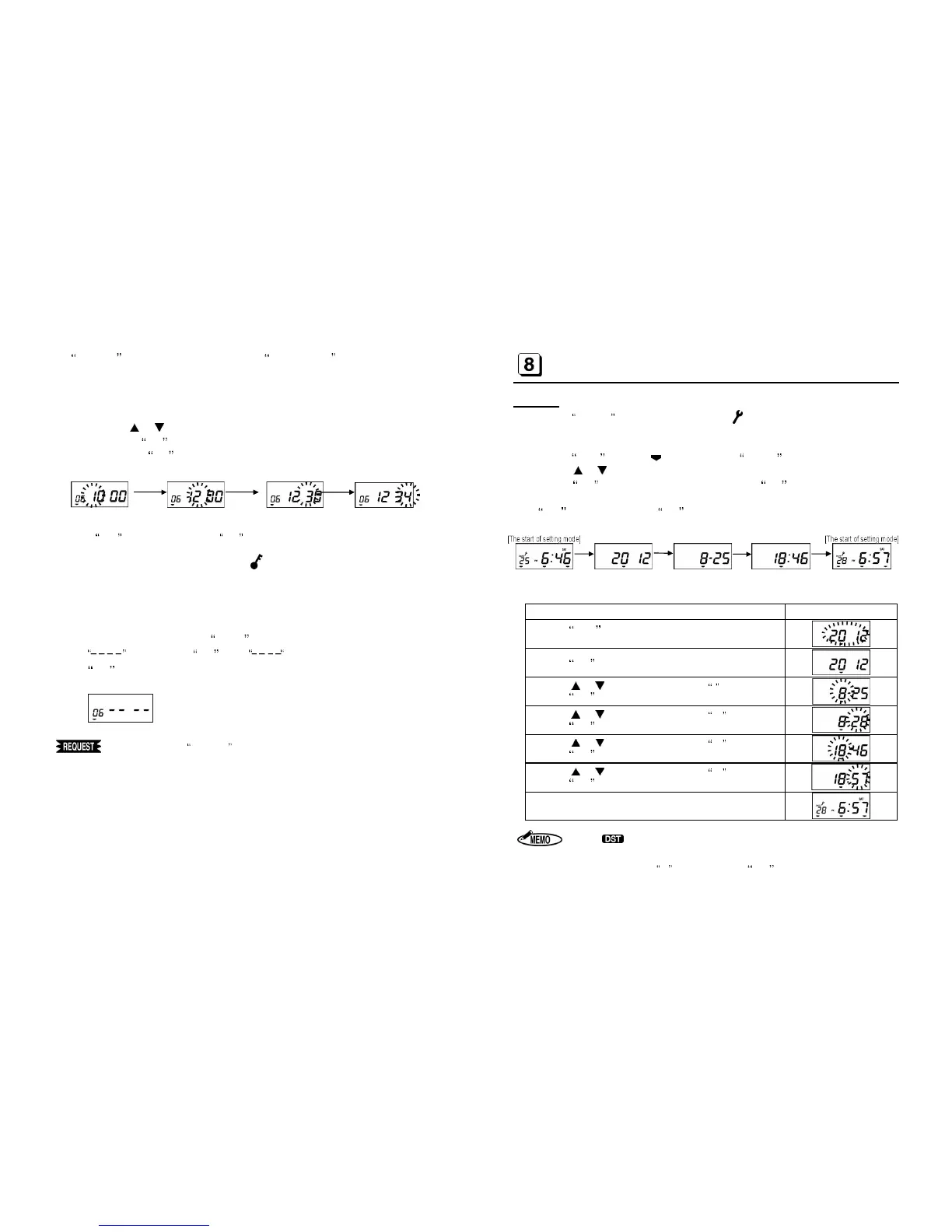
A 4-digit password can be set to prevent someone other than the administrator from
modifying the time or changing the settings.
1. Press the or key to change the number of each digit.
2. Pressing the SET key shifts control to the next digit, allowing you to change its num-
ber. When the SET key is pressed at the 4
th
digit, password setting is completed. Af-
ter the buzzer beeps twice, the display returns to the start of the setting mode.
If C-05 is displayed, press the SET key. (See [14] on page 22.)
After password setting is completed, the symbol is always displayed while waiting.
Before entering the setting mode, the password input screen is displayed; you cannot
enter the setting mode unless a correct password is input.
To set no password, press the CLEAR key in the password setting screen to display
, followed by the SET key. If (initial value) is displayed, press the
SET key.
[Initial value]
Making note of the Password
place to prevent it from being lost or used by an u
authorized person.
- 14 -
SETTING YEAR, MONTH, DATE, HOUR, AND MINUTE
(MODE 2)
Procedure
1. Press the CANCEL key for 3sec. or more. The symbol appears on the display to in-
dicate the setting mode is on. If password has been set up, enter the password before into
the setting mode. (See [6 ] on page 13)
2. Press the OUT1 key. The symbol appears at MODE 2 on the display.
3. Press the or key to change the Year, Month, Date, Hour and Minute.
4. Press the SET key after changing each item. When the SET key is pressed at the end,
the buzzer beeps twice and the display returns to the start of the setting mode.
If C-05 is displayed, press the SET key. (See [14] on page 22.)
[Example] 6:57 (PM), 28th August, 2012
Procedure [MODE 2] Display
Press the OUT1 key.
Current Year is shown on the display.
Press the SET key to register the Year.
Press the or key until the display shows 8 for August.
Press the SET key to register the Month.
Press the or key until the display shows 28.
Press the SET key to register the Date.
Press the or key until the display shows 18.
Press the SET key to register the Hour.
Press the or key until the display shows 57.
Press the SET key to register the Minute.
The display returns to the start of setting mode.
1. The symbol appears during Daylight Saving Time when it has been set.
2. In Europe, set Date first and Month second.
3. The clock starts at 00 seconds when the SET key is pressed at the end.


 To Next Page