PB 15MAXDATA PLATINUM 300 IR M8Hardware Installations and Upgrades
3 Hardware Installations and Upgrades
Before You Begin
Before working with your server product, pay close attention to the “Safety Information” at the
beginning of this manual.
Tools and Supplies Needed
• Phillips (cross head) screwdriver (#1 bit and #2 bit)
• Needle nosed pliers
• Antistatic wrist strap and conductive foam pad (recommended)
Installing and Removing Memory
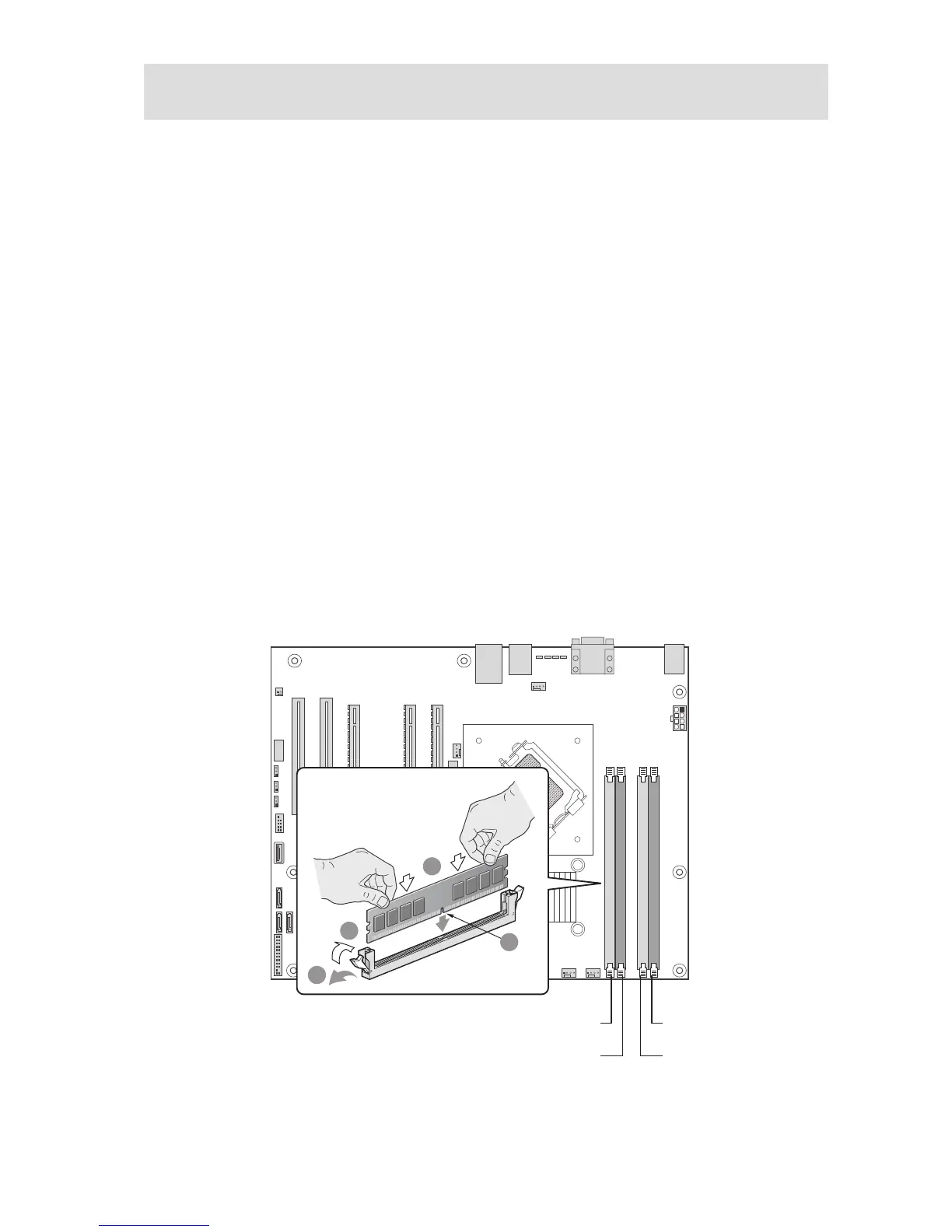
The silkscreen on the board for the DIMMs displays DIMM A1, DIMM A2, DIMM B1, DIMM B2
starting from the center of the board. DIMM A1 is the socket closest to the processor socket. See
„Memory“ for a discussion of the memory requirements and options.
Installing DIMMs
To install DIMMs, follow these steps:
1. Observe the safety and ESD precautions in “Safety Information”.
2. Turn off all peripheral devices connected to the server. Turn off the server.
3. Disconnect the AC power cord from the server.
4. Remove the server‘s cover.
5. Locate the DIMM sockets (see Figure 5).
Figure 5. Installing DIMMs



 To Next Page