1
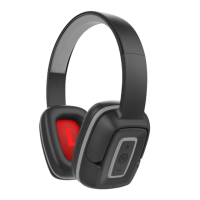
HEADPHONES OVERVIEW
OPERATING INSTRUCTIONS
Charging the headphone
1. Your headphone uses a rechargeable built-in battery, so be sure to fully charge the battery before using
2. Connect the USB cable to the charging socket on the headphone to charge the battery.
3. The LED indicator will remain RED while charging is in progress. After the battery is fully charged the
LED will turn OFF.
• Turning the headphone ON
1. Press the POWER switch button for 2 seconds in Shutdown mode, a voice prompt will be heard.
• Turning the headphone OFF
1. Press the POWER switch button for 2 seconds in Standby mode, a voice prompt will be heard.
• Pairing and Connecting the headphone with a mobile phone
1. The earphone automatically enters Pairing Mode, indicated by the RED and BLUE lights alternately
2. Enter Bluetooth settings on the mobile phone and search for the headphone.
3. Select the headphone (example: EB-BT300) from the available list of devices found by the phone.
• Reconnecting the headphone with a phone
1. The headphone will attempt to reconnect to the last paired device automatically each time it is
powered on. If the reconnect feature is not available on the phone, the headphone will have to be
reconnected from the “paired devices” found on the phone.
• Answering a call
1. Short press the Power switch button to answer a call when the incoming call prompt tone is heard.
2. If listening to music when a call is answered, the music will stop while the call is in progress and will
resume after the call has ended.
• Ending a call
1. Short press the Power switch button to end a call.
•Rejecting a call
1.Long press the Power switch button to reject an incoming call.
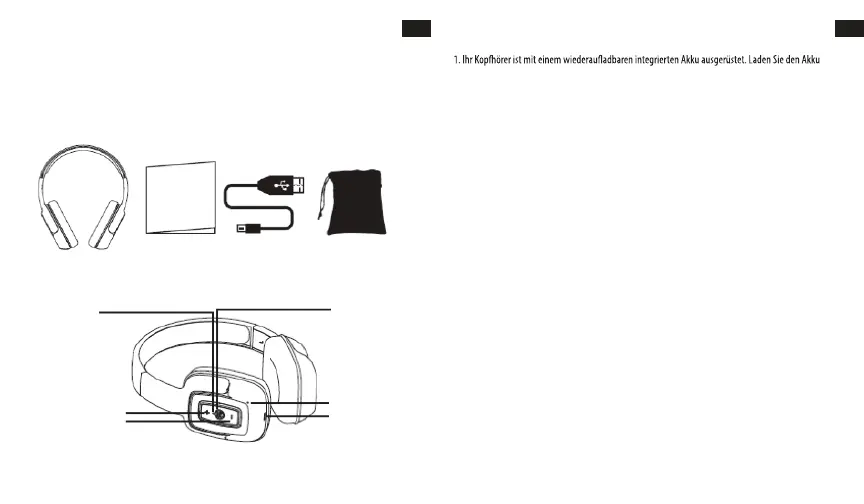
LED Indicator
Power: ON/OFF
Microphone
Charge
VOL - / Prev Song
VOL + / Next Song
Bluetooth Headphone User´s Guide USB Charging Cable Carry Pouch
EN
2
EN
USER’S MANUAL
Please read this user’s manual completely before operating this unit and retain this booklet for future
reference.
LOCATION OF CONTROLS
IN THE BOX
BEDIENUNGSANLEITUNG
Bitte lesen Sie die gesamte Bedienungsanleitung vor Gebrauch dieses Geräts und bewahren Sie dieses
Handbuch für ein späteres Nachschlagen auf.
ÜBERSICHT KOPFHÖRER
IN DER BOX
DE
Bluetooth-Kopfhörer Bedienungsanleitung USB-Ladekabel
Tragetasche
POSITION DER BEDIENELEMENTE
LED-Anzeige
Netzanschluss: ON/OFF
VOL + / Nächster Titel
VOL - / Vorangegangener Titel
Mikrofon
Laden
BEDIENUNGSANLEITUNG
Laden der Kopfhörer
vor
dem ersten Gebrauch vollständig auf.
2. Schließen Sie das USB-Kabel an die Ladebuchse des Kopfhörers an, um den Akku aufzuladen.
3. Während des Ladevorganges leuchtet die LED-Anzeige rot. Die LED erlischt, sobald der Akku
vollständig aufgeladen ist.
• Einschalten der Kopfhörer
1. Halten Sie die Einschalttaste 2 Sekunden lang im Shutdown-Modus gedrückt, Sie hören eine
Sprachansage.
• Ausschalten der Kopfhörer
1. Halten Sie die Einschalttaste 2 Sekunden lang im Standby-Modus gedrückt, Sie hören eine
Sprachansage.
• Das Mobiltelefon mit dem Kopfhörer koppeln und verbinden
1. Der Kopfhörer wechselt automatisch in den Pairing-Modus, der durch abwechselnd blinkendes ROTES
und BLAUES Licht angezeigt wird.
2. Geben Sie die Bluetooth-Einstellungen auf dem Mobiltelefon ein und suchen Sie nach dem Kopfhörer.
3. Wählen Sie den Kopfhörer (Beispiel: EB-BT300) aus der Liste der vom Telefon gefundenen Geräte aus.
Das Koppeln ist abgeschlossen. (Hinweis: War das Koppeln erfolgreich, blinkt das blaue Anzeigelicht)
• Den Kopfhörer mit dem Telefon nochmals verbinden
1. Der Kopfhörer versucht nach jedem Einschalten, sich automatisch mit dem zuletzt gekoppelten Gerät
zu verbinden. Wenn die Wiederverbindungsfunktion auf dem Telefon nicht verfügbar ist, muss der
Kopfhörer mit den vom Telefon gefundenen "gekoppelten Geräten" wieder verbunden werden.
• Anrufbeantwortung
1. Drücken Sie kurz die Einschalttast
e, um einen Anruf zu beantworten, wenn der Anrufton für
ankommende Anrufe zu hören ist.
2. Wenn Sie während eines Anrufs Musik hören, stoppt die Musik während des Anrufs und wird nach
Beendigung des Anrufs fortgesetzt.
• Anruf beenden
1. Zum Beenden des Anrufs drücken Sie kurz die Einschalttaste.
•Anruf nicht annehmen
1.Halten Sie die Einschalttaste lange gedrückt, um einen eingehenden Anruf abzulehnen.
DE
17 18


 To Next Page
 Loading...