1
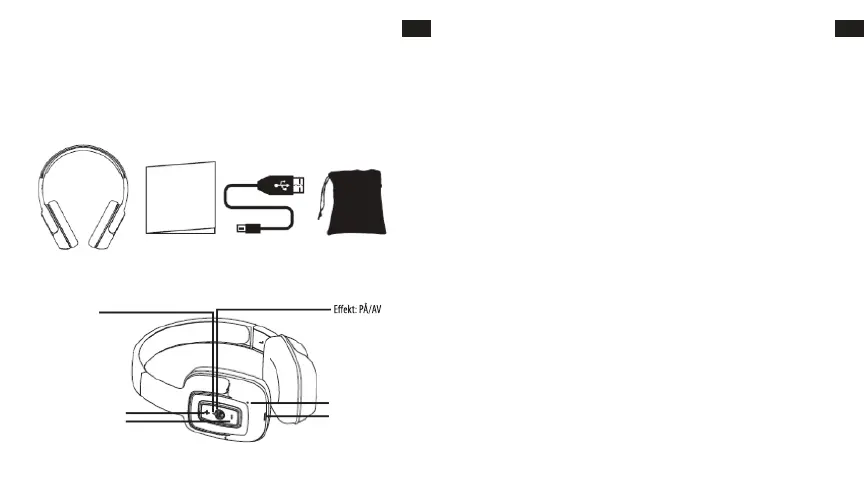
HEADPHONES OVERVIEW
OPERATING INSTRUCTIONS
Charging the headphone
1. Your headphone uses a rechargeable built-in battery, so be sure to fully charge the battery before using
2. Connect the USB cable to the charging socket on the headphone to charge the battery.
3. The LED indicator will remain RED while charging is in progress. After the battery is fully charged the
LED will turn OFF.
• Turning the headphone ON
1. Press the POWER switch button for 2 seconds in Shutdown mode, a voice prompt will be heard.
• Turning the headphone OFF
1. Press the POWER switch button for 2 seconds in Standby mode, a voice prompt will be heard.
• Pairing and Connecting the headphone with a mobile phone
1. The earphone automatically enters Pairing Mode, indicated by the RED and BLUE lights alternately
2. Enter Bluetooth settings on the mobile phone and search for the headphone.
3. Select the headphone (example: EB-BT300) from the available list of devices found by the phone.
• Reconnecting the headphone with a phone
1. The headphone will attempt to reconnect to the last paired device automatically each time it is
powered on. If the reconnect feature is not available on the phone, the headphone will have to be
reconnected from the “paired devices” found on the phone.
• Answering a call
1. Short press the Power switch button to answer a call when the incoming call prompt tone is heard.
2. If listening to music when a call is answered, the music will stop while the call is in progress and will
resume after the call has ended.
• Ending a call
1. Short press the Power switch button to end a call.
•Rejecting a call
1.Long press the Power switch button to reject an incoming call.
LED Indicator
Power: ON/OFF
Microphone
Charge
VOL - / Prev Song
VOL + / Next Song
Bluetooth Headphone User´s Guide USB Charging Cable Carry Pouch
EN
2
EN
USER’S MANUAL
Please read this user’s manual completely before operating this unit and retain this booklet for future
reference.
LOCATION OF CONTROLS
IN THE BOX
ANVÄNDARMANUAL
Vänligen läs igenom hela användarmanualen innan du börjar använda denna enhet och spara den för
framtida referens.
VAD FINNS
I LÅDAN
SV
Bluetooth hörlurar Användarguide USB-laddningskabel
Bärfodral
KNAPPARNAS PLACERING
LED-indikator
Vol+ / Nästa låt
VOL - / Föregående låt
Mikrofon
Laddning
ANVÄNDARINSTRUKTIONER
Ladda hörlurarna
1. I dina hörlurar sitter ett laddningsbart inbyggt batteri, så var noga med att ladda batteriet helt innan
du använder hörlurarna för första gången.
2. Anslut USB-kabeln till laddningsuttaget på hörlurarna för att ladda batteriet.
3. Indikatorlampan förblir RÖD medan laddningen pågår. När batteriet är fulladdat släcks lampan.
• Slå PÅ hörlurarna
1. Tryck på strömbrytaren i 2 sekunder i avslaget läge och ett röstmeddelande kommer att höras.
• Slå AV hörlurarna
1. Tryck på strömbrytaren i 2 sekunder i standby-läge och ett röstmeddelande kommer att höras.
• Parkoppla och anslut hörlurarna med en mobiltelefon.
1. Hörlurarna går automatiskt in i Parkoppling, vilket indikeras med växelvis blinkande RÖDA och BLÅA
lampor.
2. Öppna Bluetooth-inställningarna på mobiltelefonen och sök efter hörlurarna.
3. Välj hörlurarna (exempel: EB-BT300) från den tillgängliga listan över enheter som hittats av telefonen.
Parkopplingen är genomförd. (Observera: När parkopplingen utförts framgångsrikt blinkar den blå
indikatorlampan.
• Återanslut hörlurarna med en telefon
1. Hörlurarna kommer automatiskt att försöka ansluta till den senaste parkopplade enheten varje gång
de slås på. Om återkopplingsfunktionen inte är tillgänglig på telefonen måste hörlurarna återanslutas
från de “parkopplade enheterna” som hittats på telefonen.
• Ta emot ett samtal
1. Tryck kort på strömbrytaren för att svara på ett samtal när en inkommande ringsignal hörs.
2. Om du lyssnar på musik när du tar emot ett samtal stängs musiken av medan samtalet pågår och
återupptas efter att sam
talet har avslutats.
• Avsluta ett samtal
1. Tryck kort på strömbrytaren för att avsluta ett samtal.
•Avvisa ett samtal
1.Håll strömbrytaren intryckt länge för att avvisa ett inkommande samtal.
SV
67 68



 To Next Page