1
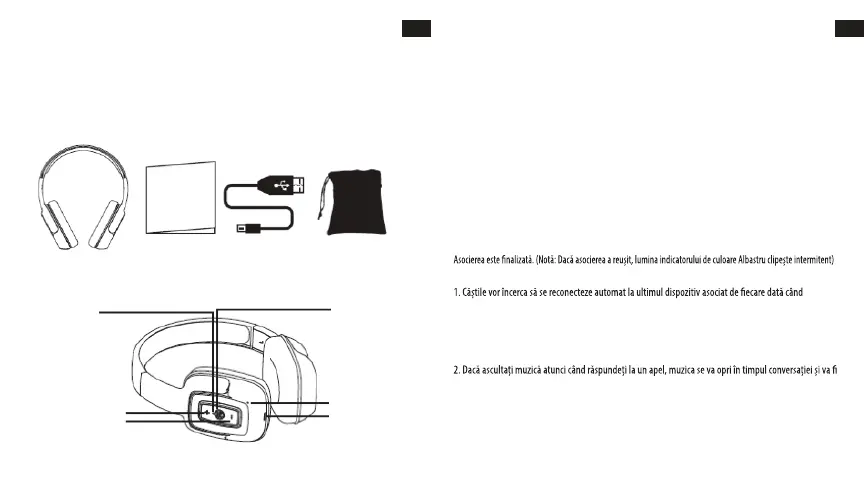
HEADPHONES OVERVIEW
OPERATING INSTRUCTIONS
Charging the headphone
1. Your headphone uses a rechargeable built-in battery, so be sure to fully charge the battery before using
2. Connect the USB cable to the charging socket on the headphone to charge the battery.
3. The LED indicator will remain RED while charging is in progress. After the battery is fully charged the
LED will turn OFF.
• Turning the headphone ON
1. Press the POWER switch button for 2 seconds in Shutdown mode, a voice prompt will be heard.
• Turning the headphone OFF
1. Press the POWER switch button for 2 seconds in Standby mode, a voice prompt will be heard.
• Pairing and Connecting the headphone with a mobile phone
1. The earphone automatically enters Pairing Mode, indicated by the RED and BLUE lights alternately
2. Enter Bluetooth settings on the mobile phone and search for the headphone.
3. Select the headphone (example: EB-BT300) from the available list of devices found by the phone.
• Reconnecting the headphone with a phone
1. The headphone will attempt to reconnect to the last paired device automatically each time it is
powered on. If the reconnect feature is not available on the phone, the headphone will have to be
reconnected from the “paired devices” found on the phone.
• Answering a call
1. Short press the Power switch button to answer a call when the incoming call prompt tone is heard.
2. If listening to music when a call is answered, the music will stop while the call is in progress and will
resume after the call has ended.
• Ending a call
1. Short press the Power switch button to end a call.
•Rejecting a call
1.Long press the Power switch button to reject an incoming call.
LED Indicator
Power: ON/OFF
Microphone
Charge
VOL - / Prev Song
VOL + / Next Song
Bluetooth Headphone User´s Guide USB Charging Cable Carry Pouch
EN
2
EN
USER’S MANUAL
Please read this user’s manual completely before operating this unit and retain this booklet for future
reference.
LOCATION OF CONTROLS
IN THE BOX
MANUALUL UTILIZATORULUI
Citiți în întregime acest manual al utilizatorului înainte de a utiliza această unitate și păstrați-l pentru
consultarea ulterioară.
PREZENTARE DE ANSAMBLU A CĂȘTILOR
PACHETUL DE LIVRARE
RO
Căști Bluetooth Ghidul utilizatorului Cablu de încărcare cu USB
Husă de păstrare
AMPLASAREA BUTOANELOR DE CONTROL
Indicator LED
Alimentare: ON/OFF
VOL + / Melodia următoare
VOL - / Melodia precedentă
Microfon
Încărcare
INSTRUCŢIUNI DE UTILIZARE
Încărcarea căștilor
1. Căștile utilizează o baterie reîncărcabilă încorporată, de aceea asigurați-vă că ați încărcat complet
bateria înainte de prima utilizare.
2. Conectați cablul USB la mufa de încărcare de pe căști pentru încărcarea bateriei.
3. Indicatorul LED va rămâne ROȘU în timpul încărcării. LED-ul se va STINGE automat când bateria este
complet încărcată.
• PORNIREA căștilor
1. Apăsați butonul de ALIMENTARE timp de 2 secunde în modul Shutdown și veți auzi o comandă vocală.
• OPRIREA căștilor
1. Apăsați butonul de ALIMENTARE timp de 2 secunde în modul Standby și veți auzi o comandă vocală.
• Asocierea și conectarea căștilor cu un telefon mobil
1. Căștile intră automat în modul de asociere, lucru indicat de clipitul intermitent al luminilor de culoare
ROȘU și ALBASTRU.
2. Intrați în setările Bluetooth pe telefonul mobil și căutați căștile.
3. Selectați căștile (de exemplu: EB-BT300) din lista disponibilă de dispozitive găsite pe telefon.
• Reconectarea căștilor cu un telefon
sunt pornite. În cazul în care caracteristica de reconectare nu este disponibilă pe telefon, va trebui să
reconectați căștile dintre „dispozitivele asociate” găsite pe telefon.
• Recepționarea unui apel
1. Apăsați scurt butonul de Alimentare pentru a răspunde unui apel, atunci când auziți tonul de
avertizare pentru apel primit.
reluată după terminarea conversației.
• Terminarea unei conversații
1. Apăsați scurt butonul de Alimentare pentru a termina o conversație.
• Respingerea unui apel
1.Apăsați lung butonul de Alimentare pentru a respinge un apel primit.
RO
55 56


 To Next Page