1
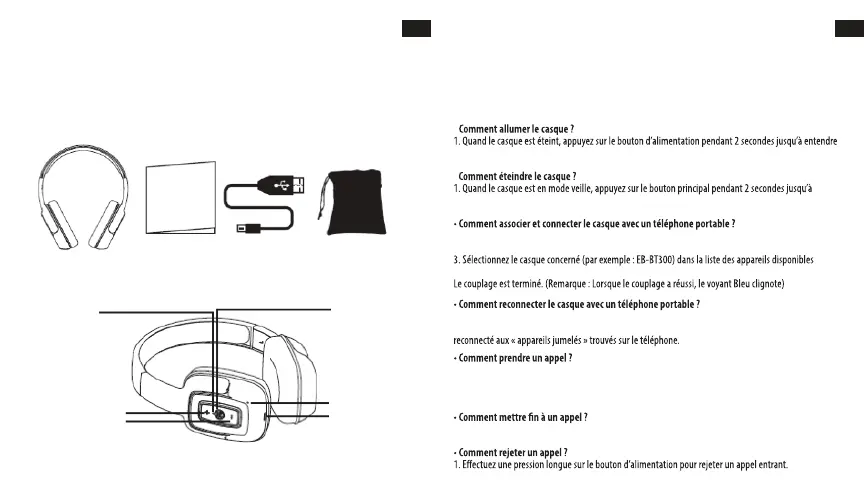
HEADPHONES OVERVIEW
OPERATING INSTRUCTIONS
Charging the headphone
1. Your headphone uses a rechargeable built-in battery, so be sure to fully charge the battery before using
2. Connect the USB cable to the charging socket on the headphone to charge the battery.
3. The LED indicator will remain RED while charging is in progress. After the battery is fully charged the
LED will turn OFF.
• Turning the headphone ON
1. Press the POWER switch button for 2 seconds in Shutdown mode, a voice prompt will be heard.
• Turning the headphone OFF
1. Press the POWER switch button for 2 seconds in Standby mode, a voice prompt will be heard.
• Pairing and Connecting the headphone with a mobile phone
1. The earphone automatically enters Pairing Mode, indicated by the RED and BLUE lights alternately
2. Enter Bluetooth settings on the mobile phone and search for the headphone.
3. Select the headphone (example: EB-BT300) from the available list of devices found by the phone.
• Reconnecting the headphone with a phone
1. The headphone will attempt to reconnect to the last paired device automatically each time it is
powered on. If the reconnect feature is not available on the phone, the headphone will have to be
reconnected from the “paired devices” found on the phone.
• Answering a call
1. Short press the Power switch button to answer a call when the incoming call prompt tone is heard.
2. If listening to music when a call is answered, the music will stop while the call is in progress and will
resume after the call has ended.
• Ending a call
1. Short press the Power switch button to end a call.
•Rejecting a call
1.Long press the Power switch button to reject an incoming call.
LED Indicator
Power: ON/OFF
Microphone
Charge
VOL - / Prev Song
VOL + / Next Song
Bluetooth Headphone User´s Guide USB Charging Cable Carry Pouch
EN
2
EN
USER’S MANUAL
Please read this user’s manual completely before operating this unit and retain this booklet for future
reference.
LOCATION OF CONTROLS
IN THE BOX
MANUEL DE L'UTILISATEUR
Veuillez lire intégralement ce manuel de l’utilisateur avant d’utiliser cet appareil et conservez ce guide
pour consultation ultérieure.
PRÉSENTATION DU CASQUE
CONTENU DE LA LIVRAISON
FR
Casque Bluetooth Guide de l’utilisateur Câble de charge USB
Pochette de transport
EMPLACEMENT DES COMMANDES
Voyant DEL
Alimentation : ON/OFF
VOL+ / Chanson suivante
VOL- / Chanson précédente
Microphone
Charge
INSTRUCTIONS D’UTILISATION
Chargement du casque
1. Votre casque est équipé d’une batterie rechargeable intégrée. Veillez à ce que votre casque soit
complètement chargé avant toute première utilisation.
2. Branchez le câble USB à la prise de charge située sur le casque pour charger la batterie.
3. Le voyant DEL reste allumé en ROUGE lorsque le processus de charge est en cours. La DEL s'éteindra
quand la batterie sera complètement rechargée.
•
une invite vocale.
•
entendre une invite vocale.
1. Le casque bascule automatiquement en mode Couplage, les voyants ROUGE et BLEU clignotent alors en alternance.
2. Saisissez les paramètres Bluetooth sur le téléphone portable et recherchez le casque.
détectés par le téléphone portable.
1. Le casque tente automatiquement de se reconnecter avec le dernier appareil associé dès qu’il
est allumé. Si la fonction de reconnexion n’est pas disponible sur le téléphone, le casque devra être
1. Appuyez brièvement sur le bouton principal pour prendre un appel quand vous entendez la tonalité de l’appel entrant.
2. Si vous écoutez de la musique au moment de prendre un appel, la musique s’arrête pendant l’appel et
reprend une fois l’appel terminé.
1. Appuyez brièvement sur le bouton d’alimentation pour raccrocher.
FR
29 30


 To Next Page