1
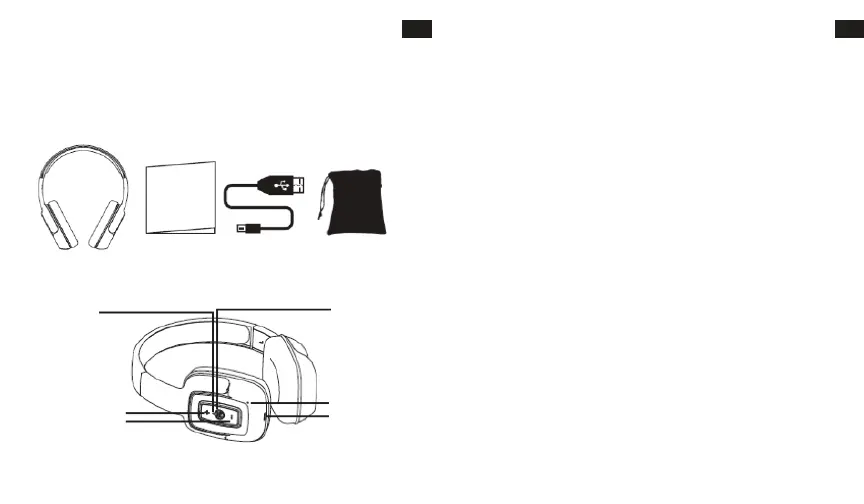
HEADPHONES OVERVIEW
OPERATING INSTRUCTIONS
Charging the headphone
1. Your headphone uses a rechargeable built-in battery, so be sure to fully charge the battery before using
2. Connect the USB cable to the charging socket on the headphone to charge the battery.
3. The LED indicator will remain RED while charging is in progress. After the battery is fully charged the
LED will turn OFF.
• Turning the headphone ON
1. Press the POWER switch button for 2 seconds in Shutdown mode, a voice prompt will be heard.
• Turning the headphone OFF
1. Press the POWER switch button for 2 seconds in Standby mode, a voice prompt will be heard.
• Pairing and Connecting the headphone with a mobile phone
1. The earphone automatically enters Pairing Mode, indicated by the RED and BLUE lights alternately
2. Enter Bluetooth settings on the mobile phone and search for the headphone.
3. Select the headphone (example: EB-BT300) from the available list of devices found by the phone.
• Reconnecting the headphone with a phone
1. The headphone will attempt to reconnect to the last paired device automatically each time it is
powered on. If the reconnect feature is not available on the phone, the headphone will have to be
reconnected from the “paired devices” found on the phone.
• Answering a call
1. Short press the Power switch button to answer a call when the incoming call prompt tone is heard.
2. If listening to music when a call is answered, the music will stop while the call is in progress and will
resume after the call has ended.
• Ending a call
1. Short press the Power switch button to end a call.
•Rejecting a call
1.Long press the Power switch button to reject an incoming call.
LED Indicator
Power: ON/OFF
Microphone
Charge
VOL - / Prev Song
VOL + / Next Song
Bluetooth Headphone User´s Guide USB Charging Cable Carry Pouch
EN
2
EN
USER’S MANUAL
Please read this user’s manual completely before operating this unit and retain this booklet for future
reference.
LOCATION OF CONTROLS
IN THE BOX
HANDLEIDING
Lees deze handleiding volledig alvorens dit toestel te bedienen en bewaar hem voor toekomstige
raadpleging.
OVERZICHT HOOFDTELEFOON
IN DE DOOS
NL
Bluetooth Hoofdtelefoon Gebruikersgids USB-oplaadkabel
Draagzakje
PLAATS VAN BEDIENINGSORGANEN
LED-controlelampje
Power: AAN/UIT
VOL + / Volgende Song
VOL - / Vorige Song
Microfoon
Opladen
INSTRUCTIES VOOR DE BEDIENING
De hoofdtelefoon opladen
1. Uw hoofdtelefoon maakt gebruik van een ingebouwde, herlaadbare batterij. Zorg ervoor dat uw
hoofdtelefoon volledig is opgeladen voordat u hem voor het eerst gebruikt.
2. Sluit de USB-kabel aan op de laadaansluiting op de hoofdtelefoon om de batterij te laden.
3. Het LED-controlelampje zal ROOD blijven terwijl het laden bezig is. De LED gaat automatisch UIT als de
batterij volledig is opgeladen.
• De hoofdtelefoon AAN zetten
1. Houd de knop van de POWER-schakelaar 2 seconden in de Afsluitmodus ingedrukt, waarna u een
gesproken mededeling zult horen.
• De hoofdtelefoon UIT zetten
1. Houd de knop van de POWER-schakelaar 2 seconden in de Stand-bymodus ingedrukt, waarna u een
gesproken mededeling zult horen.
• De hoofdtelefoon met een mobiele telefoon koppelen en verbinden
1. De hoofdtelefoon gaat automatisch de Koppelingsmodus binnen, wat aangeduid wordt door het
afwisselend knipperen van de RODE en BLAUWE lampjes.
2. Ga de Bluetooth instellingen op de mobiele telefoon binnen en zoek naar de hoofdtelefoon.
3. Selecteer de hoofdtelefoon (voorbeeld: EB-BT300) uit de lijst met beschikbare apparaten die door de telefoon gevonden zijn.
De koppeling is klaar. (Opmerking: Als de koppeling succes gehad heeft, knippert het blauwe controlelampje)
• De hoofdtelefoon met een telefoon verbinden
1. De hoofdtelefoon zal automatisch proberen opnieuw verbinding met het laatst gekoppelde apparaat te maken telkens
wanneer hij ingeschakeld wordt. Als deze functie van opnieuw verbinding maken niet op de telefoon beschikbaar is, zal
de hoofdtelefoon opnieuw verbonden moeten worden vanuit “gekoppelde apparaten” die op de telefoon gevonden zijn.
• Een oproep beantwoorden
1. Druk kort op de knop van de Power-schakelaar om een oproep te beantwoorden wanneer u de beltoon
van een inkomende oproep hoort.
2. Als u naar muziek luistert terwijl een oproep beantwoord wordt, zal de muziek stoppen terwijl het
gesprek gaande is en hervat worden wanneer het gesprek beëindigd is.
• Een oproep beëindigen
1. Druk kort op de knop van de Power-schakelaar om een oproep te beëindigen.
• Een oproep afwijzen
1.Druk lang op de knop van de Power-schakelaar om een inkomende oproep af te wijzen.
NL
47 48


 To Next Page