1
HEADPHONES OVERVIEW
OPERATING INSTRUCTIONS
Charging the headphone
1. Your headphone uses a rechargeable built-in battery, so be sure to fully charge the battery before using
2. Connect the USB cable to the charging socket on the headphone to charge the battery.
3. The LED indicator will remain RED while charging is in progress. After the battery is fully charged the
LED will turn OFF.
• Turning the headphone ON
1. Press the POWER switch button for 2 seconds in Shutdown mode, a voice prompt will be heard.
• Turning the headphone OFF
1. Press the POWER switch button for 2 seconds in Standby mode, a voice prompt will be heard.
• Pairing and Connecting the headphone with a mobile phone
1. The earphone automatically enters Pairing Mode, indicated by the RED and BLUE lights alternately
2. Enter Bluetooth settings on the mobile phone and search for the headphone.
3. Select the headphone (example: EB-BT300) from the available list of devices found by the phone.
• Reconnecting the headphone with a phone
1. The headphone will attempt to reconnect to the last paired device automatically each time it is
powered on. If the reconnect feature is not available on the phone, the headphone will have to be
reconnected from the “paired devices” found on the phone.
• Answering a call
1. Short press the Power switch button to answer a call when the incoming call prompt tone is heard.
2. If listening to music when a call is answered, the music will stop while the call is in progress and will
resume after the call has ended.
• Ending a call
1. Short press the Power switch button to end a call.
•Rejecting a call
1.Long press the Power switch button to reject an incoming call.
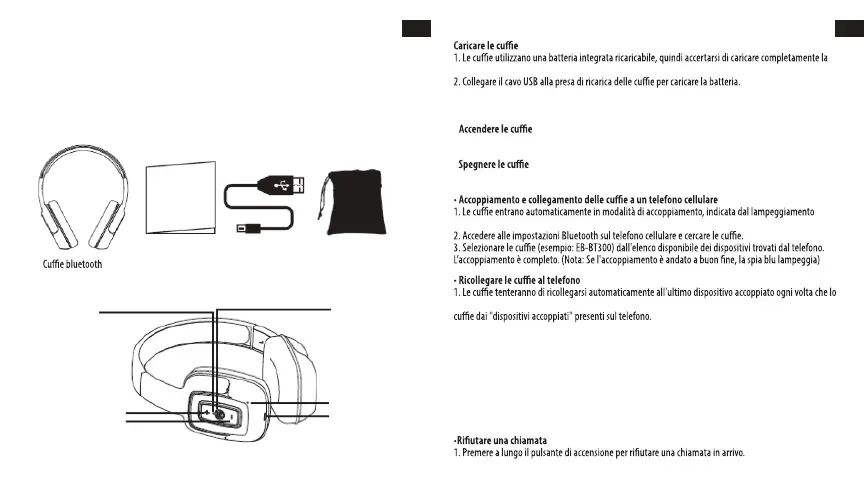
LED Indicator
Power: ON/OFF
Microphone
Charge
VOL - / Prev Song
VOL + / Next Song
Bluetooth Headphone User´s Guide USB Charging Cable Carry Pouch
EN
2
EN
USER’S MANUAL
Please read this user’s manual completely before operating this unit and retain this booklet for future
reference.
LOCATION OF CONTROLS
IN THE BOX
MANUALE D'USO
Leggere interamente il presente manuale prima di azionare l'unità e conservarlo per consultazioni future.
PANORAMICA DELLE CUFFIE
NELLA CONFEZIONE
IT
Manuale Cavo di carica USB
Astuccio
DISPOSIZIONE COMANDI
Spia LED
Accensione:
ACCENDERE/SPEGNERE
VOL+ / Brano successivo
VOL - / Brano precedente
Microfono
Carica
ISTRUZIONI PER L’USO
batteria prima di utilizzarla per la prima volta.
3. L'indicatore LED rimarrà ROSSO mentre la carica è in corso. Dopo che la batteria è completamente
carica, il LED si spegne.
•
1. Premere il pulsante di accensione per 2 secondi in modalità spegnimento, si udirà un messaggio vocale.
•
1. Premere il pulsante di accensione per 2 secondi in modalità standby, si udirà un messaggio vocale.
alternato delle spie ROSSA e BLU.
si accende. Se la funzione di riconnessione non è disponibile sul telefono, sarà necessario riconnettere le
• Rispondere a una chiamata
1. Premere brevemente il pulsante di accensione per rispondere a una chiamata quando si sente il tono
di chiamata in arrivo.
2. Se si ascolta musica quando si risponde a una chiamata, la musica si interrompe mentre la chiamata è
in corso e riprende una volta terminata.
• Terminare una chiamata
1. Premere brevemente il pulsante di accensione per terminare una chiamata.
IT
40 41



 To Next Page