1
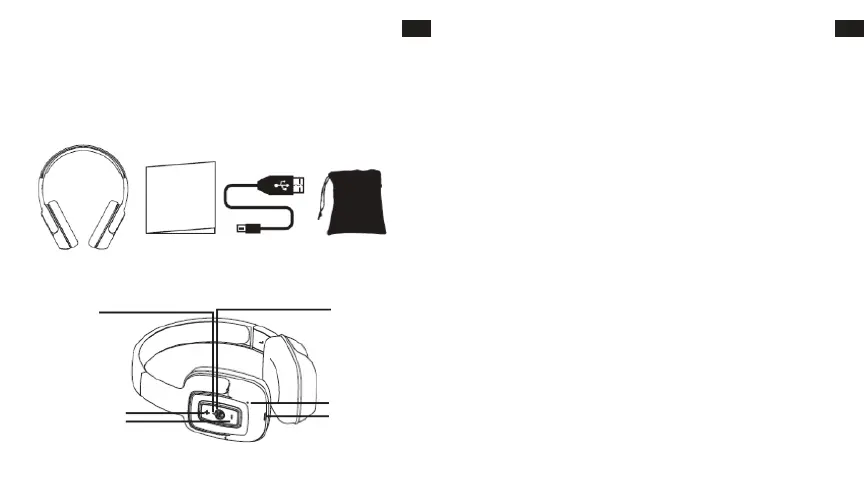
HEADPHONES OVERVIEW
OPERATING INSTRUCTIONS
Charging the headphone
1. Your headphone uses a rechargeable built-in battery, so be sure to fully charge the battery before using
2. Connect the USB cable to the charging socket on the headphone to charge the battery.
3. The LED indicator will remain RED while charging is in progress. After the battery is fully charged the
LED will turn OFF.
• Turning the headphone ON
1. Press the POWER switch button for 2 seconds in Shutdown mode, a voice prompt will be heard.
• Turning the headphone OFF
1. Press the POWER switch button for 2 seconds in Standby mode, a voice prompt will be heard.
• Pairing and Connecting the headphone with a mobile phone
1. The earphone automatically enters Pairing Mode, indicated by the RED and BLUE lights alternately
2. Enter Bluetooth settings on the mobile phone and search for the headphone.
3. Select the headphone (example: EB-BT300) from the available list of devices found by the phone.
• Reconnecting the headphone with a phone
1. The headphone will attempt to reconnect to the last paired device automatically each time it is
powered on. If the reconnect feature is not available on the phone, the headphone will have to be
reconnected from the “paired devices” found on the phone.
• Answering a call
1. Short press the Power switch button to answer a call when the incoming call prompt tone is heard.
2. If listening to music when a call is answered, the music will stop while the call is in progress and will
resume after the call has ended.
• Ending a call
1. Short press the Power switch button to end a call.
•Rejecting a call
1.Long press the Power switch button to reject an incoming call.
LED Indicator
Power: ON/OFF
Microphone
Charge
VOL - / Prev Song
VOL + / Next Song
Bluetooth Headphone User´s Guide USB Charging Cable Carry Pouch
EN
2
EN
USER’S MANUAL
Please read this user’s manual completely before operating this unit and retain this booklet for future
reference.
LOCATION OF CONTROLS
IN THE BOX
NÁVOD NA POUŽITIE
Pred použitím tohto spotrebiča je treba si prečítať celý návod a je treba ho odložiť pre budúce použitie.
PREHĽAD SLÚCHADIEL
OBSAH BALENIA
SK
Bluetooth slúchadlá Návod na použitie USB nabíjací kábel
Prenosné vrecko
UMIESTNENIE OVLÁDAČOV
LED kontrolka
Napájanie: ZAP/VYP
Hlasnosť+ / Nasledovná skladba
Hlasnosť- / Predošlá skladba
Mikrofón
Nabíjanie
POKYNY PRE POUŽITIE
Nabíjanie slúchadiel
1. Vaše slúchadlá používajú zabudovanú dobíjaciu batériu, pred prvým použitím nezabudnite slúchadlá
úplne nabiť.
2. Pre nabitie batérie pripojte USB kábel do nabíjacej zásuvky na slúchadlách.
3. V priebehu nabíjania zostane LED kontrolka ČERVENÁ. Po úplnom nabití batérie LED kontrolka ZHASNE.
• ZAPNUTIE slúchadiel
1. V režime Vypnutia stlačte tlačidlo NAPÁJANIA na 2 sekundy, ozve sa hlasová výzva.
• VYPNUTIE slúchadiel
1. V Pohotovostnom režime stlačte tlačidlo NAPÁJANIA na 2 sekundy, ozve sa hlasová výzva.
• Párovanie a spojenie slúchadiel s mobilným telefónom
1. Slúchadlá sa automaticky nastavia do režimu párovania, čo je indikované striedavým blikaním
ČERVENEJ a MODREJ kontrolky.
2. Vstúpte do nastavenia Bluetooth mobilného telefónu a vyhľadajte slúchadlá.
3. Vyberte slúchadlá (napríklad: EB-BT300) v zozname dostupných zariadení zistených telefónom.
Párovanie je dokončené. (Poznámka: Pokiaľ je párovanie úspešné, modrá kontrolka bliká.)
• Opakované spojenie slúchadiel s telefónom
1. Pri každom zapnutí sa slúchadlá automaticky pokúsia znovu spojiť s posledným spárovaným
zariadením. Pokiaľ telefón funkciu opakovaného pripojenia nemá, slúchadlá bude treba znovu pripojiť v
zozname „spárovaných zariadení“ zistených v telefóne.
• Prijatie hovoru
1. Pokiaľ sa ozve zvuk výzvy prichádzajúceho hovoru
, pre prijatie hovoru krátko stlačte tlačidlo Napájania.
2. Pokiaľ pri prijatí hovoru počúvate hudbu, hudba sa v priebehu volania preruší a bude pokračovať po
skončení hovoru.
• Ukončenie hovoru
1. Na ukončenie hovoru krátko stlačte tlačidlo Napájania.
• Odmietnutie hovoru
1. Na odmietnutie prichádzajúceho hovoru dlho stlačte tlačidlo Napájania.
SK
63 64


 To Next Page