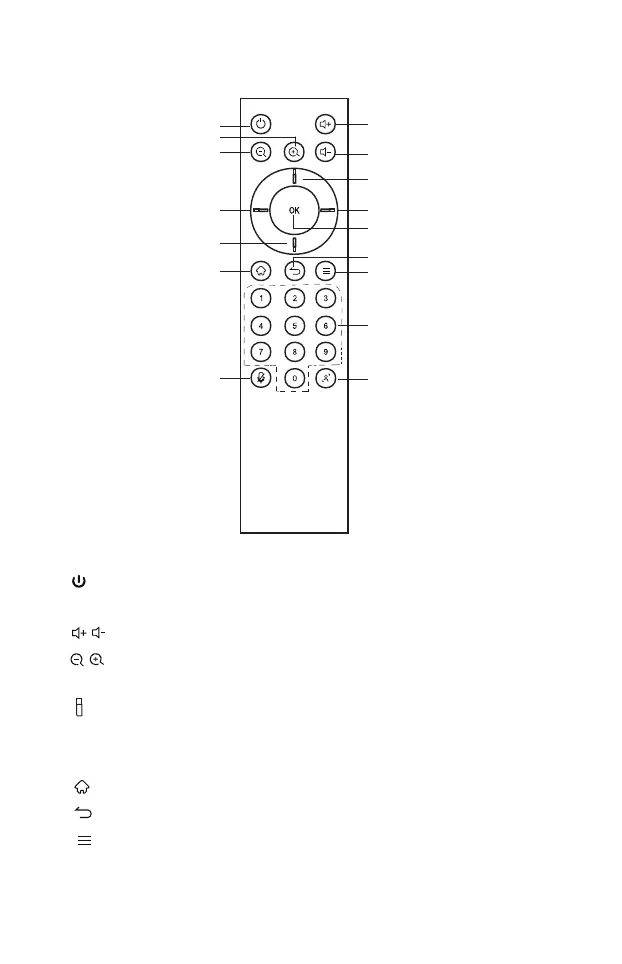
a. : Power Button, press to enter Energy-saving state, Press and hold for
2 seconds to power off.
b. : Volume Button, press to adjust the system volume.
c. : Digital Zooming, press to digitally zoom the camera. After zooming
in, the direction button may move the camera image.
d. : Direction Button, Press the direction buttons for selection.
e. OK Button: Confirm the selection. During digital zooming,
press this button would restore the default view.
f. : Invalid
g. : Invalid
h. : Invalid
7. Remote Control
e
a
c
c
b
b
d
d
d
d
f
j
g
h
i
k
6



 To Next Page