Setup
Connections
EPOS4 50/5 Hardware Reference
3-56 CCMC | 2022-04 | rel10445
Table 3-64 Extension cards (optional)
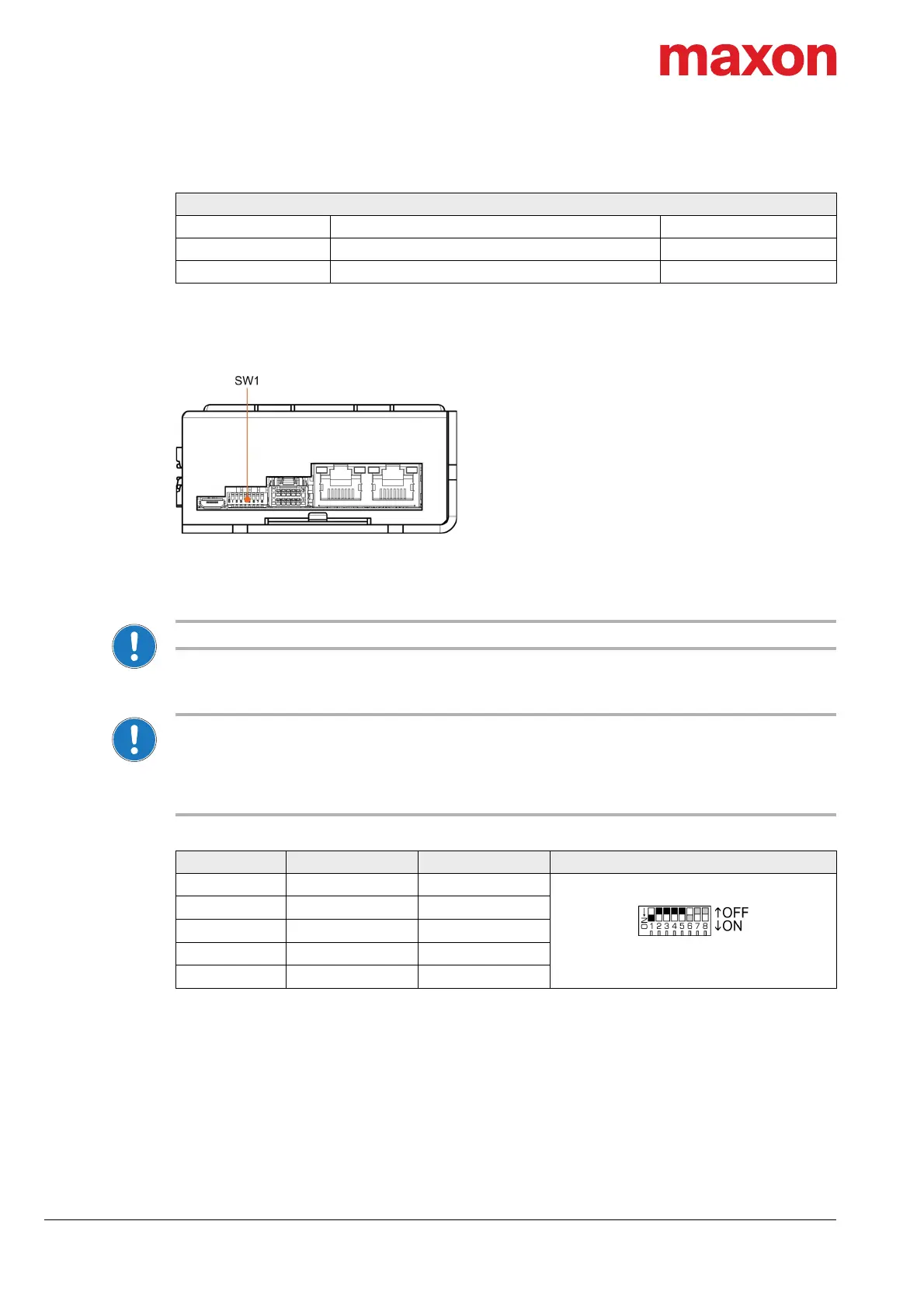
3.3.16 DIP Switch Configuration (SW1)
Figure 3-45 DIP switch SW1
3.3.16.1 CAN ID (Node-ID) / DEV ID
NOTE: Setting the ID by means of DIP switches is currently available for CAN only!
The device’s identification (subsequently called “ID”) is set by means of DIP switches 1…5. The ID (1…31)
may be coded using binary code.
Setting the ID by DIP switch SW1
• By setting the DIP switch (1…5) address 0 (“OFF”), the ID may be set by software (object 0x2000
«Node-ID», range 1…127).
• The ID results in the summed values of DIP switch addresses 1 (“ON”).
• DIP switches 6…8 do not have any impact on the ID.
Table 3-65 DIP switch SW1 – Binary code values
Continued on next page.
Extension Cards
Slot Description Part number
EXT1 EPOS4 EtherCAT Card 581245
EXT2 — —
Switch Binary Code Valence Setting
1
2
0
1
(factory setting)
2
2
1
2
3
2
2
4
4
2
3
8
5
2
4
16



 To Next Page