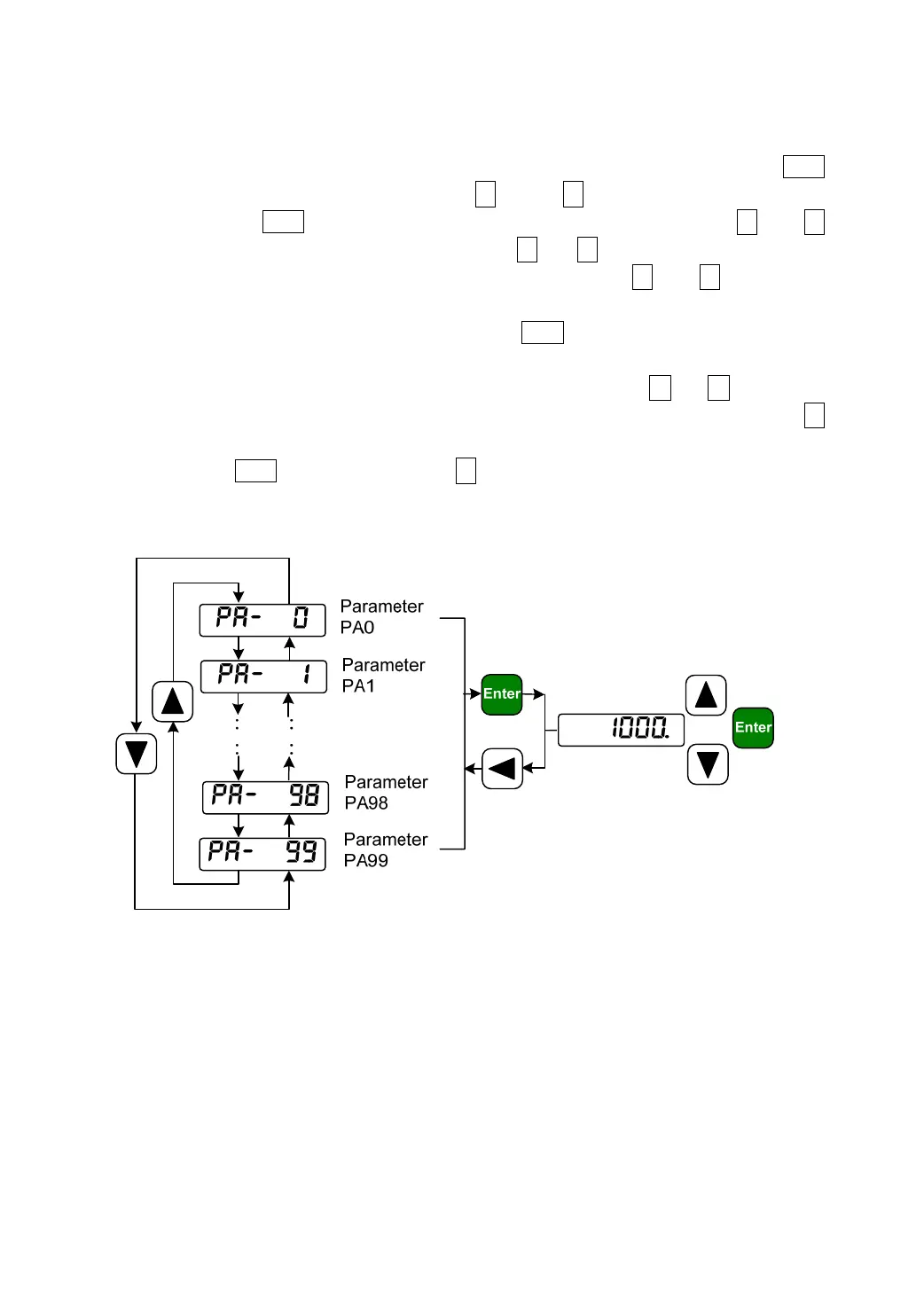
1.8.2 Parameter setting
If has chosen the parameter setting mode “PA-@@@” in the first layer, Press the Enter
button to enter the parameter setting mode. Use ↑ and or ↓ button to select the number of
parameter. Press the Enter button to display the value of selected parameter. Use ↑ and ↓
button to be able to modify the parameter value. Press ↑ (or ↓ ) button once to increase ( or
decrease) the parameter value by one. Pressing down and hold the ↑ ( or ↓ ) button, the
parameter can increase ( or decrease) continuously. When the parameter value is modified, the
decimal point on the most right sides LED is lit. Press Enter to confirm the parameter value to
be effective, meanwhile the decimal point is turned off. The modified parameter value is
immediately active to influence on the control. Hereafter pressing ↑ or ↓ button can
continue to modify the parameter. After finishing modification of parameter, press the ←
button to return to the parameter number selection. If the value of the parameter is not satisfied,
do not press the Enter button and can press ← button to cancel and to resume the original
parameter value and to return to the parameter number selection.
Picture 8.1 Diagram of parameter setting operation



 To Next Page