3-11
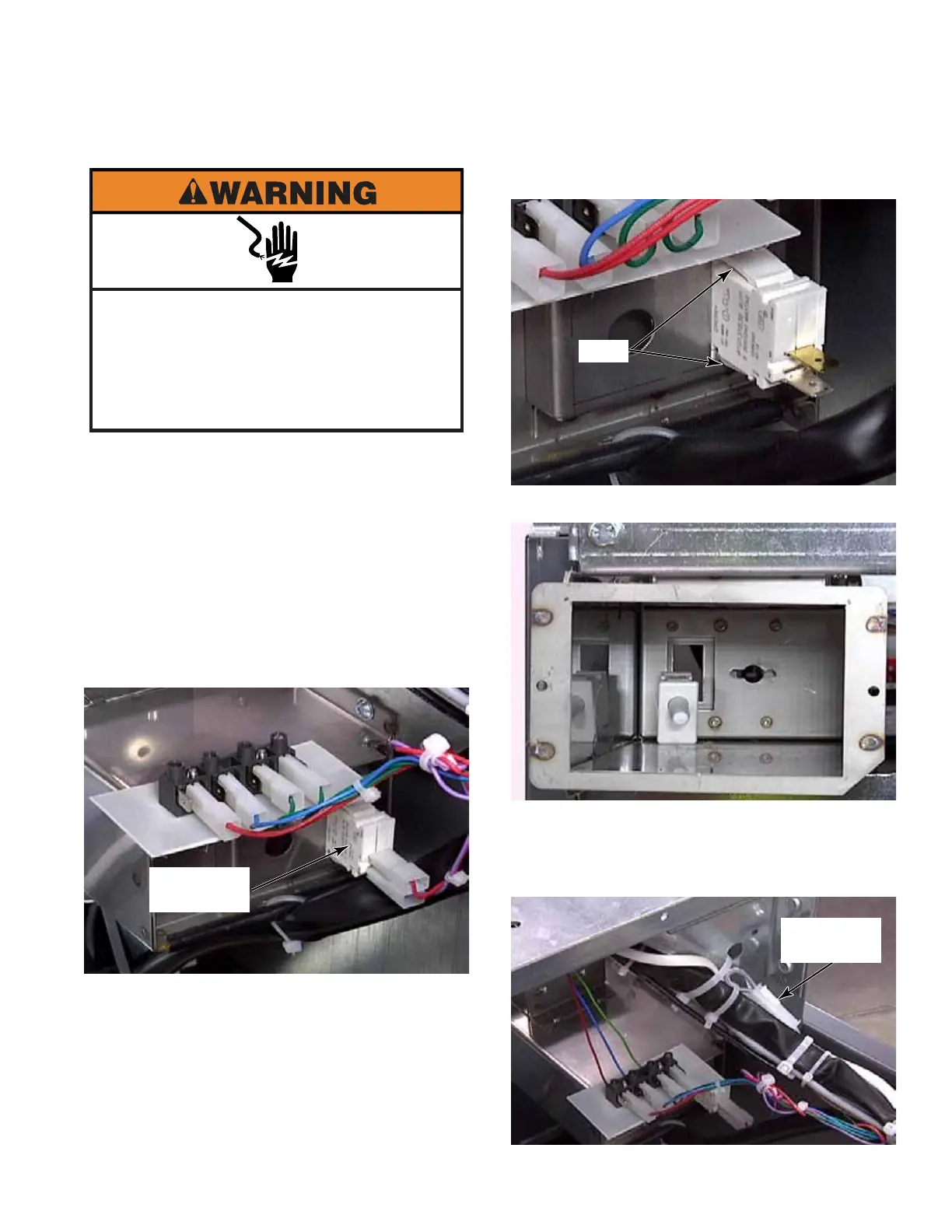
1. Remove the coin box.
2. Open the top panel. (See page 3-1)
3. The coin vault switch registers when the
coin box is removed. The switch is mounted
to the back of the coin vault, inside the
cabinet.
4. To remove the coin vault switch, pull the
wire connectors off.
NOTE: These wires are not polarity
sensitive.
5. Press tabs on top and bottom of the switch.
6. Rock switch while pushing it into coin vault.
NOTE: Above the coin vault, in the group of
wires, is a 220 volt jumper plug which can
be used to power an additional accessory if
desired.
Electrical Shock Hazard
Disconnect power before servicing.
Failure to do so can result in death or
electrical shock.
Replace all parts and panels before
operating.
COIN VAULT SWITCH - PD MODELS
Coin Vault
Switch
Tabs
Jumper
Plug



 To Next Page