ABOUT YOUR OVEN
13
HOW TO SET OVEN TO BROIL
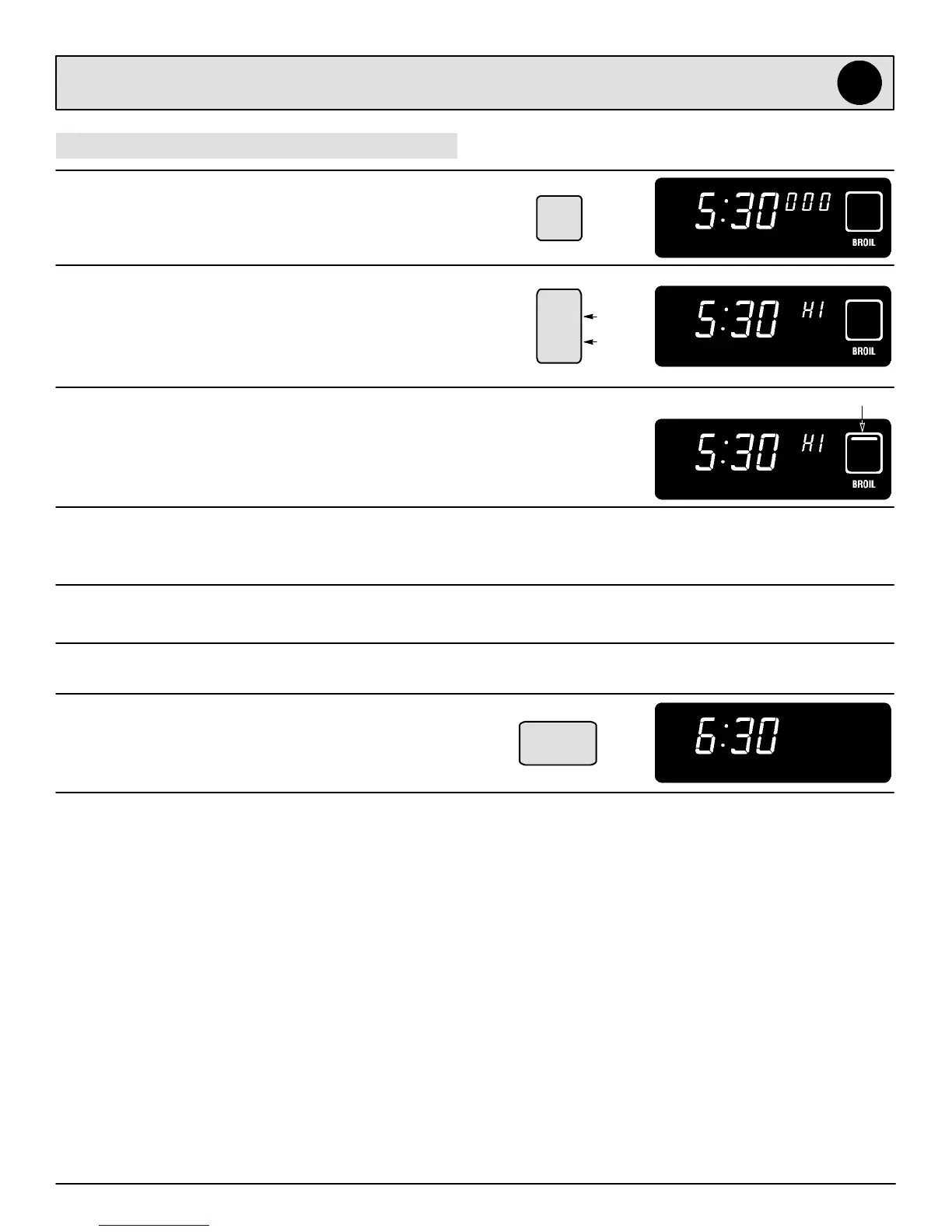
1. Press BROIL pad.
S BROIL will flash in display.
S 000 will light in display.
2. Press the Y pad to select HI (high) broil or the B pad
to select LO (low) broil.
S Select HI broil for normal broiling.
S Select LO broil for low temperature broiling of
longer cooking foods such as poultry.
3. There will bea4seconddelaybeforetheoventurns
on. When the oven turns on:
S The BROIL symbol will light in display.
4. For optimum browning, preheat broil element for 3
minutes before adding food.
5. Place food in the oven. Leave oven door opened to
the broil stop position (opened about 4-inches).
6. Turn meat once about half way through cooking.
7. Press CANCEL pad. Remove food and broiler pan
from the oven.
S Time of day will reappear in display.
Expect broil times to increase and browning to be
slightly lighter if appliance is installed on a 208 volt
circuit.
BROIL SYMBOL
See page 28 for broiling instructions and broiling
chart.
LO
HI
B
Y
Broil
Cancel



 To Next Page