99996114-LES
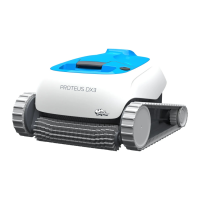
Proteus DX3
Dolphin Power Supply
maytrnnics
Dolp in
BASIC OPERATION
I. Plug the Power supply into an electrical outlet.
2. Press the ON button.
The LEDs will turn on and the robot will start to
operate.
If no program is selected, the robot will perform a
single cleaning cycle.
The Power Supply will turn off automatically after 3
hours.
3. You can program the power supply at any time.
See the relevant section below for more details on
each program.
is not available for this model
WEEKLY TIMER
ON/OFF
Weekly Timer
Quick start guide
Thank you for purchasing a ay romcs obotic Pool Cleaner.
The Robotic Pool Cleaners by Maytronics deliver advanced cleaning
technologies, long lasting performance and easy maintenance. You and your
family will be free to enjoy swimming with full confidence that your pool is
completely clean.
A Cautions&Warnings
Use the originally supplied power supply only.
Do not use an extension cable in any case
whatsoever.
Ensure the electrical outlet is protected by
a ground fault interrupter (GFI)or an earth
leakage interrupter.
Keep the power supply out of standing water.
Do not enter the pool while the Pool Cleaner is
working.
Unplug the power supply before servicing.
Do not use the cable to take the pool cleaner
out of the water.
i Helpfulhints
When working, the Power Supply should be
placed in the shade.
If the Dolphin is fitted with combined or wonder
brushes, gently squeeze the brushes until they
are soaked with water.
Release minimal required floating cable length
to ensure proper pool coverage.
Leave excess cable rolled outside the pool.
Use the Pool Cleaner in the following water
conditions only: Chlorine Max 4 ppm;
pH 7.0 - 7.8; Temperature 6 -340C(43-930F);
NaClMaximum = 5000 ppm.
Your robot has a Weekly Timer feature that enables you to set an automatic
cleaning schedule for the week ahead.
When the power supply is switched on, you can press the Weekly Timer button
to select one of the following cleaning schedule options for the week ahead.
O
One click - The robot will automatically work every day for a full cycle,
that is, once a day for 7 days.
O
Two clicks - The robot will automatically work every alternate day for a full cycle,
that is, 4 times in a week.
O
Three clicks - The robot will automatically work every 3 days,
that is, 3 times in a week.
After selecting one of the above options, the robot will start to operate at the next occurrence of the
programmed start time.
Note: A fourth clickwill cancel the cleaning schedule program (without a visible indication).
If the robot is working in Weekly Timer mode, the Weekly Timer button constantly blinks between cycles.
At the end of the week, the power supply automatically switches off and you need to reschedule the robot.
For online product warranty registration:
registration.maytronics.com
99996114-LES
Digital Power Supply
Input: 100-125ACVolts
50-60 Hertz
120 Watt
Output: VDC
IP 54
Specifications:
Motor protection: IP6B
Minimum depth: 0.80m/2.6ft
Maximum depth: 5m/16.4ft
•
After each cleaning cycle wash the filters or
cartridge. Clogged filters reduce scanning and
cleaning efficiency
To remove the kinks stretch the cable out
completely and let it sit for at least a day in the sun.
Store the pool cleaner in a shady place on its
Caddy,if not on a caddy, place the pool cleaner
upside down.
For a detailed manual (including videos):
manuals.maytronics.com/enpgggau-ces

 Need help?
 General


 To Next Page