!
Press Setup to enter the user-friendly menu system.
!
Press ‡ and ˆ to scroll through menu choices, then press Enter to select the required option.
!
Press Enter to save changes.
!
Press Cancel to quit without saving changes at any screen.
!
All setup screens time out if no key has been pressed for 30 seconds. Any changes will not be
saved.
Setting the Mode
!
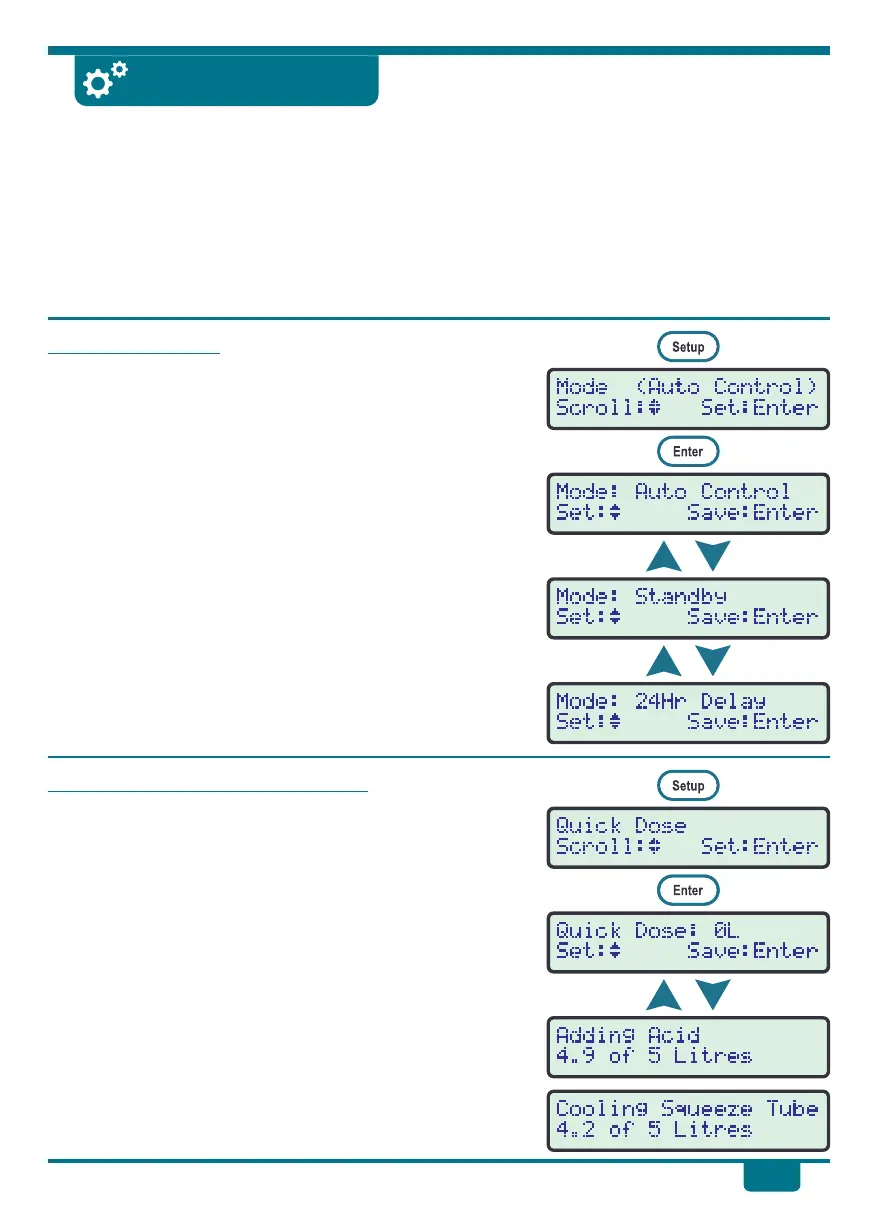
Press Setup to enter the user-friendly menu system,
then press ‡ and ˆ until Mode is selected. The current
mode is shown in brackets.
!
Press Enter to go to the Mode menu.
!
Press ‡ and ˆ to select between the Mode settings:
Auto Control . . The dosing pump will add acid or base
when the pH is outside the Set Point.
Standby . . . . . . The dosing pump is switched off and will
not add any acid or base automatically.
24Hr Delay. . . . The dosing pump is switched off for 24
hours, to allow buffer or other chemical
to mix and stabilise.
!
Press Enter to save the selection, or press Cancel to quit
without saving.
Adding a Quick Dose of Chemical
!
Use this function if you need to manually add a dose of
acid or base to the pool
!
Press Setup to enter the user-friendly menu system,
then press ‡ and ˆ until Quick Dose is selected.
!
Press Enter to go to the Quick Dose menu.
!
Press ‡ and ˆ to select the number of litres of acid or
base to dose into the pool. The range of settings is 1 to 5
litres.
!
Press Enter to start dosing, or press Cancel to quit.
!
The pH Drive counts down the litres as it doses.
!
Every 4 minutes of dosing pump operation, the pH Drive
will switch it off for 1 minute, to allow the squeeze tube
to cool down. This extends squeeze tube life.
pH Drive Settings
11


 To Next Page