13
pH Drive Settings
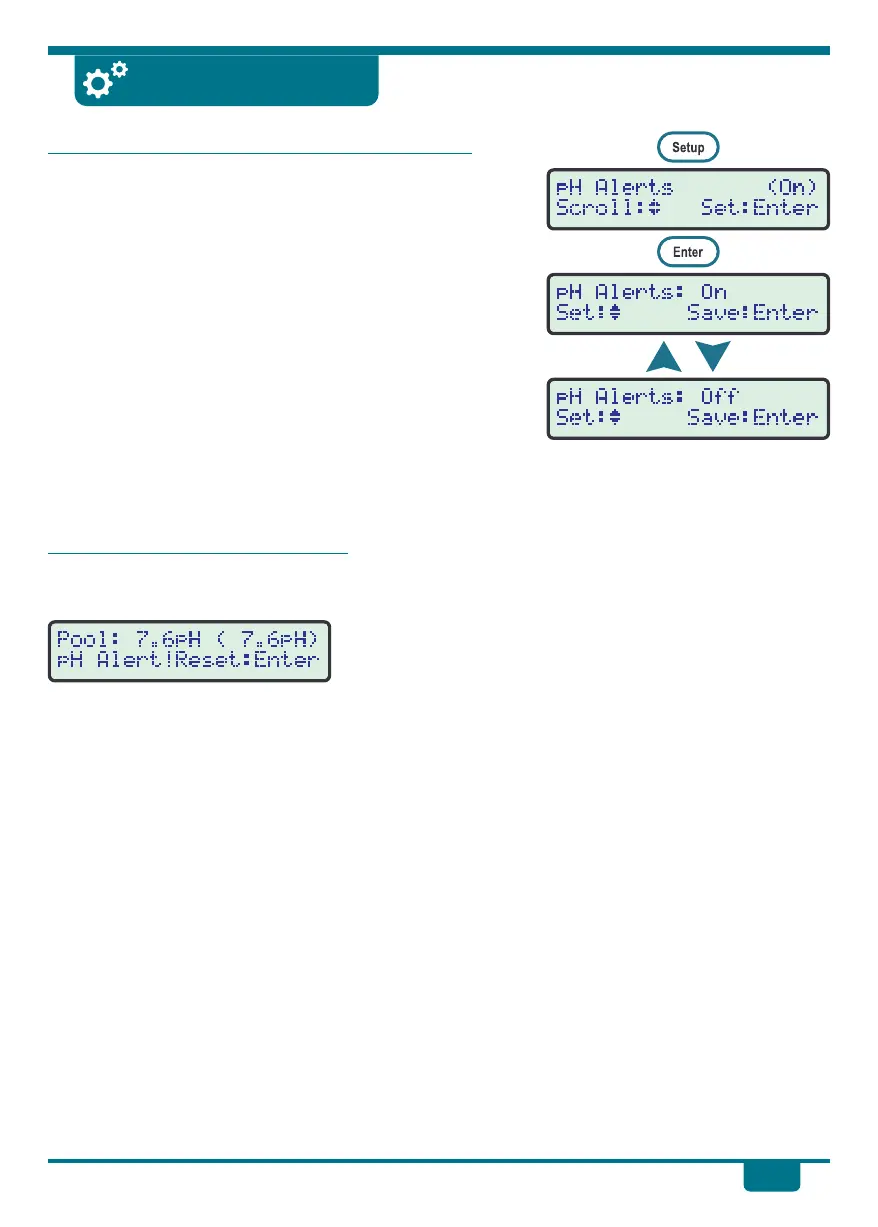
Enabling or Disabling the pH Alert Function
The pH Drive will sound an alarm and display an alert if the
pH has been outside the set point for 4 hours or more.
If this function is disabled, the alarm will never be
triggered and the pH Drive may over dose acid or base.
Only advanced users should change this setting, and only
as a temporary measure.
!
Press Setup to enter the user-friendly menu system,
then press ‡ and ˆ until pH Alerts is selected. The
current Set Point is shown in brackets.
!
Press Enter to go to the pH Alerts menu.
!
Press ‡ and ˆ to select between On and Off.
!
Press Enter to save the selection, or press Cancel to quit
without saving.
When the pH Alert is Triggered
When the pH Alert is triggered, the pH Drive will display the
alert message and sound the beeper.
!
The Dosing Pump will now be disabled, and will not
operate again until the Alert has been reset.
!
Press Enter to reset the pH Alert.
!
Refer to the list of possible causes and fixes on this
page, to rectify the condition that caused the alert to be
triggered.
Possible causes and solutions for
the pH Alert being triggered:
Cause ....Very high acid demand in
new concrete pool.
Fix ..........Increase Pool Size Setting
to a higher value until the
acid demand settles to
normal amounts.
Cause ....Acid or Base drum empty.
Fix ..........Refill drum with water and
a c i d o r b a s e a s p e r
instructions on page 6.
Cause ....Pool Size Setting is too low
or too high.
Fix ..........S e e p a g e 1 2 f o r
information on how to
change Pool Size Setting.
Cause ....pH Reading is inaccurate.
Fix ..........Re-calibrate pH Sensor.
Cause ....pH S e nso r b r oken o r
faulty.
Fix ..........If re-calibration is not
possible, then replace pH
Sensor.
Cause ....Pump is not pumping acid
correctly.
Fix ..........Check all tube fittings for
leakage. Re-fit or replace
as necessary.
Check squeeze tube inside
pump cassette for leakage
and replace if necessary.


 To Next Page