EasyManua.ls Logo

Maytronics pH Drive - User Manual

Maytronics pH Drive
20 pages
Print Icon
To Next Page IconTo Next Page
Loading...
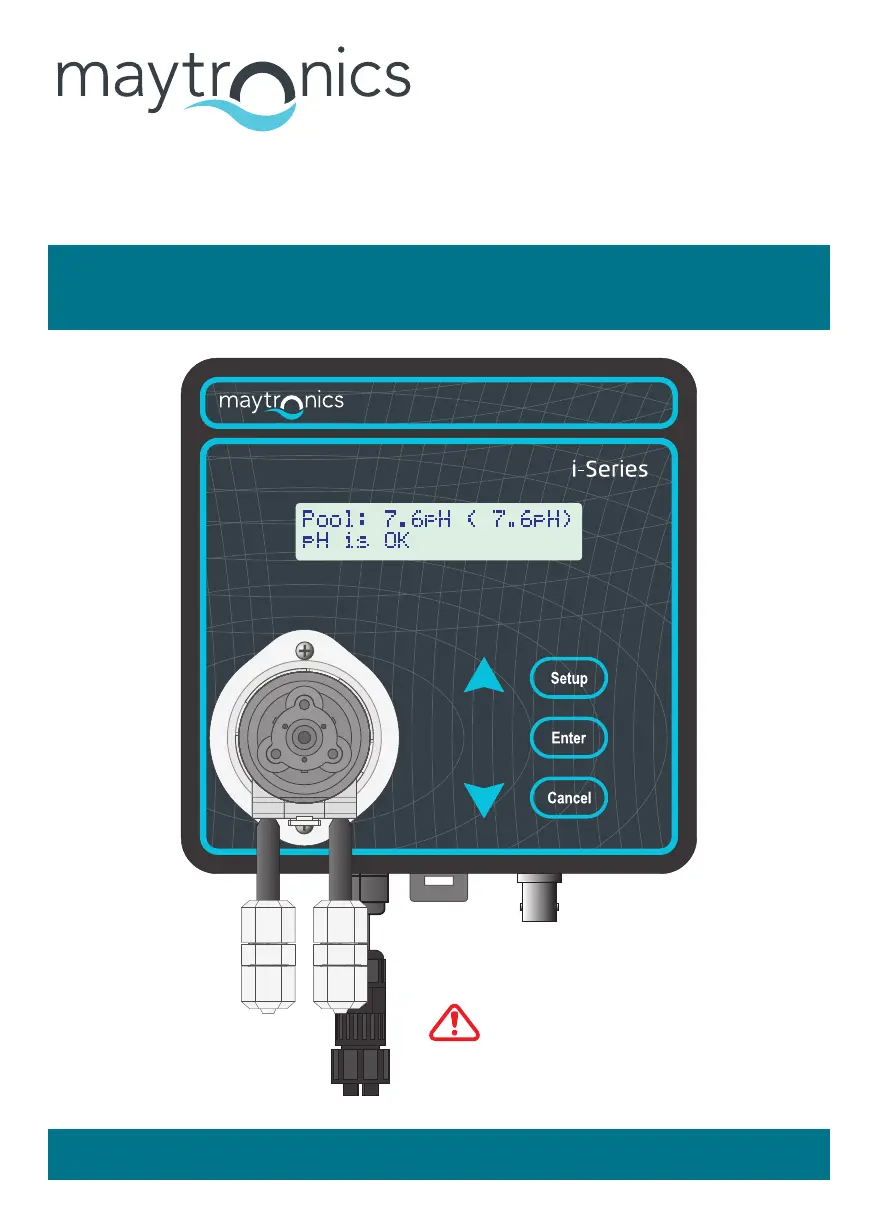
pH Drive
Automatic pH
Controller
www.maytronics.com.au
Instruction Manual
Ensure Acid is diluted, as per
page 6 of these instructions.
pH Drive

Questions and Answers

  • C
    Carolyn RhodesAug 12, 2025
    How to fix unstable pH readings on my Maytronics Controller?
    • P
      paul63Aug 12, 2025
      If the pH readings from your Maytronics Controller are unstable or inaccurate, it might be due to several reasons: * The pH Sensor may be dirty: Disconnect the pH Sensor, unscrew it, and gently wipe the glass bulb with a soft tissue soaked in methylated spirits. Then, soak the tip in diluted Hydrochloric acid, rinse thoroughly with clean water, and reassemble. * The pH Sensor may need recalibration: Clean the pH Sensor as described above and then recalibrate it. * The pool water might have low conductivity: Add one bag of pool salt per 50,000 Litres of pool water.
  • J
    joshuawoodsAug 16, 2025
    What to do if the acid pump turns but no acid is flowing in my Maytronics pH Drive?
    • C
      Cassandra TaylorAug 16, 2025
      If your Maytronics Controller's acid pump turns, but acid isn't flowing, it could be due to leaking or worn squeeze tubes and/or rollers. Try tightening the acid pump fittings or replacing them. If needed, replace the dosing pump cassette.
  • B
    barbara88Aug 20, 2025
    Why is my Maytronics pH Drive alarming due to low pH?
    • W
      William DavisAug 20, 2025
      If the alarm sounds because the pH is too low on your Maytronics Controller, it might be that the Pool Size Setting is set too high. Try reducing the Pool Size Setting by one level and check again in 2 days.
  • S
    Scott Phillips IIAug 23, 2025
    What to do if pH reading cannot be calibrated on Maytronics Controller?
    • W
      William AdamsAug 23, 2025
      If you cannot calibrate the pH reading on your Maytronics Controller, the pH Sensor may be dirty. In this case, follow the pH Sensor cleaning procedure. If cleaning doesn't help, the pH Sensor may be faulty and needs replacement.
  • M
    Michelle DonovanAug 27, 2025
    Why is my Maytronics pH Drive Controller not adding acid even when the dosing pump is running?
    • L
      Leslie ForbesAug 27, 2025
      If the Maytronics Controller unit is not adding acid while the dosing pump is operating, check the following: ensure the pH Drive diluted acid drum is not empty; verify that all suction and output tubes are correctly fitted without any leakage; and inspect the squeeze tube inside the pump cassette for leaks. If acid has leaked, immediately wash the area with fresh water. If the squeeze tube was leaking, remove the lid, take out the squeeze tube, and wash it with fresh water.
  • A
    Autumn KingAug 31, 2025
    Why does my Maytronics pH Drive pH reading stuck around pH7?
    • A
      Alexander GonzalezAug 31, 2025
      If your Maytronics Controller's pH reads around pH7 without changing, there might be a short circuit in the pH Sensor BNC Plug or Socket. Disconnect the pH Sensor plug from the socket, dry it with a hair dryer or let it air dry, then reconnect and re-check. If the problem continues, the pH Sensor might need to be returned for connector replacement, or you may need to replace the pH Sensor.
  • O
    omcdanielSep 4, 2025
    What does it mean if my Maytronics Controller pH reads around pH4 to 5?
    • N
      Nicole GonzalezSep 4, 2025
      If the pH reading on your Maytronics Controller is stuck around pH4 to 5 without changing, the glass bulb or internal stem of the pH Sensor might be cracked. In this case, replace the pH Sensor.
  • M
    Megan StaffordSep 8, 2025
    How to troubleshoot a Maytronics pH Drive Controller that won't power on?
    • J
      Jeanne IbarraSep 8, 2025
      If your Maytronics Controller unit does not power up, it might be a faulty pH Drive main unit. Return it for repair.

Summary

Cautions and Warnings

Getting to Know Your pH Drive

Display Overview

User-friendly text menu and help system.

Keypad Controls

Used for setup and maintenance of the pH Drive.

Dosing Pump

High quality, low maintenance peristaltic dosing pump.

Power Connector

IP65 Waterproof connector for power input.

Mounting Clip

Clip for mounting and unmounting the pH Drive unit.

pH Sensor Socket

Connects the pH Sensor to the BNC socket.

pH Sensor

Commercial quality pH Sensor for measurement.

pH Tee

Component for installing the pH Sensor and injection valve.

Non-Return Valve

Prevents backflow of liquid into the system.

pH Drive Display Details

Pool pH Reading

Displays the current pH reading of the pool water.

Set Point Display

Shows the programmed target pH level for the pool.

Information Line Messages

Provides helpful messages and warnings about the unit's status.

Acid Safety and Dilution

Safety Information for Acid Handling

Guidelines for safe handling and dilution of acid with the pH Drive.

Acid Dilution Procedure

Step-by-step guide for diluting concentrated acid safely.

Additional Acid Usage Information

Further advice on acid usage and important safety precautions.

pH Tee Installation Guide

pH Tee Pre-Installation Checklist

Items to check before installing the pH Tee component.

Cutting Pipe for pH Tee

Instructions on cutting the PVC pipe for pH Tee installation.

Gluing the pH Tee

Steps for using primer and glue to install the pH Tee.

pH Drive Unit Installation

pH Drive Pre-Installation Checklist

Key points to verify before mounting the pH Drive unit.

Install Mounting Plate

Instructions for securely installing the mounting plate.

Mounting the pH Drive Unit

Steps for physically attaching the pH Drive to the mounting plate.

Tube Installation Procedures

pH Tee Tube Installation

Connecting the suction and delivery tubes to the pH Tee.

Drum Weight Tube Installation

Installing the tube for the drum weight into the lid.

Dosing Pump Tube Installation

Connecting suction and supply tubes to the dosing pump fittings.

pH Sensor Installation

Completed Installation Overview

Connect Power Lead

pH Drive Settings Configuration

Setting the Operating Mode

Configuring the operational mode: Auto Control, Standby, or 24Hr Delay.

Adding a Quick Dose of Chemical

Manually dosing a specific amount of acid or base into the pool.

pH Drive Operational Settings

Setting the pH Set Point

Adjusting the target pH level for the pool system.

Pool Size Setting

Configuring the pool volume for accurate chemical dosing.

pH Drive Alert Settings

Enabling;Disabling pH Alerts

Configuring the pool pH alert function to be On or Off.

Resolving pH Alert Triggers

Understanding and fixing causes when the pH alert is triggered.

pH Sensor Calibration Methods

Inline Calibration Procedure

Calibrating the sensor using actual pool water readings.

pH7.0 Buffer Calibration

Calibrating the sensor using a pH 7.0 buffer solution.

pH Sensor Calibration Procedures

pH7.0 Buffer Calibration Details

Detailed steps for preparing and using pH7.0 buffer for calibration.

Calibration Procedure Steps

Step-by-step instructions to perform the sensor calibration.

Troubleshooting Calibration Failure

Steps to resolve issues if the pH sensor calibration fails.

Changing the Pump Cassette

Resetting the Pump Cassette Reminder

How to reset the maintenance reminder after replacing the pump cassette.

Troubleshooting Common Issues

Troubleshooting Messages and Errors

Alert Messages and Causes

Explains specific alert messages, their causes, and remedies.

Reminder Messages and Actions

Details reminder messages and the required actions.

General Messages Explanation

Explains general status messages displayed by the unit.

Hardware Failure Messages

Explains error messages related to hardware failures.

Warranty Information

Contact Information

Maytronics pH Drive Specifications

General IconGeneral
BrandMaytronics
ModelpH Drive
CategoryController
LanguageEnglish