!
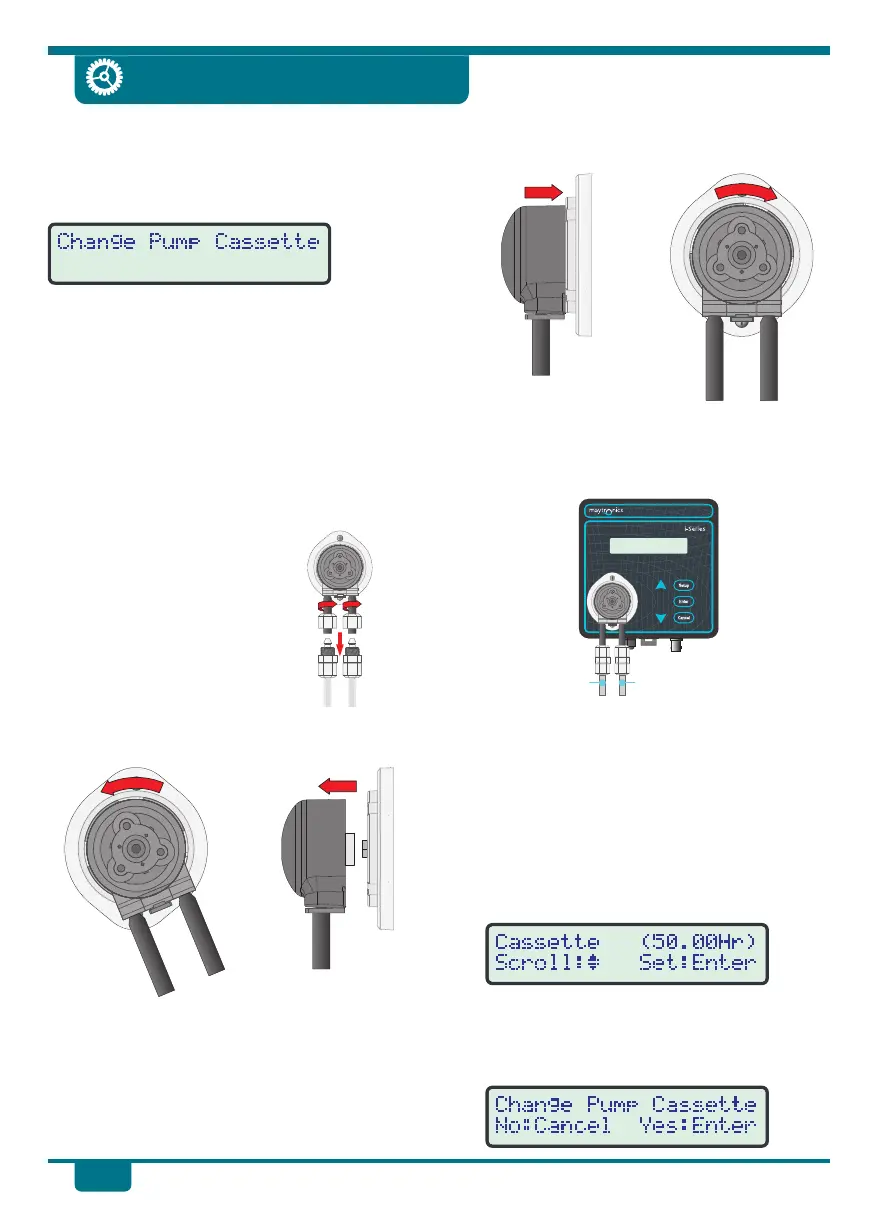
Turn the cassette clockwise around 1/8 of
a turn until it clicks into place.
!
Refit the clear PVC Suction and Supply
tubes. Suction is on the left and Supply is
on the right . Refer to tube fit ting
instructions on page 9.
!
Switch the pH Drive back on.
Resetting the Pump Cassette Reminder
!
Press Setup to enter the user-friendly
menu system, then press ‡ and ˆ until
Maintenance is selected.
!
Press Enter, then select Cassette from the
Maintenance menu. The total pump
operating hours is displayed on the right.
!
At the Change Pump Cassette screen,
press Enter to reset the Pump Cassette
hours to zero. Press Cancel to exit if the
pump cassette was not replaced.
Changing Pump Cassette
16
pH Drive
!
Turn the cassette clockwise around 1/8 of
a turn until it clicks into place.
!
Refit the clear PVC Suction and Supply
tubes. Suction is on the left and Supply is
on the right . Refer to tube fit ting
instructions on page 9.
!
Switch the pH Drive back on.
Resetting the Pump Cassette Reminder
!
Press Setup to enter the user-friendly
menu system, then press ‡ and ˆ until
Maintenance is selected.
!
Press Enter, then select Cassette from the
Maintenance menu. The total pump
operating hours is displayed on the right.
!
At the Change Pump Cassette screen,
press Enter to reset the Pump Cassette
hours to zero. Press Cancel to exit if the
pump cassette was not replaced.
!
Turn the cassette clockwise around 1/8 of
a turn until it clicks into place.
!
Refit the clear PVC Suction and Supply
tubes. Suction is on the left and Supply is
on the right . Refer to tube fit ting
instructions on page 9.
!
Switch the pH Drive back on.
Resetting the Pump Cassette Reminder
!
Press Setup to enter the user-friendly
menu system, then press ‡ and ˆ until
Maintenance is selected.
!
Press Enter, then select Cassette from the
Maintenance menu. The total pump
operating hours is displayed on the right.
!
At the Change Pump Cassette screen,
press Enter to reset the Pump Cassette
hours to zero. Press Cancel to exit if the
pump cassette was not replaced.
!
Turn the cassette clockwise around 1/8 of
a turn until it clicks into place.
!
Refit the clear PVC Suction and Supply
tubes. Suction is on the left and Supply is
on the right . Refer to tube fit ting
instructions on page 9.
!
Switch the pH Drive back on.
Resetting the Pump Cassette Reminder
!
Press Setup to enter the user-friendly
menu system, then press ‡ and ˆ until
Maintenance is selected.
!
Press Enter, then select Cassette from the
Maintenance menu. The total pump
operating hours is displayed on the right.
!
At the Change Pump Cassette screen,
press Enter to reset the Pump Cassette
hours to zero. Press Cancel to exit if the
pump cassette was not replaced.
!
Turn the cassette clockwise around 1/8 of
a turn until it clicks into place.
!
Refit the clear PVC Suction and Supply
tubes. Suction is on the left and Supply is
on the right . Refer to tube fit ting
instructions on page 9.
!
Switch the pH Drive back on.
Resetting the Pump Cassette Reminder
!
Press Setup to enter the user-friendly
menu system, then press ‡ and ˆ until
Maintenance is selected.
!
Press Enter, then select Cassette from the
Maintenance menu. The total pump
operating hours is displayed on the right.
!
At the Change Pump Cassette screen,
press Enter to reset the Pump Cassette
hours to zero. Press Cancel to exit if the
pump cassette was not replaced.
!
Turn the cassette clockwise around 1/8 of
a turn until it clicks into place.
!
Refit the clear PVC Suction and Supply
tubes. Suction is on the left and Supply is
on the right . Refer to tube fit ting
instructions on page 9.
!
Switch the pH Drive back on.
Resetting the Pump Cassette Reminder
!
Press Setup to enter the user-friendly
menu system, then press ‡ and ˆ until
Maintenance is selected.
!
Press Enter, then select Cassette from the
Maintenance menu. The total pump
operating hours is displayed on the right.
!
At the Change Pump Cassette screen,
press Enter to reset the Pump Cassette
hours to zero. Press Cancel to exit if the
pump cassette was not replaced.
!
Turn the cassette clockwise around 1/8 of
a turn until it clicks into place.
!
Refit the clear PVC Suction and Supply
tubes. Suction is on the left and Supply is
on the right . Refer to tube fit ting
instructions on page 9.
!
Switch the pH Drive back on.
Resetting the Pump Cassette Reminder
!
Press Setup to enter the user-friendly
menu system, then press ‡ and ˆ until
Maintenance is selected.
!
Press Enter, then select Cassette from the
Maintenance menu. The total pump
operating hours is displayed on the right.
!
At the Change Pump Cassette screen,
press Enter to reset the Pump Cassette
hours to zero. Press Cancel to exit if the
pump cassette was not replaced.
!
Turn the cassette clockwise around 1/8 of
a turn until it clicks into place.
!
Refit the clear PVC Suction and Supply
tubes. Suction is on the left and Supply is
on the right . Refer to tube fit ting
instructions on page 9.
!
Switch the pH Drive back on.
Resetting the Pump Cassette Reminder
!
Press Setup to enter the user-friendly
menu system, then press ‡ and ˆ until
Maintenance is selected.
!
Press Enter, then select Cassette from the
Maintenance menu. The total pump
operating hours is displayed on the right.
!
At the Change Pump Cassette screen,
press Enter to reset the Pump Cassette
hours to zero. Press Cancel to exit if the
pump cassette was not replaced.
!
Turn the cassette clockwise around 1/8 of
a turn until it clicks into place.
!
Refit the clear PVC Suction and Supply
tubes. Suction is on the left and Supply is
on the right . Refer to tube fit ting
instructions on page 9.
!
Switch the pH Drive back on.
Resetting the Pump Cassette Reminder
!
Press Setup to enter the user-friendly
menu system, then press ‡ and ˆ until
Maintenance is selected.
!
Press Enter, then select Cassette from the
Maintenance menu. The total pump
operating hours is displayed on the right.
!
At the Change Pump Cassette screen,
press Enter to reset the Pump Cassette
hours to zero. Press Cancel to exit if the
pump cassette was not replaced.
!
Turn the cassette clockwise around 1/8 of
a turn until it clicks into place.
!
Refit the clear PVC Suction and Supply
tubes. Suction is on the left and Supply is
on the right . Refer to tube fit ting
instructions on page 9.
!
Switch the pH Drive back on.
Resetting the Pump Cassette Reminder
!
Press Setup to enter the user-friendly
menu system, then press ‡ and ˆ until
Maintenance is selected.
!
Press Enter, then select Cassette from the
Maintenance menu. The total pump
operating hours is displayed on the right.
!
At the Change Pump Cassette screen,
press Enter to reset the Pump Cassette
hours to zero. Press Cancel to exit if the
pump cassette was not replaced.
!
Turn the cassette clockwise around 1/8 of
a turn until it clicks into place.
!
Refit the clear PVC Suction and Supply
tubes. Suction is on the left and Supply is
on the right . Refer to tube fit ting
instructions on page 9.
!
Switch the pH Drive back on.
Resetting the Pump Cassette Reminder
!
Press Setup to enter the user-friendly
menu system, then press ‡ and ˆ until
Maintenance is selected.
!
Press Enter, then select Cassette from the
Maintenance menu. The total pump
operating hours is displayed on the right.
!
At the Change Pump Cassette screen,
press Enter to reset the Pump Cassette
hours to zero. Press Cancel to exit if the
pump cassette was not replaced.
!
Turn the cassette clockwise around 1/8 of
a turn until it clicks into place.
!
Refit the clear PVC Suction and Supply
tubes. Suction is on the left and Supply is
on the right . Refer to tube fit ting
instructions on page 9.
!
Switch the pH Drive back on.
Resetting the Pump Cassette Reminder
!
Press Setup to enter the user-friendly
menu system, then press ‡ and ˆ until
Maintenance is selected.
!
Press Enter, then select Cassette from the
Maintenance menu. The total pump
operating hours is displayed on the right.
!
At the Change Pump Cassette screen,
press Enter to reset the Pump Cassette
hours to zero. Press Cancel to exit if the
pump cassette was not replaced.
!
Turn the cassette clockwise around 1/8 of
a turn until it clicks into place.
!
Refit the clear PVC Suction and Supply
tubes. Suction is on the left and Supply is
on the right . Refer to tube fit ting
instructions on page 9.
!
Switch the pH Drive back on.
Resetting the Pump Cassette Reminder
!
Press Setup to enter the user-friendly
menu system, then press ‡ and ˆ until
Maintenance is selected.
!
Press Enter, then select Cassette from the
Maintenance menu. The total pump
operating hours is displayed on the right.
!
At the Change Pump Cassette screen,
press Enter to reset the Pump Cassette
hours to zero. Press Cancel to exit if the
pump cassette was not replaced.
!
Turn the cassette clockwise around 1/8 of
a turn until it clicks into place.
!
Refit the clear PVC Suction and Supply
tubes. Suction is on the left and Supply is
on the right . Refer to tube fit ting
instructions on page 9.
!
Switch the pH Drive back on.
Resetting the Pump Cassette Reminder
!
Press Setup to enter the user-friendly
menu system, then press ‡ and ˆ until
Maintenance is selected.
!
Press Enter, then select Cassette from the
Maintenance menu. The total pump
operating hours is displayed on the right.
!
At the Change Pump Cassette screen,
press Enter to reset the Pump Cassette
hours to zero. Press Cancel to exit if the
pump cassette was not replaced.
!
Turn the cassette clockwise around 1/8 of
a turn until it clicks into place.
!
Refit the clear PVC Suction and Supply
tubes. Suction is on the left and Supply is
on the right . Refer to tube fit ting
instructions on page 9.
!
Switch the pH Drive back on.
Resetting the Pump Cassette Reminder
!
Press Setup to enter the user-friendly
menu system, then press ‡ and ˆ until
Maintenance is selected.
!
Press Enter, then select Cassette from the
Maintenance menu. The total pump
operating hours is displayed on the right.
!
At the Change Pump Cassette screen,
press Enter to reset the Pump Cassette
hours to zero. Press Cancel to exit if the
pump cassette was not replaced.
!
Turn the cassette clockwise around 1/8 of
a turn until it clicks into place.
!
Refit the clear PVC Suction and Supply
tubes. Suction is on the left and Supply is
on the right . Refer to tube fit ting
instructions on page 9.
!
Switch the pH Drive back on.
Resetting the Pump Cassette Reminder
!
Press Setup to enter the user-friendly
menu system, then press ‡ and ˆ until
Maintenance is selected.
!
Press Enter, then select Cassette from the
Maintenance menu. The total pump
operating hours is displayed on the right.
!
At the Change Pump Cassette screen,
press Enter to reset the Pump Cassette
hours to zero. Press Cancel to exit if the
pump cassette was not replaced.
Suction tube
on left side
(From Drum)
Supply tube
on right side
(To pH Tee)
The pH Drive monitors the running time of
the dosing pump and will display a reminder
to replace the pump cassette when this time
exceeds 50 hours.
!
The pH Drive’s dosing pump squeeze tube
is contained in a complete replaceable
cassette, so replacing the squeeze tube is
a simple matter of replacing the cassette.
!
Use the Quick Dose function to pump 1
Litre of fresh water through the system.
This will ensure that all acid or base has
been flushed out and will make it safe to
handle.
!
Switch off the pH Drive and ensure that the
pool pump is also off.
!
Removing the clear PVC
Suction and Supply tubes
is a reversal of the tube
fitting instructions on
Page 9.
!
Turn the pump cassette anti-clockwise
around 1/8 of a turn. When you feel it stop,
pull the cassette off the base.
!
Push the replacement dosing pump
cassette onto the pump base. Rotate it a
few degrees either way to make the axle
in the pump base align with the hole in the
back of the cassette. Once it has engaged,
push the cassette onto the base at the
angle shown at the top, right of this page.
The pH Drive monitors the running time of
the dosing pump and will display a reminder
to replace the pump cassette when this time
exceeds 50 hours.
!
The pH Drive’s dosing pump squeeze tube
is contained in a complete replaceable
cassette, so replacing the squeeze tube is
a simple matter of replacing the cassette.
!
Use the Quick Dose function to pump 1
Litre of fresh water through the system.
This will ensure that all acid or base has
been flushed out and will make it safe to
handle.
!
Switch off the pH Drive and ensure that the
pool pump is also off.
!
Removing the clear PVC
Suction and Supply tubes
is a reversal of the tube
fitting instructions on
Page 9.
!
Turn the pump cassette anti-clockwise
around 1/8 of a turn. When you feel it stop,
pull the cassette off the base.
!
Push the replacement dosing pump
cassette onto the pump base. Rotate it a
few degrees either way to make the axle
in the pump base align with the hole in the
back of the cassette. Once it has engaged,
push the cassette onto the base at the
angle shown at the top, right of this page.
The pH Drive monitors the running time of
the dosing pump and will display a reminder
to replace the pump cassette when this time
exceeds 50 hours.
!
The pH Drive’s dosing pump squeeze tube
is contained in a complete replaceable
cassette, so replacing the squeeze tube is
a simple matter of replacing the cassette.
!
Use the Quick Dose function to pump 1
Litre of fresh water through the system.
This will ensure that all acid or base has
been flushed out and will make it safe to
handle.
!
Switch off the pH Drive and ensure that the
pool pump is also off.
!
Removing the clear PVC
Suction and Supply tubes
is a reversal of the tube
fitting instructions on
Page 9.
!
Turn the pump cassette anti-clockwise
around 1/8 of a turn. When you feel it stop,
pull the cassette off the base.
!
Push the replacement dosing pump
cassette onto the pump base. Rotate it a
few degrees either way to make the axle
in the pump base align with the hole in the
back of the cassette. Once it has engaged,
push the cassette onto the base at the
angle shown at the top, right of this page.
The pH Drive monitors the running time of
the dosing pump and will display a reminder
to replace the pump cassette when this time
exceeds 50 hours.
!
The pH Drive’s dosing pump squeeze tube
is contained in a complete replaceable
cassette, so replacing the squeeze tube is
a simple matter of replacing the cassette.
!
Use the Quick Dose function to pump 1
Litre of fresh water through the system.
This will ensure that all acid or base has
been flushed out and will make it safe to
handle.
!
Switch off the pH Drive and ensure that the
pool pump is also off.
!
Removing the clear PVC
Suction and Supply tubes
is a reversal of the tube
fitting instructions on
Page 9.
!
Turn the pump cassette anti-clockwise
around 1/8 of a turn. When you feel it stop,
pull the cassette off the base.
!
Push the replacement dosing pump
cassette onto the pump base. Rotate it a
few degrees either way to make the axle
in the pump base align with the hole in the
back of the cassette. Once it has engaged,
push the cassette onto the base at the
angle shown at the top, right of this page.
The pH Drive monitors the running time of
the dosing pump and will display a reminder
to replace the pump cassette when this time
exceeds 50 hours.
!
The pH Drive’s dosing pump squeeze tube
is contained in a complete replaceable
cassette, so replacing the squeeze tube is
a simple matter of replacing the cassette.
!
Use the Quick Dose function to pump 1
Litre of fresh water through the system.
This will ensure that all acid or base has
been flushed out and will make it safe to
handle.
!
Switch off the pH Drive and ensure that the
pool pump is also off.
!
Removing the clear PVC
Suction and Supply tubes
is a reversal of the tube
fitting instructions on
Page 9.
!
Turn the pump cassette anti-clockwise
around 1/8 of a turn. When you feel it stop,
pull the cassette off the base.
!
Push the replacement dosing pump
cassette onto the pump base. Rotate it a
few degrees either way to make the axle
in the pump base align with the hole in the
back of the cassette. Once it has engaged,
push the cassette onto the base at the
angle shown at the top, right of this page.
The pH Drive monitors the running time of
the dosing pump and will display a reminder
to replace the pump cassette when this time
exceeds 50 hours.
!
The pH Drive’s dosing pump squeeze tube
is contained in a complete replaceable
cassette, so replacing the squeeze tube is
a simple matter of replacing the cassette.
!
Use the Quick Dose function to pump 1
Litre of fresh water through the system.
This will ensure that all acid or base has
been flushed out and will make it safe to
handle.
!
Switch off the pH Drive and ensure that the
pool pump is also off.
!
Removing the clear PVC
Suction and Supply tubes
is a reversal of the tube
fitting instructions on
Page 9.
!
Turn the pump cassette anti-clockwise
around 1/8 of a turn. When you feel it stop,
pull the cassette off the base.
!
Push the replacement dosing pump
cassette onto the pump base. Rotate it a
few degrees either way to make the axle
in the pump base align with the hole in the
back of the cassette. Once it has engaged,
push the cassette onto the base at the
angle shown at the top, right of this page.
The pH Drive monitors the running time of
the dosing pump and will display a reminder
to replace the pump cassette when this time
exceeds 50 hours.
!
The pH Drive’s dosing pump squeeze tube
is contained in a complete replaceable
cassette, so replacing the squeeze tube is
a simple matter of replacing the cassette.
!
Use the Quick Dose function to pump 1
Litre of fresh water through the system.
This will ensure that all acid or base has
been flushed out and will make it safe to
handle.
!
Switch off the pH Drive and ensure that the
pool pump is also off.
!
Removing the clear PVC
Suction and Supply tubes
is a reversal of the tube
fitting instructions on
Page 9.
!
Turn the pump cassette anti-clockwise
around 1/8 of a turn. When you feel it stop,
pull the cassette off the base.
!
Push the replacement dosing pump
cassette onto the pump base. Rotate it a
few degrees either way to make the axle
in the pump base align with the hole in the
back of the cassette. Once it has engaged,
push the cassette onto the base at the
angle shown at the top, right of this page.
The pH Drive monitors the running time of
the dosing pump and will display a reminder
to replace the pump cassette when this time
exceeds 50 hours.
!
The pH Drive’s dosing pump squeeze tube
is contained in a complete replaceable
cassette, so replacing the squeeze tube is
a simple matter of replacing the cassette.
!
Use the Quick Dose function to pump 1
Litre of fresh water through the system.
This will ensure that all acid or base has
been flushed out and will make it safe to
handle.
!
Switch off the pH Drive and ensure that the
pool pump is also off.
!
Removing the clear PVC
Suction and Supply tubes
is a reversal of the tube
fitting instructions on
Page 9.
!
Turn the pump cassette anti-clockwise
around 1/8 of a turn. When you feel it stop,
pull the cassette off the base.
!
Push the replacement dosing pump
cassette onto the pump base. Rotate it a
few degrees either way to make the axle
in the pump base align with the hole in the
back of the cassette. Once it has engaged,
push the cassette onto the base at the
angle shown at the top, right of this page.
The pH Drive monitors the running time of
the dosing pump and will display a reminder
to replace the pump cassette when this time
exceeds 50 hours.
!
The pH Drive’s dosing pump squeeze tube
is contained in a complete replaceable
cassette, so replacing the squeeze tube is
a simple matter of replacing the cassette.
!
Use the Quick Dose function to pump 1
Litre of fresh water through the system.
This will ensure that all acid or base has
been flushed out and will make it safe to
handle.
!
Switch off the pH Drive and ensure that the
pool pump is also off.
!
Removing the clear PVC
Suction and Supply tubes
is a reversal of the tube
fitting instructions on
Page 9.
!
Turn the pump cassette anti-clockwise
around 1/8 of a turn. When you feel it stop,
pull the cassette off the base.
!
Push the replacement dosing pump
cassette onto the pump base. Rotate it a
few degrees either way to make the axle
in the pump base align with the hole in the
back of the cassette. Once it has engaged,
push the cassette onto the base at the
angle shown at the top, right of this page.
The pH Drive monitors the running time of
the dosing pump and will display a reminder
to replace the pump cassette when this time
exceeds 50 hours.
!
The pH Drive’s dosing pump squeeze tube
is contained in a complete replaceable
cassette, so replacing the squeeze tube is
a simple matter of replacing the cassette.
!
Use the Quick Dose function to pump 1
Litre of fresh water through the system.
This will ensure that all acid or base has
been flushed out and will make it safe to
handle.
!
Switch off the pH Drive and ensure that the
pool pump is also off.
!
Removing the clear PVC
Suction and Supply tubes
is a reversal of the tube
fitting instructions on
Page 9.
!
Turn the pump cassette anti-clockwise
around 1/8 of a turn. When you feel it stop,
pull the cassette off the base.
!
Push the replacement dosing pump
cassette onto the pump base. Rotate it a
few degrees either way to make the axle
in the pump base align with the hole in the
back of the cassette. Once it has engaged,
push the cassette onto the base at the
angle shown at the top, right of this page.
The pH Drive monitors the running time of
the dosing pump and will display a reminder
to replace the pump cassette when this time
exceeds 50 hours.
!
The pH Drive’s dosing pump squeeze tube
is contained in a complete replaceable
cassette, so replacing the squeeze tube is
a simple matter of replacing the cassette.
!
Use the Quick Dose function to pump 1
Litre of fresh water through the system.
This will ensure that all acid or base has
been flushed out and will make it safe to
handle.
!
Switch off the pH Drive and ensure that the
pool pump is also off.
!
Removing the clear PVC
Suction and Supply tubes
is a reversal of the tube
fitting instructions on
Page 9.
!
Turn the pump cassette anti-clockwise
around 1/8 of a turn. When you feel it stop,
pull the cassette off the base.
!
Push the replacement dosing pump
cassette onto the pump base. Rotate it a
few degrees either way to make the axle
in the pump base align with the hole in the
back of the cassette. Once it has engaged,
push the cassette onto the base at the
angle shown at the top, right of this page.
The pH Drive monitors the running time of
the dosing pump and will display a reminder
to replace the pump cassette when this time
exceeds 50 hours.
!
The pH Drive’s dosing pump squeeze tube
is contained in a complete replaceable
cassette, so replacing the squeeze tube is
a simple matter of replacing the cassette.
!
Use the Quick Dose function to pump 1
Litre of fresh water through the system.
This will ensure that all acid or base has
been flushed out and will make it safe to
handle.
!
Switch off the pH Drive and ensure that the
pool pump is also off.
!
Removing the clear PVC
Suction and Supply tubes
is a reversal of the tube
fitting instructions on
Page 9.
!
Turn the pump cassette anti-clockwise
around 1/8 of a turn. When you feel it stop,
pull the cassette off the base.
!
Push the replacement dosing pump
cassette onto the pump base. Rotate it a
few degrees either way to make the axle
in the pump base align with the hole in the
back of the cassette. Once it has engaged,
push the cassette onto the base at the
angle shown at the top, right of this page.
The pH Drive monitors the running time of
the dosing pump and will display a reminder
to replace the pump cassette when this time
exceeds 50 hours.
!
The pH Drive’s dosing pump squeeze tube
is contained in a complete replaceable
cassette, so replacing the squeeze tube is
a simple matter of replacing the cassette.
!
Use the Quick Dose function to pump 1
Litre of fresh water through the system.
This will ensure that all acid or base has
been flushed out and will make it safe to
handle.
!
Switch off the pH Drive and ensure that the
pool pump is also off.
!
Removing the clear PVC
Suction and Supply tubes
is a reversal of the tube
fitting instructions on
Page 9.
!
Turn the pump cassette anti-clockwise
around 1/8 of a turn. When you feel it stop,
pull the cassette off the base.
!
Push the replacement dosing pump
cassette onto the pump base. Rotate it a
few degrees either way to make the axle
in the pump base align with the hole in the
back of the cassette. Once it has engaged,
push the cassette onto the base at the
angle shown at the top, right of this page.
The pH Drive monitors the running time of
the dosing pump and will display a reminder
to replace the pump cassette when this time
exceeds 50 hours.
!
The pH Drive’s dosing pump squeeze tube
is contained in a complete replaceable
cassette, so replacing the squeeze tube is
a simple matter of replacing the cassette.
!
Use the Quick Dose function to pump 1
Litre of fresh water through the system.
This will ensure that all acid or base has
been flushed out and will make it safe to
handle.
!
Switch off the pH Drive and ensure that the
pool pump is also off.
!
Removing the clear PVC
Suction and Supply tubes
is a reversal of the tube
fitting instructions on
Page 9.
!
Turn the pump cassette anti-clockwise
around 1/8 of a turn. When you feel it stop,
pull the cassette off the base.
!
Push the replacement dosing pump
cassette onto the pump base. Rotate it a
few degrees either way to make the axle
in the pump base align with the hole in the
back of the cassette. Once it has engaged,
push the cassette onto the base at the
angle shown at the top, right of this page.
The pH Drive monitors the running time of
the dosing pump and will display a reminder
to replace the pump cassette when this time
exceeds 50 hours.
!
The pH Drive’s dosing pump squeeze tube
is contained in a complete replaceable
cassette, so replacing the squeeze tube is
a simple matter of replacing the cassette.
!
Use the Quick Dose function to pump 1
Litre of fresh water through the system.
This will ensure that all acid or base has
been flushed out and will make it safe to
handle.
!
Switch off the pH Drive and ensure that the
pool pump is also off.
!
Removing the clear PVC
Suction and Supply tubes
is a reversal of the tube
fitting instructions on
Page 9.
!
Turn the pump cassette anti-clockwise
around 1/8 of a turn. When you feel it stop,
pull the cassette off the base.
!
Push the replacement dosing pump
cassette onto the pump base. Rotate it a
few degrees either way to make the axle
in the pump base align with the hole in the
back of the cassette. Once it has engaged,
push the cassette onto the base at the
angle shown at the top, right of this page.
The pH Drive monitors the running time of
the dosing pump and will display a reminder
to replace the pump cassette when this time
exceeds 50 hours.
!
The pH Drive’s dosing pump squeeze tube
is contained in a complete replaceable
cassette, so replacing the squeeze tube is
a simple matter of replacing the cassette.
!
Use the Quick Dose function to pump 1
Litre of fresh water through the system.
This will ensure that all acid or base has
been flushed out and will make it safe to
handle.
!
Switch off the pH Drive and ensure that the
pool pump is also off.
!
Removing the clear PVC
Suction and Supply tubes
is a reversal of the tube
fitting instructions on
Page 9.
!
Turn the pump cassette anti-clockwise
around 1/8 of a turn. When you feel it stop,
pull the cassette off the base.
!
Push the replacement dosing pump
cassette onto the pump base. Rotate it a
few degrees either way to make the axle
in the pump base align with the hole in the
back of the cassette. Once it has engaged,
push the cassette onto the base at the
angle shown at the top, right of this page.
The pH Drive monitors the running time of
the dosing pump and will display a reminder
to replace the pump cassette when this time
exceeds 50 hours.
!
The pH Drive’s dosing pump squeeze tube
is contained in a complete replaceable
cassette, so replacing the squeeze tube is
a simple matter of replacing the cassette.
!
Use the Quick Dose function to pump 1
Litre of fresh water through the system.
This will ensure that all acid or base has
been flushed out and will make it safe to
handle.
!
Switch off the pH Drive and ensure that the
pool pump is also off.
!
Removing the clear PVC
Suction and Supply tubes
is a reversal of the tube
fitting instructions on
Page 9.
!
Turn the pump cassette anti-clockwise
around 1/8 of a turn. When you feel it stop,
pull the cassette off the base.
!
Push the replacement dosing pump
cassette onto the pump base. Rotate it a
few degrees either way to make the axle
in the pump base align with the hole in the
back of the cassette. Once it has engaged,
push the cassette onto the base at the
angle shown at the top, right of this page.
The pH Drive monitors the running time of
the dosing pump and will display a reminder
to replace the pump cassette when this time
exceeds 50 hours.
!
The pH Drive’s dosing pump squeeze tube
is contained in a complete replaceable
cassette, so replacing the squeeze tube is
a simple matter of replacing the cassette.
!
Use the Quick Dose function to pump 1
Litre of fresh water through the system.
This will ensure that all acid or base has
been flushed out and will make it safe to
handle.
!
Switch off the pH Drive and ensure that the
pool pump is also off.
!
Removing the clear PVC
Suction and Supply tubes
is a reversal of the tube
fitting instructions on
Page 9.
!
Turn the pump cassette anti-clockwise
around 1/8 of a turn. When you feel it stop,
pull the cassette off the base.
!
Push the replacement dosing pump
cassette onto the pump base. Rotate it a
few degrees either way to make the axle
in the pump base align with the hole in the
back of the cassette. Once it has engaged,
push the cassette onto the base at the
angle shown at the top, right of this page.
The pH Drive monitors the running time of
the dosing pump and will display a reminder
to replace the pump cassette when this time
exceeds 50 hours.
!
The pH Drive’s dosing pump squeeze tube
is contained in a complete replaceable
cassette, so replacing the squeeze tube is
a simple matter of replacing the cassette.
!
Use the Quick Dose function to pump 1
Litre of fresh water through the system.
This will ensure that all acid or base has
been flushed out and will make it safe to
handle.
!
Switch off the pH Drive and ensure that the
pool pump is also off.
!
Removing the clear PVC
Suction and Supply tubes
is a reversal of the tube
fitting instructions on
Page 9.
!
Turn the pump cassette anti-clockwise
around 1/8 of a turn. When you feel it stop,
pull the cassette off the base.
!
Push the replacement dosing pump
cassette onto the pump base. Rotate it a
few degrees either way to make the axle
in the pump base align with the hole in the
back of the cassette. Once it has engaged,
push the cassette onto the base at the
angle shown at the top, right of this page.
The pH Drive monitors the running time of
the dosing pump and will display a reminder
to replace the pump cassette when this time
exceeds 50 hours.
!
The pH Drive’s dosing pump squeeze tube
is contained in a complete replaceable
cassette, so replacing the squeeze tube is
a simple matter of replacing the cassette.
!
Use the Quick Dose function to pump 1
Litre of fresh water through the system.
This will ensure that all acid or base has
been flushed out and will make it safe to
handle.
!
Switch off the pH Drive and ensure that the
pool pump is also off.
!
Removing the clear PVC
Suction and Supply tubes
is a reversal of the tube
fitting instructions on
Page 9.
!
Turn the pump cassette anti-clockwise
around 1/8 of a turn. When you feel it stop,
pull the cassette off the base.
!
Push the replacement dosing pump
cassette onto the pump base. Rotate it a
few degrees either way to make the axle
in the pump base align with the hole in the
back of the cassette. Once it has engaged,
push the cassette onto the base at the
angle shown at the top, right of this page.
The pH Drive monitors the running time of
the dosing pump and will display a reminder
to replace the pump cassette when this time
exceeds 50 hours.
!
The pH Drive’s dosing pump squeeze tube
is contained in a complete replaceable
cassette, so replacing the squeeze tube is
a simple matter of replacing the cassette.
!
Use the Quick Dose function to pump 1
Litre of fresh water through the system.
This will ensure that all acid or base has
been flushed out and will make it safe to
handle.
!
Switch off the pH Drive and ensure that the
pool pump is also off.
!
Removing the clear PVC
Suction and Supply tubes
is a reversal of the tube
fitting instructions on
Page 9.
!
Turn the pump cassette anti-clockwise
around 1/8 of a turn. When you feel it stop,
pull the cassette off the base.
!
Push the replacement dosing pump
cassette onto the pump base. Rotate it a
few degrees either way to make the axle
in the pump base align with the hole in the
back of the cassette. Once it has engaged,
push the cassette onto the base at the
angle shown at the top, right of this page.
The pH Drive monitors the running time of
the dosing pump and will display a reminder
to replace the pump cassette when this time
exceeds 50 hours.
!
The pH Drive’s dosing pump squeeze tube
is contained in a complete replaceable
cassette, so replacing the squeeze tube is
a simple matter of replacing the cassette.
!
Use the Quick Dose function to pump 1
Litre of fresh water through the system.
This will ensure that all acid or base has
been flushed out and will make it safe to
handle.
!
Switch off the pH Drive and ensure that the
pool pump is also off.
!
Removing the clear PVC
Suction and Supply tubes
is a reversal of the tube
fitting instructions on
Page 9.
!
Turn the pump cassette anti-clockwise
around 1/8 of a turn. When you feel it stop,
pull the cassette off the base.
!
Push the replacement dosing pump
cassette onto the pump base. Rotate it a
few degrees either way to make the axle
in the pump base align with the hole in the
back of the cassette. Once it has engaged,
push the cassette onto the base at the
angle shown at the top, right of this page.
The pH Drive monitors the running time of
the dosing pump and will display a reminder
to replace the pump cassette when this time
exceeds 50 hours.
!
The pH Drive’s dosing pump squeeze tube
is contained in a complete replaceable
cassette, so replacing the squeeze tube is
a simple matter of replacing the cassette.
!
Use the Quick Dose function to pump 1
Litre of fresh water through the system.
This will ensure that all acid or base has
been flushed out and will make it safe to
handle.
!
Switch off the pH Drive and ensure that the
pool pump is also off.
!
Removing the clear PVC
Suction and Supply tubes
is a reversal of the tube
fitting instructions on
Page 9.
!
Turn the pump cassette anti-clockwise
around 1/8 of a turn. When you feel it stop,
pull the cassette off the base.
!
Push the replacement dosing pump
cassette onto the pump base. Rotate it a
few degrees either way to make the axle
in the pump base align with the hole in the
back of the cassette. Once it has engaged,
push the cassette onto the base at the
angle shown at the top, right of this page.
The pH Drive monitors the running time of
the dosing pump and will display a reminder
to replace the pump cassette when this time
exceeds 50 hours.
!
The pH Drive’s dosing pump squeeze tube
is contained in a complete replaceable
cassette, so replacing the squeeze tube is
a simple matter of replacing the cassette.
!
Use the Quick Dose function to pump 1
Litre of fresh water through the system.
This will ensure that all acid or base has
been flushed out and will make it safe to
handle.
!
Switch off the pH Drive and ensure that the
pool pump is also off.
!
Removing the clear PVC
Suction and Supply tubes
is a reversal of the tube
fitting instructions on
Page 9.
!
Turn the pump cassette anti-clockwise
around 1/8 of a turn. When you feel it stop,
pull the cassette off the base.
!
Push the replacement dosing pump
cassette onto the pump base. Rotate it a
few degrees either way to make the axle
in the pump base align with the hole in the
back of the cassette. Once it has engaged,
push the cassette onto the base at the
angle shown at the top, right of this page.
The pH Drive monitors the running time of
the dosing pump and will display a reminder
to replace the pump cassette when this time
exceeds 50 hours.
!
The pH Drive’s dosing pump squeeze tube
is contained in a complete replaceable
cassette, so replacing the squeeze tube is
a simple matter of replacing the cassette.
!
Use the Quick Dose function to pump 1
Litre of fresh water through the system.
This will ensure that all acid or base has
been flushed out and will make it safe to
handle.
!
Switch off the pH Drive and ensure that the
pool pump is also off.
!
Removing the clear PVC
Suction and Supply tubes
is a reversal of the tube
fitting instructions on
Page 9.
!
Turn the pump cassette anti-clockwise
around 1/8 of a turn. When you feel it stop,
pull the cassette off the base.
!
Push the replacement dosing pump
cassette onto the pump base. Rotate it a
few degrees either way to make the axle
in the pump base align with the hole in the
back of the cassette. Once it has engaged,
push the cassette onto the base at the
angle shown at the top, right of this page.
The pH Drive monitors the running time of
the dosing pump and will display a reminder
to replace the pump cassette when this time
exceeds 50 hours.
!
The pH Drive’s dosing pump squeeze tube
is contained in a complete replaceable
cassette, so replacing the squeeze tube is
a simple matter of replacing the cassette.
!
Use the Quick Dose function to pump 1
Litre of fresh water through the system.
This will ensure that all acid or base has
been flushed out and will make it safe to
handle.
!
Switch off the pH Drive and ensure that the
pool pump is also off.
!
Removing the clear PVC
Suction and Supply tubes
is a reversal of the tube
fitting instructions on
Page 9.
!
Turn the pump cassette anti-clockwise
around 1/8 of a turn. When you feel it stop,
pull the cassette off the base.
!
Push the replacement dosing pump
cassette onto the pump base. Rotate it a
few degrees either way to make the axle
in the pump base align with the hole in the
back of the cassette. Once it has engaged,
push the cassette onto the base at the
angle shown at the top, right of this page.
The pH Drive monitors the running time of
the dosing pump and will display a reminder
to replace the pump cassette when this time
exceeds 50 hours.
!
The pH Drive’s dosing pump squeeze tube
is contained in a complete replaceable
cassette, so replacing the squeeze tube is
a simple matter of replacing the cassette.
!
Use the Quick Dose function to pump 1
Litre of fresh water through the system.
This will ensure that all acid or base has
been flushed out and will make it safe to
handle.
!
Switch off the pH Drive and ensure that the
pool pump is also off.
!
Removing the clear PVC
Suction and Supply tubes
is a reversal of the tube
fitting instructions on
Page 9.
!
Turn the pump cassette anti-clockwise
around 1/8 of a turn. When you feel it stop,
pull the cassette off the base.
!
Push the replacement dosing pump
cassette onto the pump base. Rotate it a
few degrees either way to make the axle
in the pump base align with the hole in the
back of the cassette. Once it has engaged,
push the cassette onto the base at the
angle shown at the top, right of this page.
The pH Drive monitors the running time of
the dosing pump and will display a reminder
to replace the pump cassette when this time
exceeds 50 hours.
!
The pH Drive’s dosing pump squeeze tube
is contained in a complete replaceable
cassette, so replacing the squeeze tube is
a simple matter of replacing the cassette.
!
Use the Quick Dose function to pump 1
Litre of fresh water through the system.
This will ensure that all acid or base has
been flushed out and will make it safe to
handle.
!
Switch off the pH Drive and ensure that the
pool pump is also off.
!
Removing the clear PVC
Suction and Supply tubes
is a reversal of the tube
fitting instructions on
Page 9.
!
Turn the pump cassette anti-clockwise
around 1/8 of a turn. When you feel it stop,
pull the cassette off the base.
!
Push the replacement dosing pump
cassette onto the pump base. Rotate it a
few degrees either way to make the axle
in the pump base align with the hole in the
back of the cassette. Once it has engaged,
push the cassette onto the base at the
angle shown at the top, right of this page.
The pH Drive monitors the running time of
the dosing pump and will display a reminder
to replace the pump cassette when this time
exceeds 50 hours.
!
The pH Drive’s dosing pump squeeze tube
is contained in a complete replaceable
cassette, so replacing the squeeze tube is
a simple matter of replacing the cassette.
!
Use the Quick Dose function to pump 1
Litre of fresh water through the system.
This will ensure that all acid or base has
been flushed out and will make it safe to
handle.
!
Switch off the pH Drive and ensure that the
pool pump is also off.
!
Removing the clear PVC
Suction and Supply tubes
is a reversal of the tube
fitting instructions on
Page 9.
!
Turn the pump cassette anti-clockwise
around 1/8 of a turn. When you feel it stop,
pull the cassette off the base.
!
Push the replacement dosing pump
cassette onto the pump base. Rotate it a
few degrees either way to make the axle
in the pump base align with the hole in the
back of the cassette. Once it has engaged,
push the cassette onto the base at the
angle shown at the top, right of this page.
The pH Drive monitors the running time of
the dosing pump and will display a reminder
to replace the pump cassette when this time
exceeds 50 hours.
!
The pH Drive’s dosing pump squeeze tube
is contained in a complete replaceable
cassette, so replacing the squeeze tube is
a simple matter of replacing the cassette.
!
Use the Quick Dose function to pump 1
Litre of fresh water through the system.
This will ensure that all acid or base has
been flushed out and will make it safe to
handle.
!
Switch off the pH Drive and ensure that the
pool pump is also off.
!
Removing the clear PVC
Suction and Supply tubes
is a reversal of the tube
fitting instructions on
Page 9.
!
Turn the pump cassette anti-clockwise
around 1/8 of a turn. When you feel it stop,
pull the cassette off the base.
!
Push the replacement dosing pump
cassette onto the pump base. Rotate it a
few degrees either way to make the axle
in the pump base align with the hole in the
back of the cassette. Once it has engaged,
push the cassette onto the base at the
angle shown at the top, right of this page.
The pH Drive monitors the running time of
the dosing pump and will display a reminder
to replace the pump cassette when this time
exceeds 50 hours.
!
The pH Drive’s dosing pump squeeze tube
is contained in a complete replaceable
cassette, so replacing the squeeze tube is
a simple matter of replacing the cassette.
!
Use the Quick Dose function to pump 1
Litre of fresh water through the system.
This will ensure that all acid or base has
been flushed out and will make it safe to
handle.
!
Switch off the pH Drive and ensure that the
pool pump is also off.
!
Removing the clear PVC
Suction and Supply tubes
is a reversal of the tube
fitting instructions on
Page 9.
!
Turn the pump cassette anti-clockwise
around 1/8 of a turn. When you feel it stop,
pull the cassette off the base.
!
Push the replacement dosing pump
cassette onto the pump base. Rotate it a
few degrees either way to make the axle
in the pump base align with the hole in the
back of the cassette. Once it has engaged,
push the cassette onto the base at the
angle shown at the top, right of this page.
The pH Drive monitors the running time of
the dosing pump and will display a reminder
to replace the pump cassette when this time
exceeds 50 hours.
!
The pH Drive’s dosing pump squeeze tube
is contained in a complete replaceable
cassette, so replacing the squeeze tube is
a simple matter of replacing the cassette.
!
Use the Quick Dose function to pump 1
Litre of fresh water through the system.
This will ensure that all acid or base has
been flushed out and will make it safe to
handle.
!
Switch off the pH Drive and ensure that the
pool pump is also off.
!
Removing the clear PVC
Suction and Supply tubes
is a reversal of the tube
fitting instructions on
Page 9.
!
Turn the pump cassette anti-clockwise
around 1/8 of a turn. When you feel it stop,
pull the cassette off the base.
!
Push the replacement dosing pump
cassette onto the pump base. Rotate it a
few degrees either way to make the axle
in the pump base align with the hole in the
back of the cassette. Once it has engaged,
push the cassette onto the base at the
angle shown at the top, right of this page.
The pH Drive monitors the running time of
the dosing pump and will display a reminder
to replace the pump cassette when this time
exceeds 50 hours.
!
The pH Drive’s dosing pump squeeze tube
is contained in a complete replaceable
cassette, so replacing the squeeze tube is
a simple matter of replacing the cassette.
!
Use the Quick Dose function to pump 1
Litre of fresh water through the system.
This will ensure that all acid or base has
been flushed out and will make it safe to
handle.
!
Switch off the pH Drive and ensure that the
pool pump is also off.
!
Removing the clear PVC
Suction and Supply tubes
is a reversal of the tube
fitting instructions on
Page 9.
!
Turn the pump cassette anti-clockwise
around 1/8 of a turn. When you feel it stop,
pull the cassette off the base.
!
Push the replacement dosing pump
cassette onto the pump base. Rotate it a
few degrees either way to make the axle
in the pump base align with the hole in the
back of the cassette. Once it has engaged,
push the cassette onto the base at the
angle shown at the top, right of this page.
!
Turn the cassette clockwise around 1/8 of
a turn until it clicks into place.
!
Refit the clear PVC Suction and Supply
tubes. Suction is on the left and Supply is
on the right . Refer to tube fit ting
instructions on page 9.
!
Switch the pH Drive back on.
Resetting the Pump Cassette Reminder
!
Press Setup to enter the user-friendly
menu system, then press ‡ and ˆ until
Maintenance is selected.
!
Press Enter, then select Cassette from the
Maintenance menu. The total pump
operating hours is displayed on the right.
!
At the Change Pump Cassette screen,
press Enter to reset the Pump Cassette
hours to zero. Press Cancel to exit if the
pump cassette was not replaced.
!
Turn the cassette clockwise around 1/8 of
a turn until it clicks into place.
!
Refit the clear PVC Suction and Supply
tubes. Suction is on the left and Supply is
on the right . Refer to tube fit ting
instructions on page 9.
!
Switch the pH Drive back on.
Resetting the Pump Cassette Reminder
!
Press Setup to enter the user-friendly
menu system, then press ‡ and ˆ until
Maintenance is selected.
!
Press Enter, then select Cassette from the
Maintenance menu. The total pump
operating hours is displayed on the right.
!
At the Change Pump Cassette screen,
press Enter to reset the Pump Cassette
hours to zero. Press Cancel to exit if the
pump cassette was not replaced.
!
Turn the cassette clockwise around 1/8 of
a turn until it clicks into place.
!
Refit the clear PVC Suction and Supply
tubes. Suction is on the left and Supply is
on the right . Refer to tube fit ting
instructions on page 9.
!
Switch the pH Drive back on.
Resetting the Pump Cassette Reminder
!
Press Setup to enter the user-friendly
menu system, then press ‡ and ˆ until
Maintenance is selected.
!
Press Enter, then select Cassette from the
Maintenance menu. The total pump
operating hours is displayed on the right.
!
At the Change Pump Cassette screen,
press Enter to reset the Pump Cassette
hours to zero. Press Cancel to exit if the
pump cassette was not replaced.
!
Turn the cassette clockwise around 1/8 of
a turn until it clicks into place.
!
Refit the clear PVC Suction and Supply
tubes. Suction is on the left and Supply is
on the right . Refer to tube fit ting
instructions on page 9.
!
Switch the pH Drive back on.
Resetting the Pump Cassette Reminder
!
Press Setup to enter the user-friendly
menu system, then press ‡ and ˆ until
Maintenance is selected.
!
Press Enter, then select Cassette from the
Maintenance menu. The total pump
operating hours is displayed on the right.
!
At the Change Pump Cassette screen,
press Enter to reset the Pump Cassette
hours to zero. Press Cancel to exit if the
pump cassette was not replaced.
!
Turn the cassette clockwise around 1/8 of
a turn until it clicks into place.
!
Refit the clear PVC Suction and Supply
tubes. Suction is on the left and Supply is
on the right . Refer to tube fit ting
instructions on page 9.
!
Switch the pH Drive back on.
Resetting the Pump Cassette Reminder
!
Press Setup to enter the user-friendly
menu system, then press ‡ and ˆ until
Maintenance is selected.
!
Press Enter, then select Cassette from the
Maintenance menu. The total pump
operating hours is displayed on the right.
!
At the Change Pump Cassette screen,
press Enter to reset the Pump Cassette
hours to zero. Press Cancel to exit if the
pump cassette was not replaced.
!
Turn the cassette clockwise around 1/8 of
a turn until it clicks into place.
!
Refit the clear PVC Suction and Supply
tubes. Suction is on the left and Supply is
on the right . Refer to tube fit ting
instructions on page 9.
!
Switch the pH Drive back on.
Resetting the Pump Cassette Reminder
!
Press Setup to enter the user-friendly
menu system, then press ‡ and ˆ until
Maintenance is selected.
!
Press Enter, then select Cassette from the
Maintenance menu. The total pump
operating hours is displayed on the right.
!
At the Change Pump Cassette screen,
press Enter to reset the Pump Cassette
hours to zero. Press Cancel to exit if the
pump cassette was not replaced.
!
Turn the cassette clockwise around 1/8 of
a turn until it clicks into place.
!
Refit the clear PVC Suction and Supply
tubes. Suction is on the left and Supply is
on the right . Refer to tube fit ting
instructions on page 9.
!
Switch the pH Drive back on.
Resetting the Pump Cassette Reminder
!
Press Setup to enter the user-friendly
menu system, then press ‡ and ˆ until
Maintenance is selected.
!
Press Enter, then select Cassette from the
Maintenance menu. The total pump
operating hours is displayed on the right.
!
At the Change Pump Cassette screen,
press Enter to reset the Pump Cassette
hours to zero. Press Cancel to exit if the
pump cassette was not replaced.
!
Turn the cassette clockwise around 1/8 of
a turn until it clicks into place.
!
Refit the clear PVC Suction and Supply
tubes. Suction is on the left and Supply is
on the right . Refer to tube fit ting
instructions on page 9.
!
Switch the pH Drive back on.
Resetting the Pump Cassette Reminder
!
Press Setup to enter the user-friendly
menu system, then press ‡ and ˆ until
Maintenance is selected.
!
Press Enter, then select Cassette from the
Maintenance menu. The total pump
operating hours is displayed on the right.
!
At the Change Pump Cassette screen,
press Enter to reset the Pump Cassette
hours to zero. Press Cancel to exit if the
pump cassette was not replaced.
!
Turn the cassette clockwise around 1/8 of
a turn until it clicks into place.
!
Refit the clear PVC Suction and Supply
tubes. Suction is on the left and Supply is
on the right . Refer to tube fit ting
instructions on page 9.
!
Switch the pH Drive back on.
Resetting the Pump Cassette Reminder
!
Press Setup to enter the user-friendly
menu system, then press ‡ and ˆ until
Maintenance is selected.
!
Press Enter, then select Cassette from the
Maintenance menu. The total pump
operating hours is displayed on the right.
!
At the Change Pump Cassette screen,
press Enter to reset the Pump Cassette
hours to zero. Press Cancel to exit if the
pump cassette was not replaced.
!
Turn the cassette clockwise around 1/8 of
a turn until it clicks into place.
!
Refit the clear PVC Suction and Supply
tubes. Suction is on the left and Supply is
on the right . Refer to tube fit ting
instructions on page 9.
!
Switch the pH Drive back on.
Resetting the Pump Cassette Reminder
!
Press Setup to enter the user-friendly
menu system, then press ‡ and ˆ until
Maintenance is selected.
!
Press Enter, then select Cassette from the
Maintenance menu. The total pump
operating hours is displayed on the right.
!
At the Change Pump Cassette screen,
press Enter to reset the Pump Cassette
hours to zero. Press Cancel to exit if the
pump cassette was not replaced.
!
Turn the cassette clockwise around 1/8 of
a turn until it clicks into place.
!
Refit the clear PVC Suction and Supply
tubes. Suction is on the left and Supply is
on the right . Refer to tube fit ting
instructions on page 9.
!
Switch the pH Drive back on.
Resetting the Pump Cassette Reminder
!
Press Setup to enter the user-friendly
menu system, then press ‡ and ˆ until
Maintenance is selected.
!
Press Enter, then select Cassette from the
Maintenance menu. The total pump
operating hours is displayed on the right.
!
At the Change Pump Cassette screen,
press Enter to reset the Pump Cassette
hours to zero. Press Cancel to exit if the
pump cassette was not replaced.
!
Turn the cassette clockwise around 1/8 of
a turn until it clicks into place.
!
Refit the clear PVC Suction and Supply
tubes. Suction is on the left and Supply is
on the right . Refer to tube fit ting
instructions on page 9.
!
Switch the pH Drive back on.
Resetting the Pump Cassette Reminder
!
Press Setup to enter the user-friendly
menu system, then press ‡ and ˆ until
Maintenance is selected.
!
Press Enter, then select Cassette from the
Maintenance menu. The total pump
operating hours is displayed on the right.
!
At the Change Pump Cassette screen,
press Enter to reset the Pump Cassette
hours to zero. Press Cancel to exit if the
pump cassette was not replaced.
!
Turn the cassette clockwise around 1/8 of
a turn until it clicks into place.
!
Refit the clear PVC Suction and Supply
tubes. Suction is on the left and Supply is
on the right . Refer to tube fit ting
instructions on page 9.
!
Switch the pH Drive back on.
Resetting the Pump Cassette Reminder
!
Press Setup to enter the user-friendly
menu system, then press ‡ and ˆ until
Maintenance is selected.
!
Press Enter, then select Cassette from the
Maintenance menu. The total pump
operating hours is displayed on the right.
!
At the Change Pump Cassette screen,
press Enter to reset the Pump Cassette
hours to zero. Press Cancel to exit if the
pump cassette was not replaced.
!
Turn the cassette clockwise around 1/8 of
a turn until it clicks into place.
!
Refit the clear PVC Suction and Supply
tubes. Suction is on the left and Supply is
on the right . Refer to tube fit ting
instructions on page 9.
!
Switch the pH Drive back on.
Resetting the Pump Cassette Reminder
!
Press Setup to enter the user-friendly
menu system, then press ‡ and ˆ until
Maintenance is selected.
!
Press Enter, then select Cassette from the
Maintenance menu. The total pump
operating hours is displayed on the right.
!
At the Change Pump Cassette screen,
press Enter to reset the Pump Cassette
hours to zero. Press Cancel to exit if the
pump cassette was not replaced.
!
Turn the cassette clockwise around 1/8 of
a turn until it clicks into place.
!
Refit the clear PVC Suction and Supply
tubes. Suction is on the left and Supply is
on the right . Refer to tube fit ting
instructions on page 9.
!
Switch the pH Drive back on.
Resetting the Pump Cassette Reminder
!
Press Setup to enter the user-friendly
menu system, then press ‡ and ˆ until
Maintenance is selected.
!
Press Enter, then select Cassette from the
Maintenance menu. The total pump
operating hours is displayed on the right.
!
At the Change Pump Cassette screen,
press Enter to reset the Pump Cassette
hours to zero. Press Cancel to exit if the
pump cassette was not replaced.


 To Next Page
 Loading...