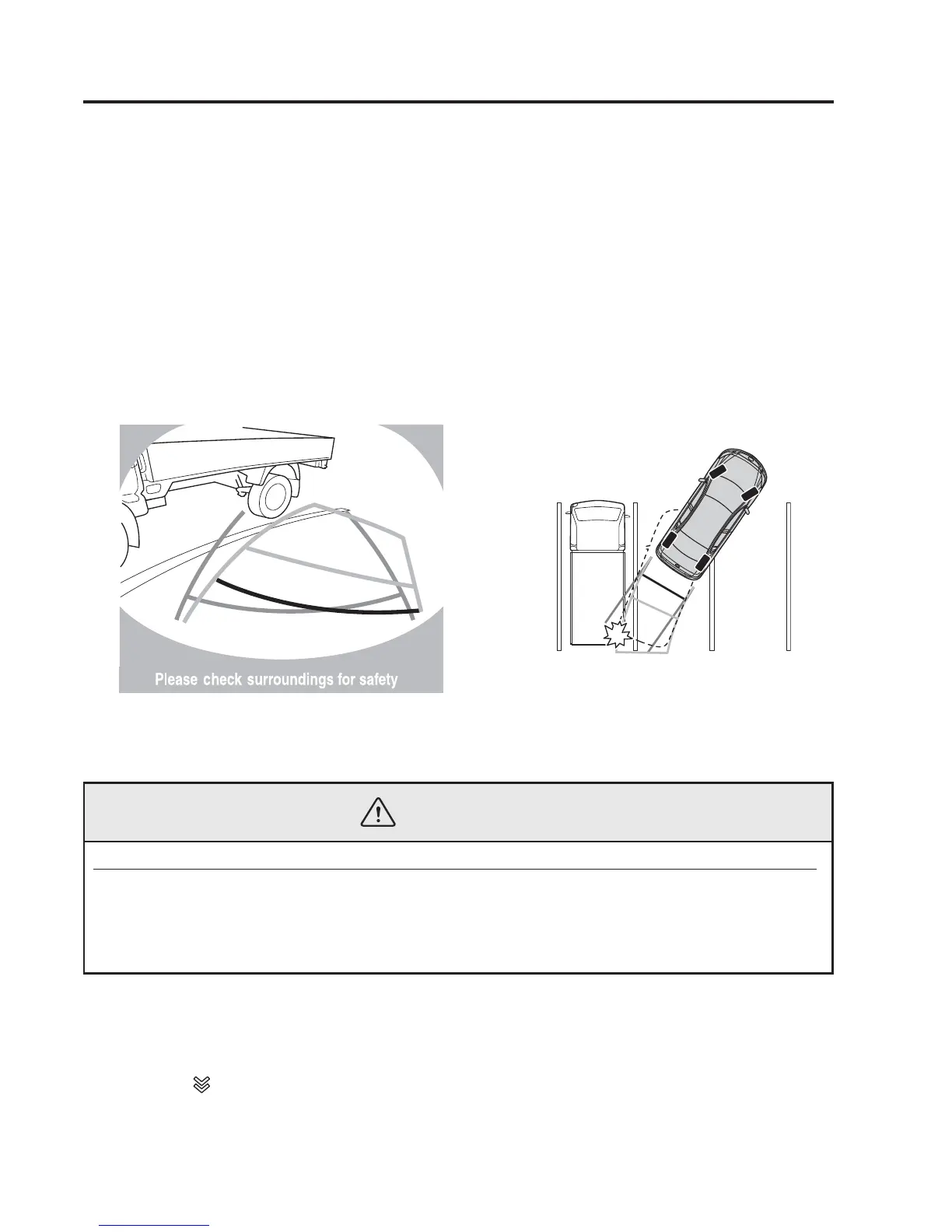
(Predicted vehicle path assist lines display type)
When reversing near a three-dimensional object
When reversing near an overhanging object, the vehicle may hit the object even if the
anticipated course line does not contact the object on the screen. The position of the object
displayed on the screen is different from the actual position because the anticipated course
lines on the screen are displayed based on a horizontal road surface. When backing up near
an overhanging object, confirm the rear and surrounding conditions directly with your
eyes.
(Screen display) (Actual view)
qPicture Quality Adjustment
WARNING
Always adjust the picture quality of the rear view monitor while the vehicle is stopped:
Do not adjust the picture quality of the rear view monitor while driving the vehicle.
Adjusting the picture quality of the rear view monitor such as brightness, contrast,
colour, and tint while driving the vehicle is dangerous as it could distract your
attention from the vehicle operation which could lead to an accident.
Picture quality adjustment can be done while the shift lever is in reverse (R).
There are four settings which can be adjusted including brightness, contrast, colour, and
tint. When adjusting, pay sufficient attention to the vehicle surroundings.
1. Select the
icon on the screen to display the tabs.
2. Select the desired tab item.
4-232
When Driving
Rear View Monitor


 To Next Page