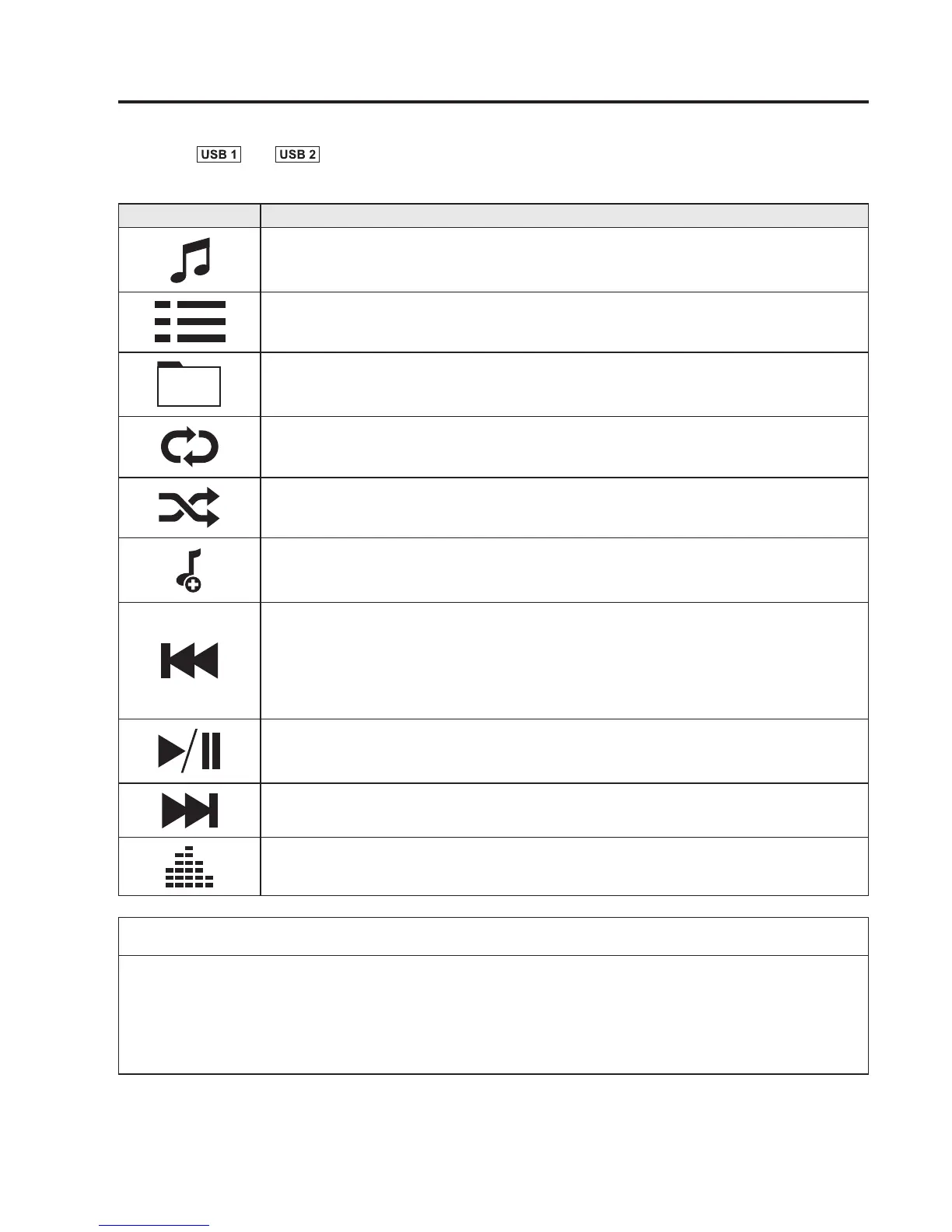
2. Select or to switch the USB mode. The following icons are displayed in
the lower part of the centre displ ay.
Icon Function
Displays the Entertainment menu. Use to switch to a different audio source.
Category list is displayed.
Current track list is displayed.
Select a desired track to play it.
Plays the current track repeatedly.
Select it again to play the tracks in the current track list repeatedly.
When selected again, the function is cancelled.
Tracks in the current track list are played randomly.
Select it again to cancel.
Starts playing a track similar to the current track using Gracenote's More Like This™.
Select the desired song from the category list to cancel More Like This™.
If selected within a few seconds from the beginning of a song which has started to play, the
previous song is selected.
If more than a few seconds have elapsed, the song currently being played is replayed from
the beginning.
Long-press to fast reverse. It stops when you remove your hand from the icon or the
commander knob.
Track is played. When selected again, playback is temporarily stopped.
Advances to the beginning of the next song.
Long-press to fast forward.
Displays sound settings to adjust audio quality level.
Refer to Volume/Display/Sound Controls on page 5-51.
NOTE
l
To move to the desired location on the track, move the slider indicating the playback
time.
l
The appearance of the repeat and shuffle icons changes depending on the type of
operation in which the function is used.
Interior Features
Audio System
5-85



 To Next Page