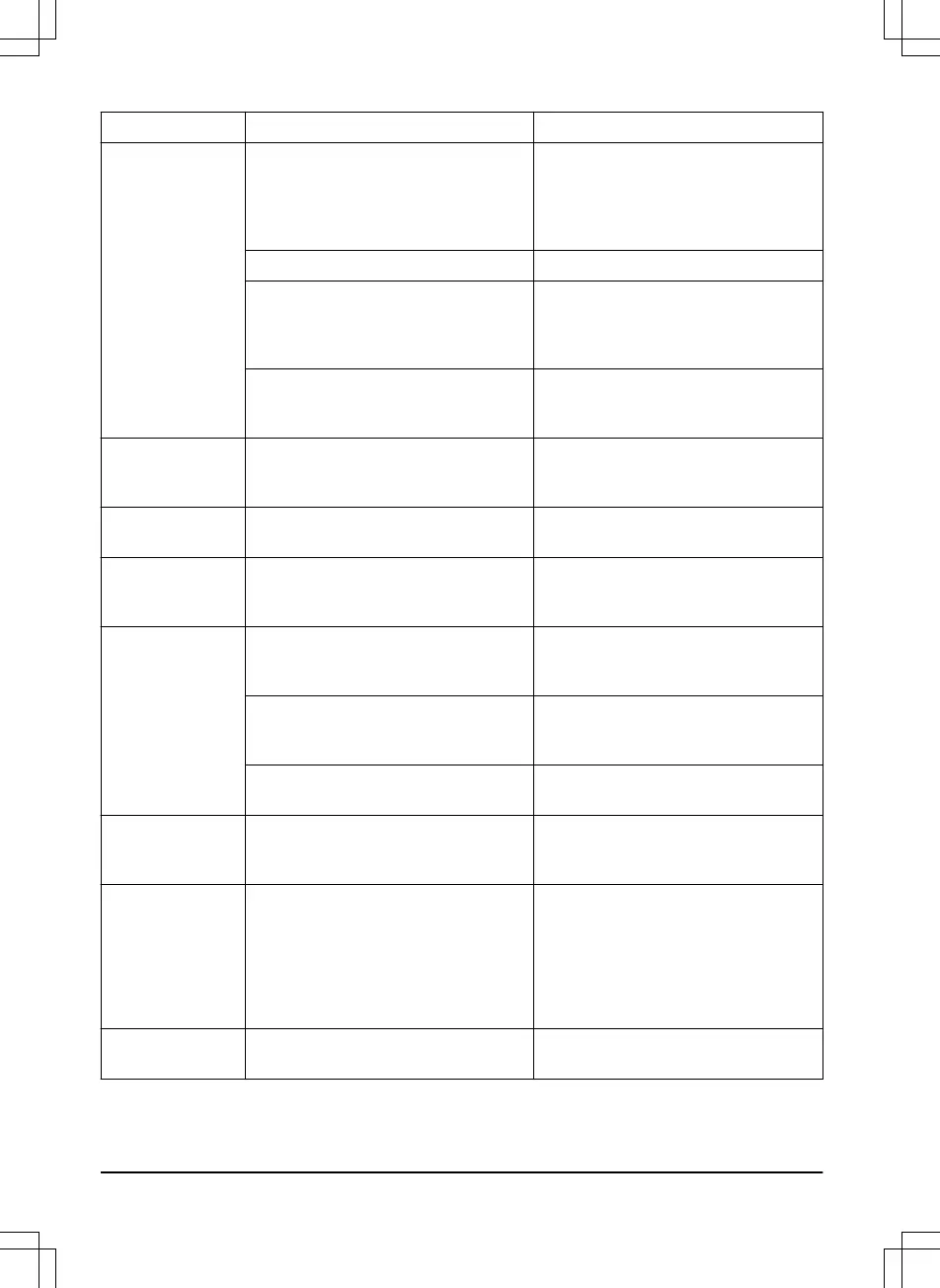
Message Cause Action
Charging station
blocked
The contact between the charging
plates (product) and contact plates
(charging station) may be poor and the
product has made a number of at-
tempts to charge.
Put the product in the charging station
and check that the charging plates and
contact plates make good contact.
An object is obstructing the product. Remove the object.
The charging station is tilted or bent. Confirm that the charging station is
placed on a fully flat and horizontal
ground. The charging station must not
be tilted or bent.
The guide wire is not installed correctly. Check if the guide wire is installed ac-
cording to the instructions. Refer to
To
install the guide wire on page 21
.
Stuck in charging
station
There is an object in the way of the
product preventing it from leaving the
charging station.
Remove the object.
Upside down
The product is leaning too much or has
turned over.
Turn the product the right way up.
Needs manual
charging
The product is set to the
Secondary
area
operating mode.
Place the product in the charging sta-
tion. This behavior is normal and no ac-
tion is required.
Next start hh:mm
The schedule setting prevents the
product from operating.
Change the schedule settings. Refer to
To do the schedule settings on page
23
.
The rest period is in progress. The
product has an inbuilt standby period
according to the Standby time table.
This behavior is normal and no action
is required.
The clock or date in the product is not
correct.
Set the time. Refer to
To set the time &
date on page 28
.
Today's mowing
completed
The product has an inbuilt standby peri-
od according to the Standby time table.
This behavior is normal and no action
is required. Refer to
Schedule and
Standby on page 32
.
Lifted
The lift sensor has been activated as
the product has been lifted.
Check that the product body can move
freely around its chassis. Remove or
create an island around objects that
can cause the chassis to be lifted. If the
problem remains, the message re-
quires action by an authorized service
technician.
Wheel drive prob-
lem, right/left
Grass or other object is wrapped
around the drive wheel.
Clean the wheels and around the
wheels.
40 - Troubleshooting 1411 - 001 - 18.12.2019




 To Next Page