The MicroTech Remote Monitoring and Control (RMC) Panel, identified by Part Number 578998Y-01 and dated November 1996, is a self-contained device designed for monitoring and controlling McQuay RoofPak applied rooftop systems and self-contained air conditioning (SCAC) systems. It can manage up to eight such units via network communications. The panel's software, RMC-E01A, is factory installed and tested, with its program code ("Ident") available on menu 16 of the keypad/display or via MicroTech Monitor™ software.
Function Description:
The RMC Panel serves as a central hub for displaying and modifying operational data, system alarms, control parameters, and schedules for connected units. It allows users to monitor operating conditions, view current and historical alarms, and adjust set points and schedules after entering a password. The keypad/display on the RMC Panel can emulate each unit's keypad/display, providing a unified interface for system management. However, a unit's service mode cannot be changed remotely from the RMC Panel, except for older versions of applied rooftop programs (95016*-03* and earlier, and 95031*-01*).
Keypad/Display Interface:
The device features a keypad/display board with a 2-line, 16-character LCD display. The keypad consists of 12 pressure-sensitive membrane switches divided into four groups: "Category," "Menu," "Item," and "Action."
- Category Group: Provides quick access to desired menus.
- Status Key: Displays the first menu in the Status category (Menu 1, "RMC Status").
- Control Key: Displays the first menu in the Control category (Menu 4, "Group Assign").
- Alarms Key: Displays the first menu in the Alarm category (Menu 17, "Units w/Alarm"). When an alarm occurs, the display automatically switches to this menu.
- Switch Key: Toggles the display between associated Status and Control category menu items, allowing quick checks of controlled conditions against set points. It also returns the display to the menu and item prior to an alarm and, in conjunction with Menu NEXT or PREV keys, changes the interfaced controller.
- Menu Group: Scrolls through menus.
- Prev Key: Scrolls to the previous menu.
- Next Key: Scrolls to the next menu.
- Item Group: Scrolls through items within a selected menu.
- Prev Key: Scrolls to the previous item.
- Next Key: Scrolls to the next item.
- Action Group: Used to clear alarms or change set points and parameters.
- Incr Key: Changes the selected field's entry to the next higher value or selection.
- Decr Key: Changes the selected field's entry to the next lower value or selection.
- Enter Key: Locks in the selected field's entry and makes the next field available for editing if multiple fields exist.
- Clear Key: Clears alarms and edited (flashing) fields, restoring the field's previous entry and ending the edit.
Password Protection:
The controller includes password protection to prevent inadvertent changes. When attempting to modify an adjustable parameter, the controller prompts for a password. The default password is "ENTER, ENTER, ENTER, ENTER" and is not adjustable. After five minutes of inactivity, the controller disallows further changes until the password is re-entered.
Information is organized into three levels: categories, menus, and items.
- Status Category: Provides read-only information about the RMC controller's current operation and multiple-unit control groups.
- RMC Schedule Status (Menu 1): Shows the current status of the RMC Panel's four schedules (Occupied/Unoccupied).
- Control Temperature (Menu 2): Displays the current Control Temperature for each of the four multiple-unit control groups, calculated from return or space temperatures.
- Static Pressure (Menu 3): Shows the current duct static pressure for each of the four multiple-unit control groups, used to control VAV units.
- Control Category: Contains set points and parameters that define RMC controller operation. Most fields can be changed after password entry.
- Group Assignment (Menu 4): Assigns units (2 to 8) to one of the four multiple-unit control groups. If used only for remote monitoring or scheduling, parameters should be "NA."
- Group #1, #2, #3, #4 Setup (Menus 5, 6, 7, 8): Configures parameters for each control group, including Control Temperature source (Return/Space), temperature calculation method (Min/Max/Avg), static pressure calculation method (Min/Max/Avg), static pressure set point (0.20-4.00"WC), speed/vane percentage (0-100%), dead band (0.00-0.50"WC), modulation limit (0.02-2.00"WC), wait time (20 Sec-10 Min), and max step (1-100%).
- RMC Schedule Assignment (Menu 9): Assigns one of the RMC Panel's four schedules to each unit.
- Schedule #1, #2, #3, #4 (Menus 10, 11, 12, 13): Configures internal scheduling parameters for each day of the week and holidays (start/stop hours and minutes, 00:00-00:00 default).
- Holiday Date (Menu 14): Schedules up to 14 holiday dates, each with a duration of 1 to 31 days.
- Time and Date (Menu 15): Adjusts current time, day, and date, and sets daylight-saving time.
- Service (Menu 16): Contains controller setup and service-related items, including the number of units (0-8), unit addresses (NA or 01-40 hexadecimal), port A baud rate (1200, 2400, 9600), total slaves (0-64), configuration (RTU&SCU or ALL RTU), and the controller's program code ("IDENT=RMC-E01A").
- Alarm Category: Displays current and previous alarm information.
- Units With Current Alarms (Menu 17): Shows which units have active alarms.
- Alarm History (Menu 18): Displays the last eight alarms and their occurrence times.
- Alarm Horn Setup (Menu 19): Configures alarm horn settings.
Technical Specifications & Compatibility:
The RMC Panel (RMC-E01A software) has specific compatibility requirements with MicroTech unit controller software versions.
- VAV with common duct static pressure control: Compatible with Applied Rooftop 950164-040, 950314-020, 950162-040, 950313-020; and SCAC 950600-02C. Incompatible with earlier versions (e.g., 950164-03* and earlier).
- VAV without common duct static pressure control; CAV, all applications: Compatible with Applied Rooftop 950164-03J to -03K950164-040, 950314-01G to -01H950314-020, etc.; and SCAC 950600-020 to -02C. Incompatible with earlier versions (e.g., 950164-03I and earlier).
- Note: Older applied rooftop programs can be made compatible by setting the RMC Panel's Configuration parameter to "ALL RTU." This makes the RMC controller compatible with all applied rooftop software but incompatible with all SCAC software.
Usage Features:
- Multiple-Unit Control Groups: Allows grouping of 2 to 8 units to operate as a single large unit, with common control temperature and duct static pressure sources.
- Scheduling: Four internal schedules can be assigned to units, with daily and holiday scheduling options.
- Alarm Monitoring: Provides real-time and historical alarm data, with the ability to silence the alarm horn and clear alarms.
- Change-and-Wait Algorithm: A control strategy that adjusts variables in steps, waiting for the system to stabilize before making further adjustments. Parameters include dead band, modulation limit, wait time, and max step.
Maintenance Features:
- Software Upgrade: Unit controller software may need to be upgraded for compatibility with the RMC Panel.
- Grounding: The equipment must be properly grounded to prevent electric shock and equipment damage.
- Service Personnel: Connections and service to the MicroTech control panel must be performed only by knowledgeable personnel.
- FCC Compliance: The device complies with Class A digital device limits (Part 15 of FCC rules) for commercial environments. Users in residential areas may need to correct interference at their own expense.
Installation Literature:
- Applied Rooftop: IM 483
- SCAC: IM 608
Operation Manual Bulletin Numbers:
- Applied Rooftop Variable Air Volume: OM 108
- Applied Rooftop Constant Air Volume, Zone Temperature Control: OM 109
- Applied Rooftop Constant Air Volume, Discharge Temperature Control: OM 110
- SCAC Variable Air Volume & Constant Air Volume, Discharge Temperature Control: OM 123
- SCAC Constant Air Volume, Zone Temperature Control: OM 124

 Need help?
 General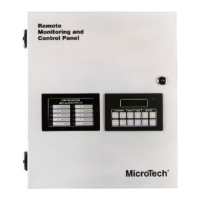

 To Next Page