8 OM-121
Getting Started
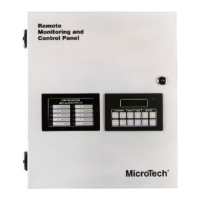
The MicroTech Remote Monitoring and Control (RMC) Panel is a self-contained device that is
capable of monitoring and controlling up to eight McQuay applied rooftop or self-contained air
conditioning (SCAC) units via network communications. You can display and modify information
in the RMC Panel and its associated unit controllers with either of the following methods:
• Using the keypad/display at the RMC Panel
• Using an optional PC equipped with Monitor software
You can also use the keypad/display at each unit, but then your access will be limited to that unit
only.
The following “Getting Started” sections describe how to use the RMC Panel’s keypad/display. (A
unit controller’s keypad/display operates similarly; the main difference is that the special keystroke
combination that changes the keypad-controller interface is not available.) For information on using
the optional Monitor software package, see the user’s manual supplied with the Monitor software.
The last “Getting Started” section describes how to set up the RMC Panel and its associated units
for normal operation.
Note: As used throughout this manual, the term “RMC network” denotes the RMC Panel and its
associated units; it would not include, for example, a reciprocating chiller that is on the same
MicroTech network. Therefore, an “RMC net work” could be either a self-contained network
(typical) or a part of a larger MicroTech network.
Using the Keypad/Display
The Keypad/Display Board, shown in Figure 1, is provided with the RMC Panel and all MicroTech
applied rooftop and SCAC unit controllers. With the keypad/display you can monitor operating
conditions, system alarms, control parameters, and schedules. After the password has been entered,
you can edit set points, parameters, and schedules.
The keypad/display on the RMC Panel can emulate each unit’s keypad/display. Once the RMC
Panel’s keypad/display is interfaced to the desired unit controller, it operates almost exactly the
same as the unit-mounted keypad/display. The only difference is that a unit’s service mode cannot
be changed from the RMC Panel. (A special keystroke combination changes the keypad-controller
interface). The Unit Selection LEDs on the panel face indicate which controller the keypad/display
is currently interfaced with.
Note: The fact that the service mode cannot be changed is not always true. This is not true for older
versions of applied rooftop programs.


 To Next Page