www.mdcusa.com Ph: 833 632 8721
51
• There may be a variation between the temperature delivered from the appliance and the temperature
at the faucet due to water conditions or the length of pipe from the appliance.
• The presence of a ow restricter in the hot water line may Limit the water ow.
How to use hot water:
• To obtain the desired water temperature at the faucet or in the shower, mix cold and hot water.
• Particularly when showering, wait until the water temperature has stabilized before entering or
allowing other people or animals to enter the shower.
Switching ON the appliance
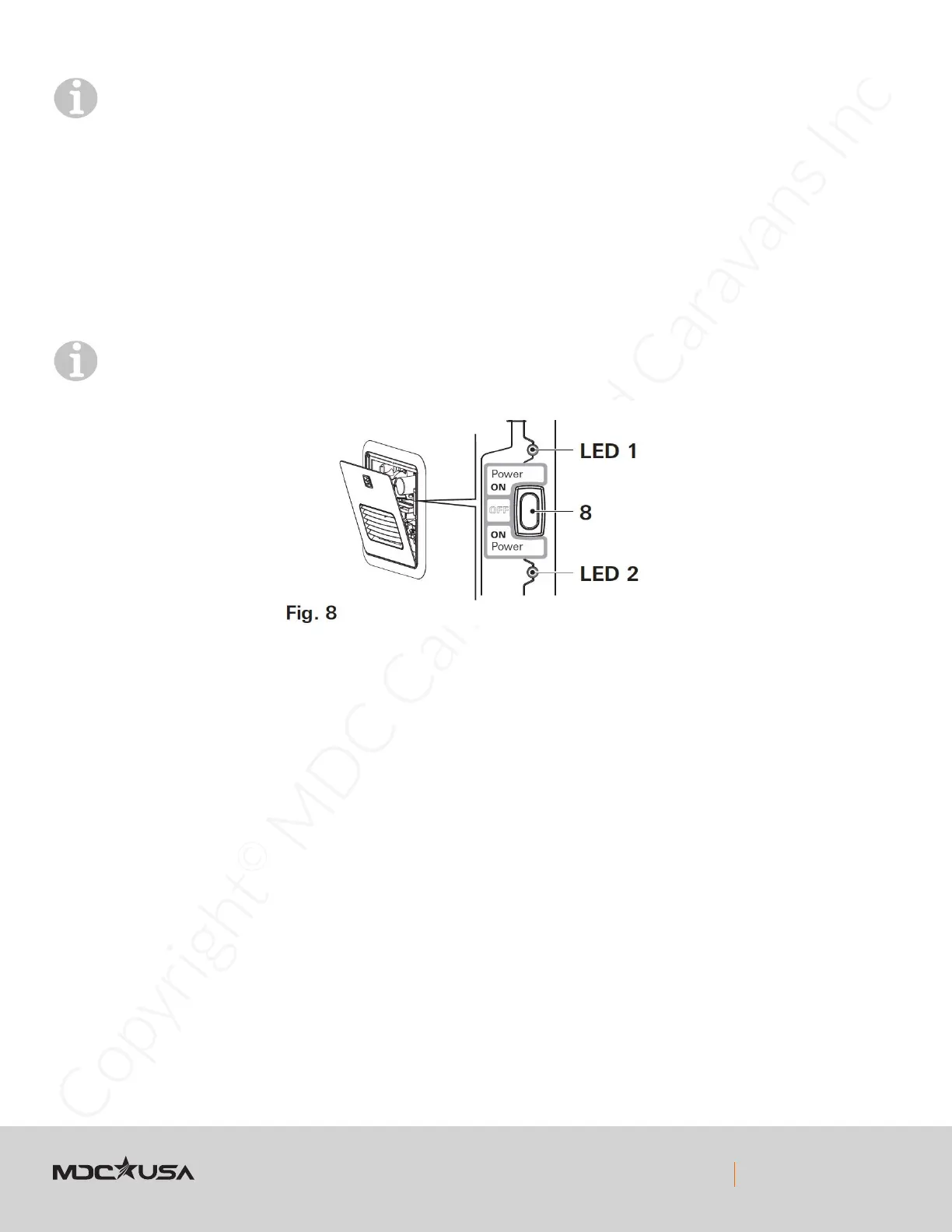
1. Open the access door (refer to “Opening the access door” on page 47).
2. To switch on the appliance, switch the POWER switch (Fig. 8 – 8) to one of the two “ON” positions.
Both ON positions on the POWER switch have the same function. Choose your preferred position.
When the green power ON LED 1 (Fig. 8 – LED 1) is lit, the appliance is switched on.
If the red error code LED 2 (Fig. 8 – LED 2) is lit / ashes, there is a fault or warning (refer to
“APPENDIX A – Error Codes” in manufacturers booklet).
AquaGo basic
• The operating mode is set automatically to “BASIC”.
• The appliance is now ready for use.
• Water temperature at the outlet is approximately 120 °F (49 °C).
AquaGo comfort / AquaGo comfort plus
• The appliance is now ready for using the control panel inside your vehicle. Refer to “Operating modes
(control panel)” on page 52.


 To Next Page