Page 35 Micro 26 - Service & Parts Manual
April 2019
Battery Charger
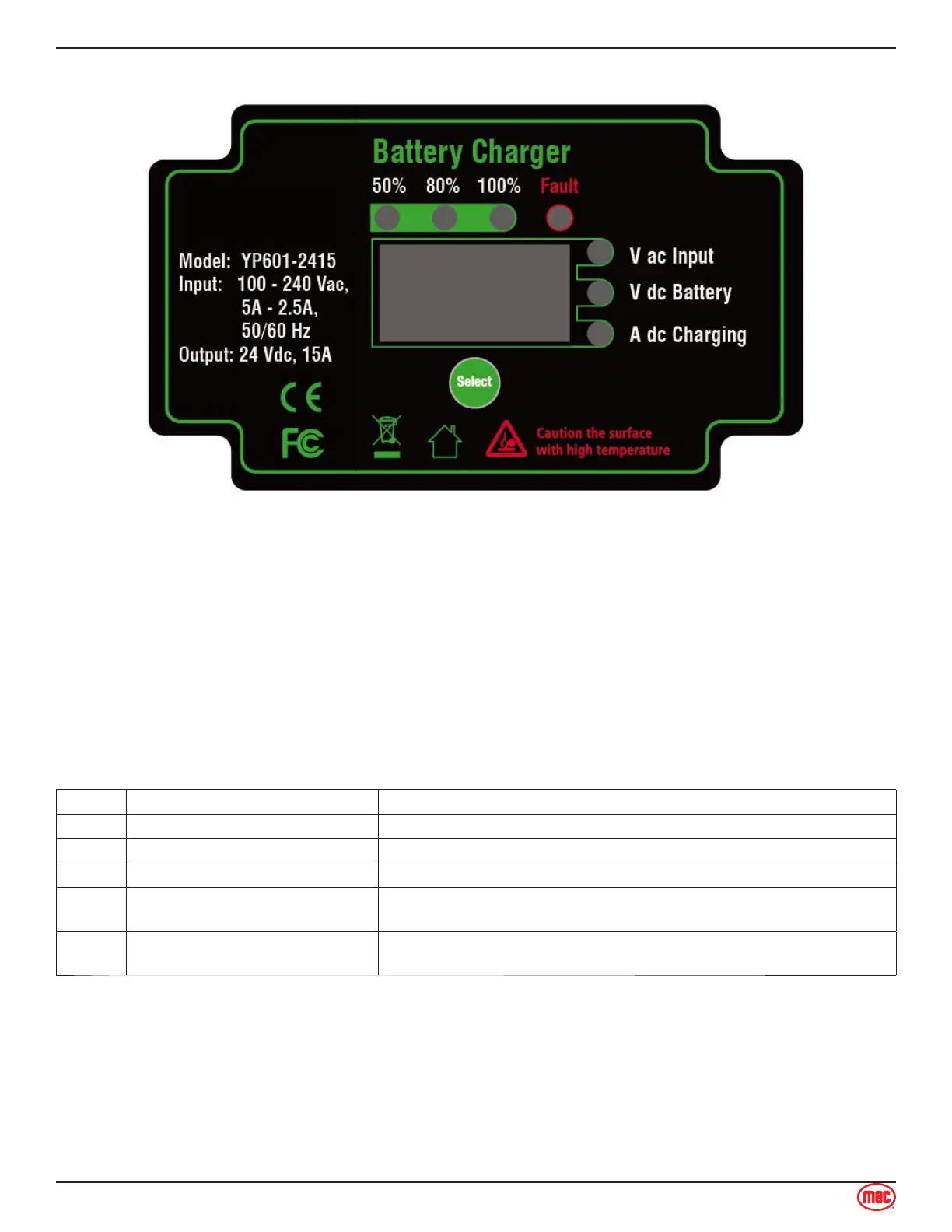
The LED display shows 50%, 80% and 100% of battery capacity. When battery capacity is less
than the LED marker, the display will blink. The display lights up when capacity has reached the
marker level.
Fault LED lights up when irregularities are encountered, for example: high input voltage, no
battery connected or over temperature of charger. When this red LED is on, the error code is on
display.
The LED display can show input AC voltage, battery voltage and charge current the status. LED
lights shows the specified status during the charging cycle.
When the AC is connected from the main, all LED displays should turn on for 10 seconds and
also show the charge curve number. After this, the charger will start to work and the LED display
shows AC input voltage, battery voltage and charge current.
Code Cause Reason Description
E01 Wrong battery voltage Output is not connected to battery or battery is incorrectly connected.
E02 Input voltage is out of range. Please check the input voltage is in 90V-260V.
E03 Battery temperature is too high. Please locked the connecting terminal with the battery tightly.
E04
The internal temperature of the
charger exceeds limit.
Don’t put anything over the surface of the charger.
E05
Wrong battery system
connected.
The battery voltage not fit the charger.
1.
2.
3.
4.
Section 13 - Battery Charger
Battery Charger



 To Next Page