Page 40 Micro 26 - Service & Parts Manual
April 2019
Parameter Adjustment
PARAMETERS SHOULD BE ADJUSTED ONLY IF THE FUNCTION IS
OPERATING OUTSIDE OF MACHINE SPECIFICATIONS, OR IF WRITTEN
APPROVAL IS OBTAINED FROM MEC PRIOR TO MAKING THE CHANGE.
The following adjustments are made at the Platform Controls
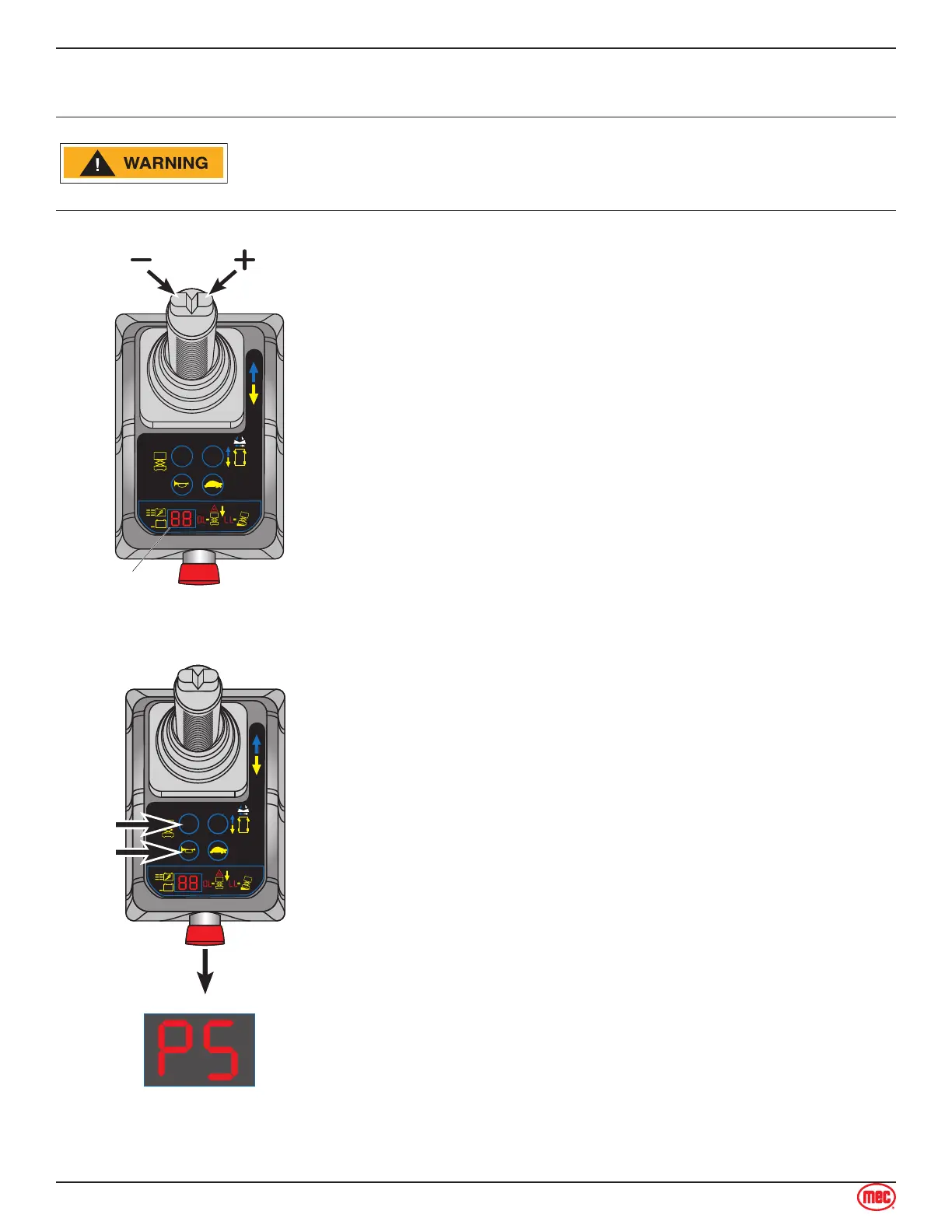
station using the LED Indicator to display the current settings.
Follow the instructions to reach the desired setting.
Change the setting by using the Steer Buttons on top of the
control handle. The right button increases the setting. The left
button decreases the setting.
Number represent a percentage. 99 means 99%. 9°9 (dot
between the digits) means 100%.
Speed Adjustment State
Set the keyswitch at the Base Controls to PLATFORM. Twist
the Base Emergency Stop Switch out to the ON position.
Push the Platform Controls Emergency Stop Button in to the
OFF Position.
Press and hold the HORN and LIFT buttons, then twist the
Platform Emergency Stop Switch to the ON position.
1.
2.
3.
“PS” and the current Lift Speed setting will alternate on the
LED Indicator.
Refer to the following pages for individual operating adjustments.
4.
Section 15 - Parameter Adjustments
Parameter Adjustment



 To Next Page