Page 14 Mast Series - Operator’s Manual
April 2021Section 5 - Components and Controls
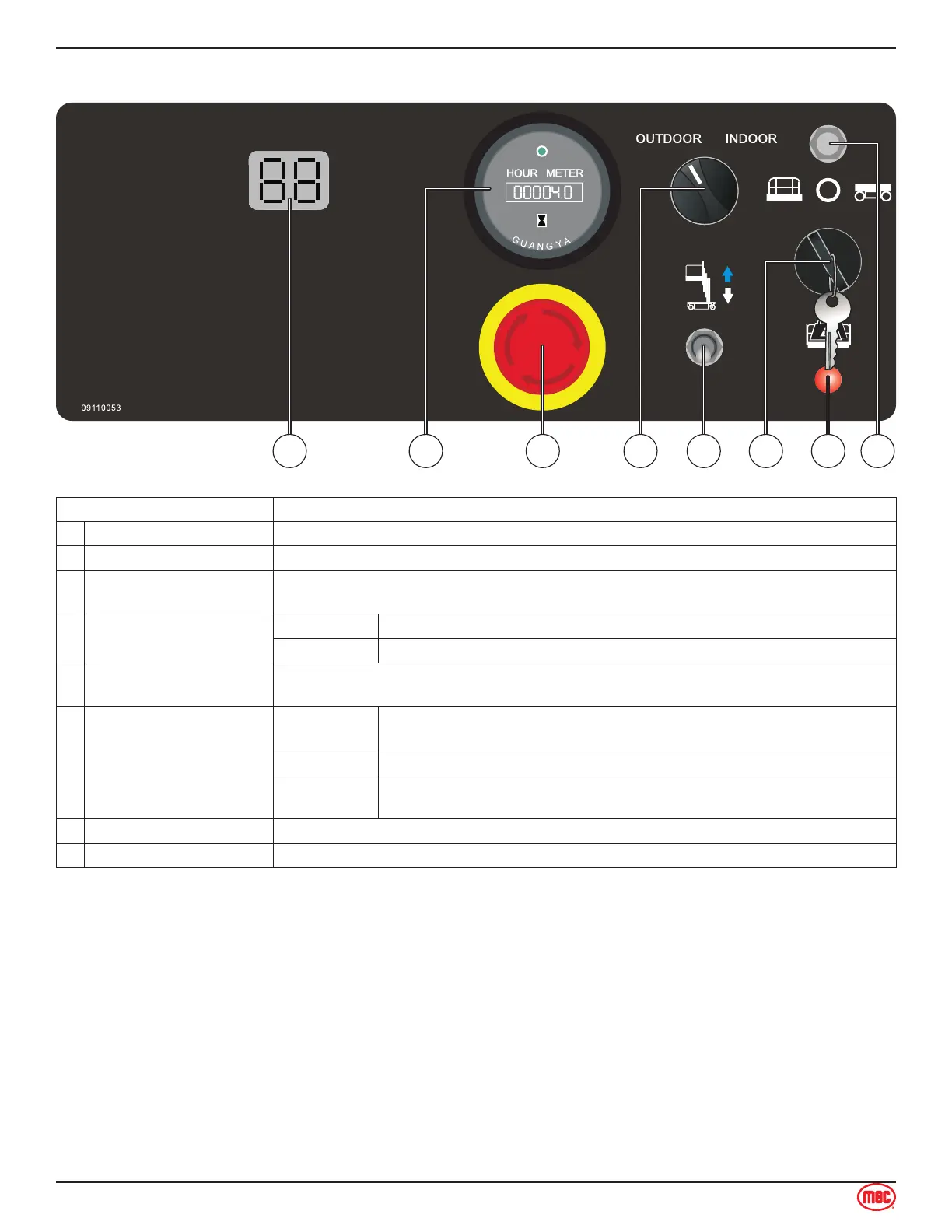
Lower Control Panel
Control Description
1 LED Diagnostic displays codes and battery charge indicator.
2 Hour Meter The hour meter displays the number of hours the machine has operated.
3 Emergency Stop Switch
Press the EMERGENCY STOP switch at any time to stop all machine functions.
Pull button out to the on position to operate the machine.
4 Indoor/Outdoor Switch
INDOOR Select to allow unrestricted height when indoors.
OUTDOOR Select to limit the maximum height when outdoors.
5
Platform Up / Down
Switch
With the Key Switch in the BASE position, move this switch up to lift the platform or
down to lower the platform.
6 Key Switch
PLATFORM
Turn the key switch to the platform position and the platform controls
will be selected.
OFF Turn the key switch to the off position and the machine will be off.
BASE
Turn the key switch to the base position and the ground controls will
be selected.
7 Overload Indicator Light Light on indicates when platform is overloaded.
8 Circuit Breaker When the current was overloaded, the circuit breaker will protect the circuit.



 To Next Page