FineTuner Echo
7
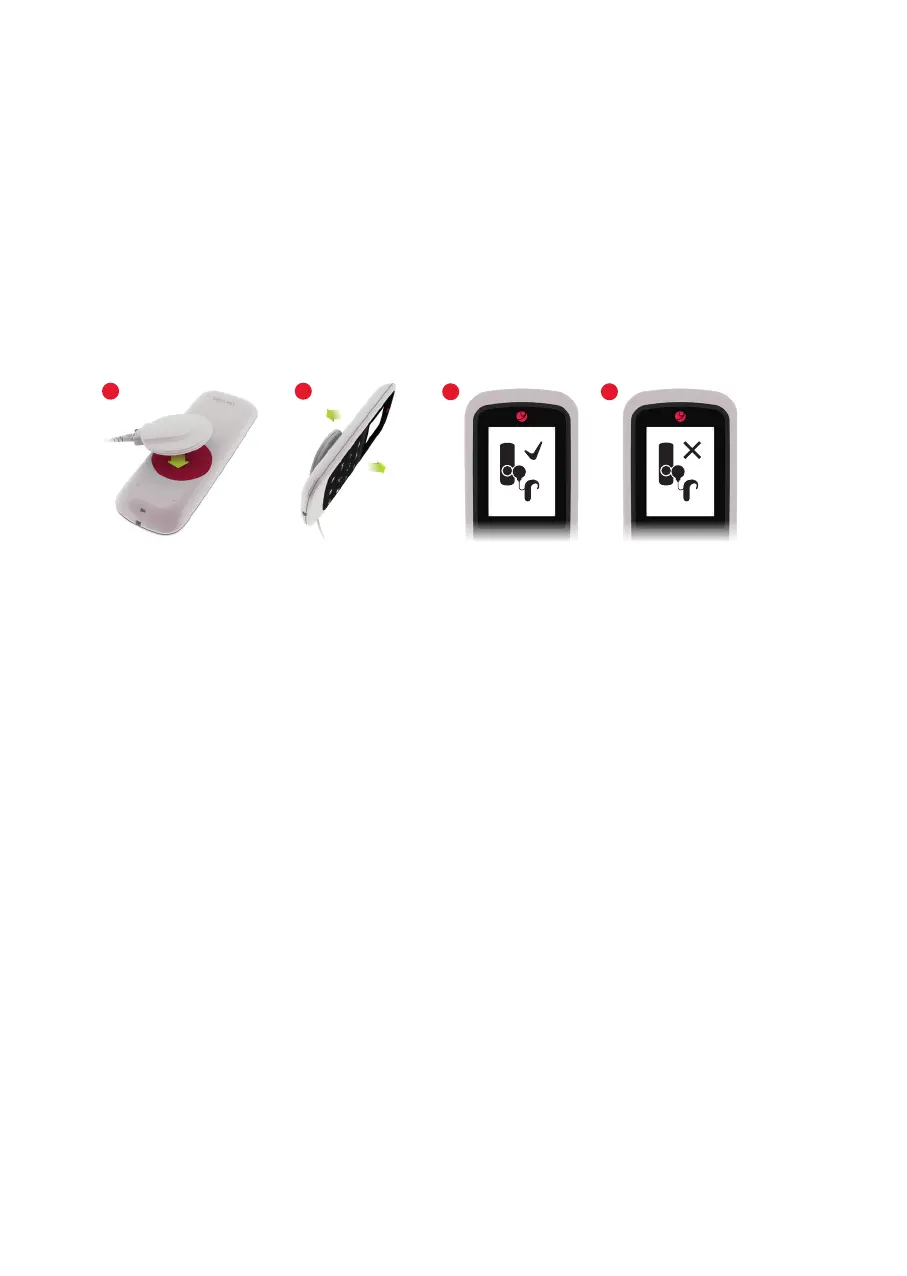
To pair the FineTuner Echo, proceed as follows:
1. Switch off the audio processor.
2. Place the coil on the battery lid of the FineTuner Echo (Fig. 4).
3. Switch on the audio processor.
4. If the pairing process was successful, a appears next to the pairing screen. If the
pairing process was not successful, a is displayed.
5. For bilateral users, repeat the steps above for the other side.
Fig. 4 Pairing the FineTuner Echo and the audio processor
NOTE: Your audio processor has to be congured for use with the FineTuner Echo.
If the audio processor is not programmed correctly, the pairing process will not be
successful. For bilaterally implanted users it is particularly important that the audio
processors are correctly programmed for the right and left side. Otherwise only one
processor can be paired to the right or left side.
If you experience problems when trying to pair the FineTuner Echo and the audio
processor, please contact your audiologist.
3 4
1 2



 To Next Page