FineTuner Echo
12
Additional functions of your FineTuner Echo
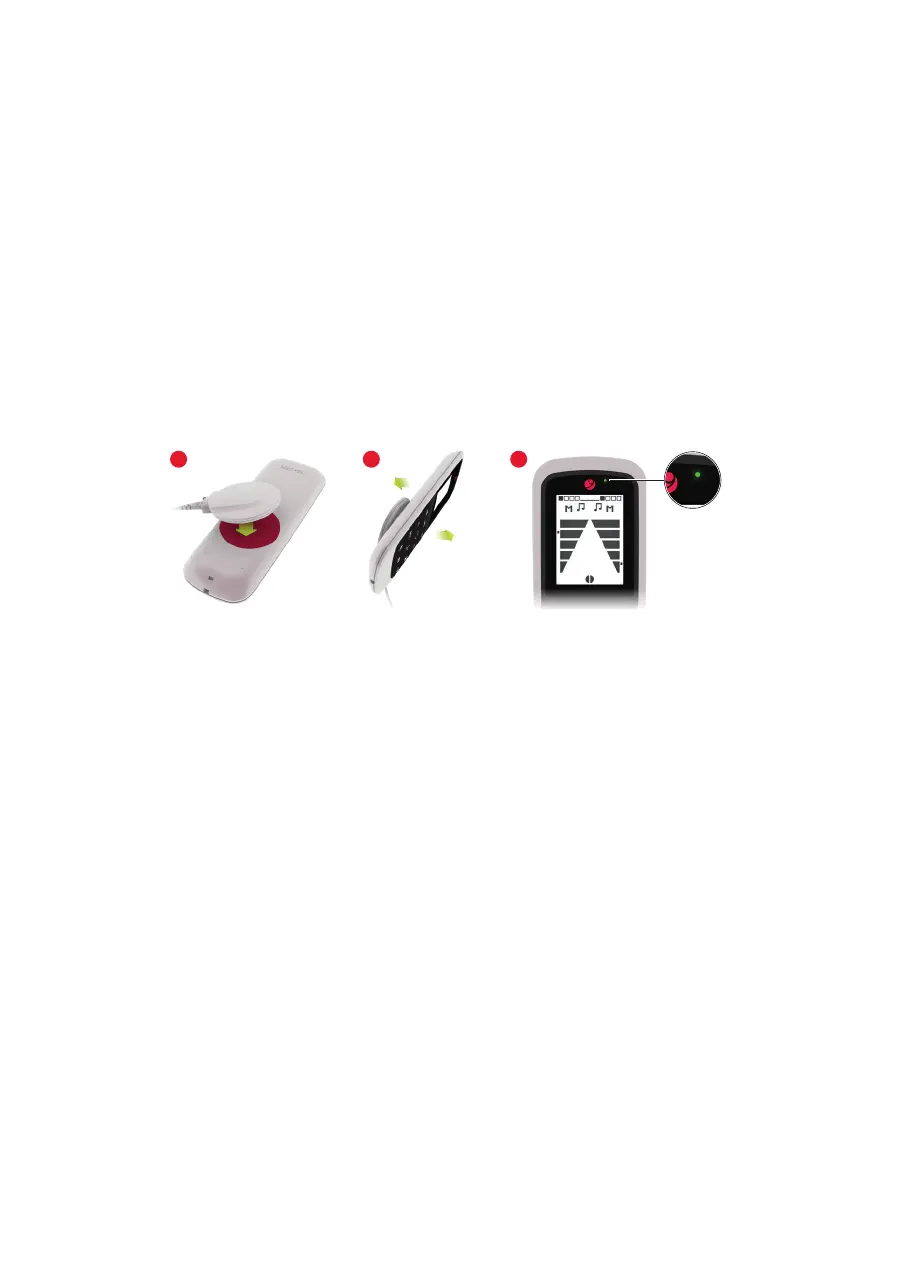
Testing your audio processor
You can use your FineTuner Echo to test proper function of the audio processor
microphones:
1. Switch on the audio processor.
2. Place the coil over the battery compartment of FineTuner Echo (see Fig. 5).
3. When speaking into the microphone, the green light on the FineTuner Echo should
icker in the rhythm of your voice.
Fig. 5 Testing your audio processor
If the green light does not light up or stays on constantly, try the following:
1. Adjust the volume setting. By using the appropriate loudness setting, you should be
able to recognize the ickering of the green light in the rhythm of your voice.
2. Change the batteries of your audio processor.
3. Replace the existing coil cable with a substitute cable.
If these measures are not successful, contact your healthcare provider or local MED‑EL
representative.
Monitoring mode
When pressing the MT button for 3 seconds, the FineTuner Echo changes into the
monitoring mode. The symbol appears on the bottom of the display. The monitoring
mode is used with the SONNET MTD. For further information about this optional service
tool for the MED‑EL Cochlear Implant System, please read the applicable user manual or
ask your audiologist for assistance.
In addition, you can switch your audio processor to silent mode if required.
31 2



 To Next Page