FineTuner Echo
6
Using the FineTuner Echo for the rst time
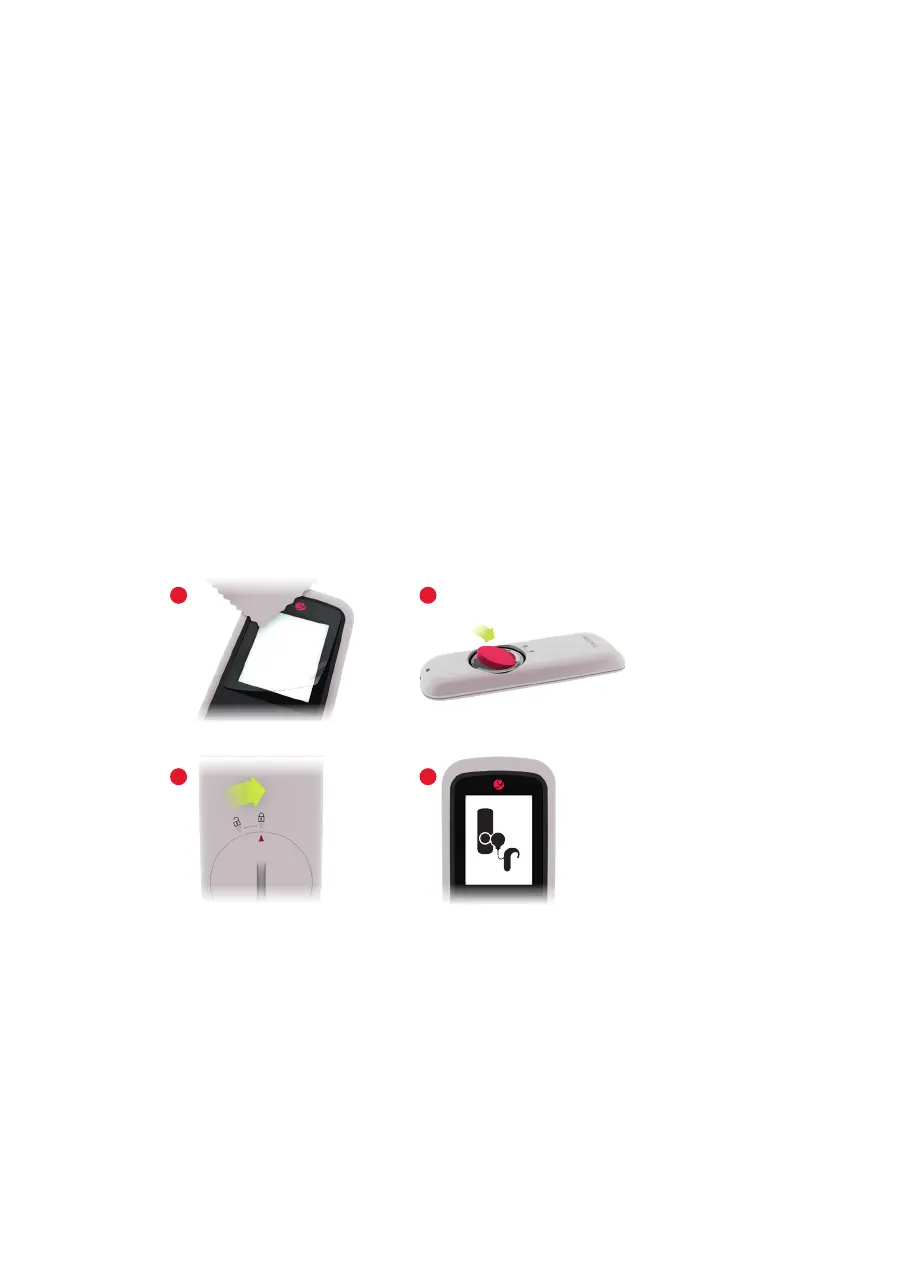
1. Clean the FineTuner Echo screen with the microbre cloth.
2. To apply the display protection foil, pull off a small section of the backing and
attach the adhesive side to the top part of the display. Slowly pull off the backing
from the foil while carefully pressing out any trapped air bubbles with the micro‑
bre cloth (Fig. 3.1).
3. Insert a coin cell battery (type CR2032) with the sign facing up. Hold the battery
at a slight angle and insert it under the lip in the battery compartment (Fig. 3.2),
then gently push it down.
4. To close the lid, align the arrow on the lid with the symbol on the housing and
push down gently. Use a coin to turn the lid until the arrow on the lid meets the
symbol on the housing (Fig. 3.3). You will feel a slight resistance when the lid
locks in place.
5. After inserting the battery, a pairing notication appears automatically (Fig. 3.4),
prompting you to pair your FineTuner Echo.
Fig. 3 Preparing the FineTuner Echo
4
2
3
1



 To Next Page