5
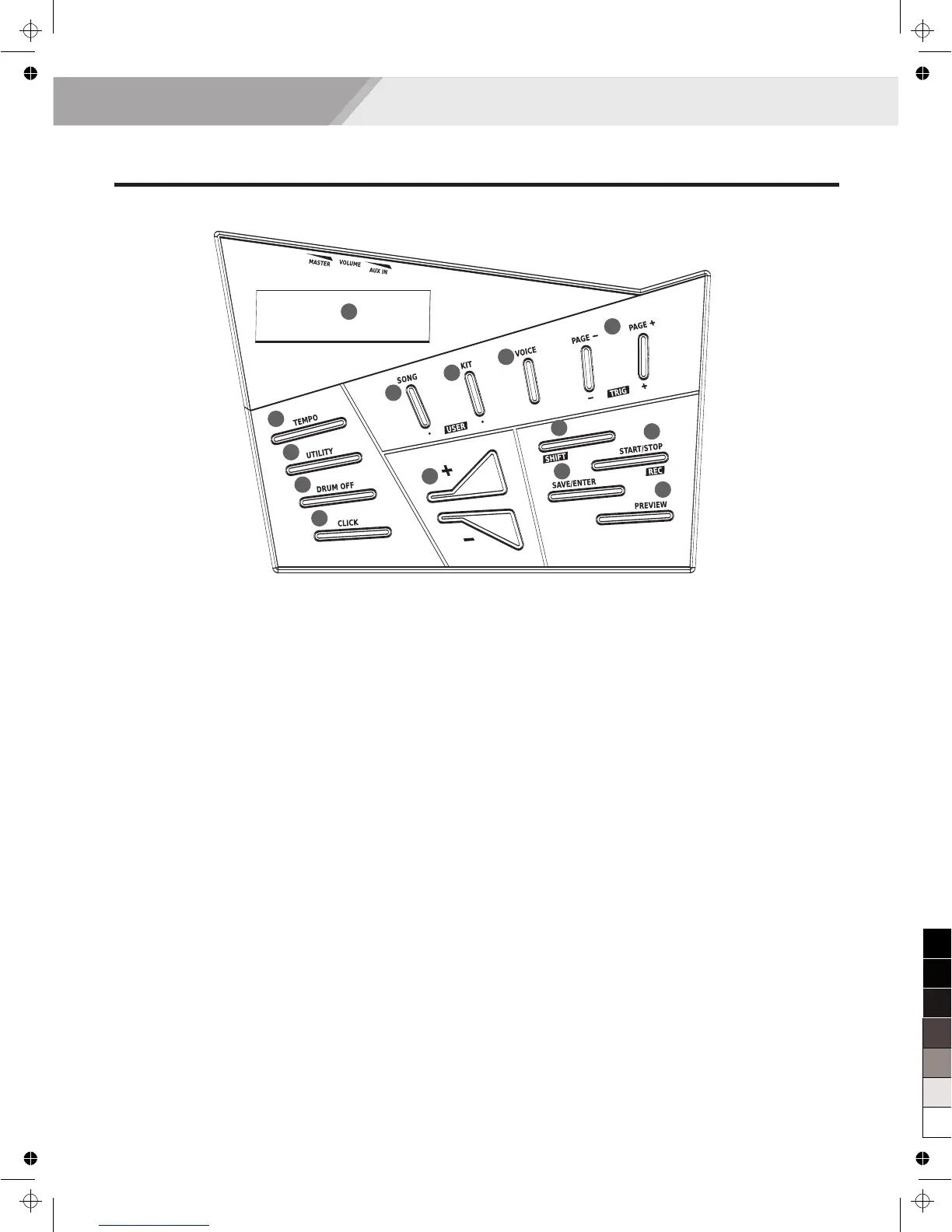
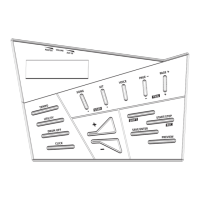
1. LCD Display
Shows the name and parameter settings of Kit,
Voice, Song and so on.
2. [TEMPO] Button
Adjust the tempo value.
3. [UTILITY] Button
Enter the utility mode.
4. [DRUM OFF] Button
Mute the drum part.
5. [CLICK] Button
Start/Stop the metronome, enter the metronome
parameter setting.
6. [SONG] Button
Accesses to Song screen. With [SHIFT] + [SONG]
shortcut buttons, quickly enter the user songs.
7. [KIT] Button
Switches drum kit. With [SHIFT] + [KIT] shortcut
buttons, quickly enter the user kit.
8. [VOICE] Button
Enter the voice mode.
9. [PAGE +]/ [TRIG +]Buttons and [PAGE -]/ [TRIG -]
Page selection.
Use the combination of [SHIFT] + [PAGE -] / [PAGE +]
buttons to select a trigger pad, such as snare, kick and
so on.
Panel & Display Description
10. [+]/[-] Button
Gradually increasing or decreasing the value of
settings.
11. [SHIFT] Button
Combined with [SONG] / [KIT] / [PAGE+] / [PAGE-]
/ [START / STOP] buttons.
Combined with [SONG]/ [KIT] button, quickly enter
the user mode.
Combined with [PAGE+]/ [PAGE-] button, select a
trigger you want.
Combined with [START]/ [STOP] button, enter
the quick record mode.
12. [START/STOP]/ [REC] Button
Start / Stop playing songs.
Press the [SHIFT] + [START / STOP], enter quick
record.
13. [ ] Button
Save the drum kit / pad settings.
14. [PREVIEW] Button
Press this button when you want to preview pad
voice, the volume value are related to the force
level you have pressed on the button.
SAVE/ENTER
1
2
3
4
5
6
7
8
9
10
11
12
13
14
Front Panel


 To Next Page