19
This digital drum lets you easily record your own performance. Quick
record 5 user songs and about 6500 drum notes could be recorded in a
song. Each song has two parts (The Drum and Accompaniment).
Preparing and starting record, refer to details bellow:
Preparing Record
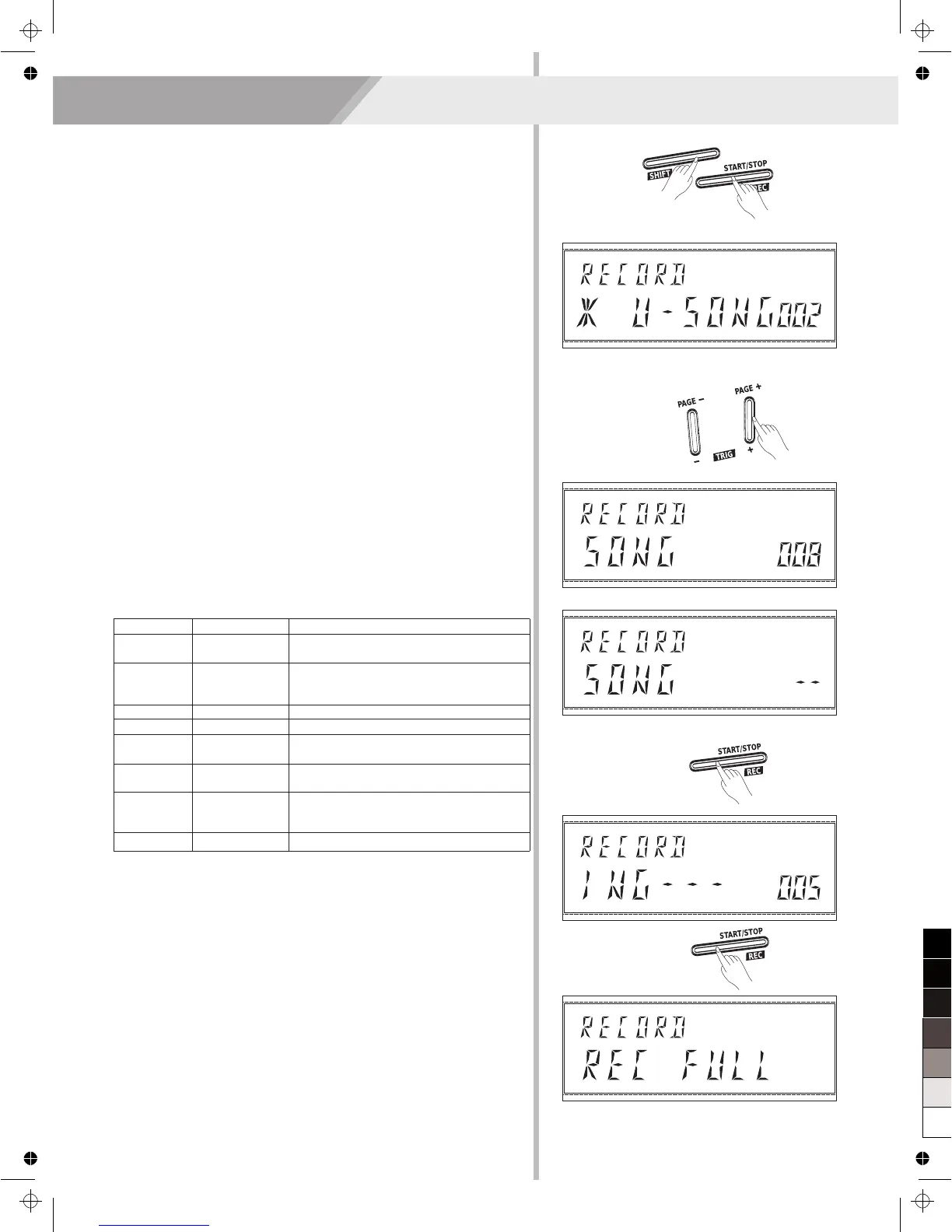
Press the [REC] button (Combination buttons [SHIFT] + [START/STOP])
to enter prepare record mode, the [REC] button will light, enter the
record standby mode.
Select User Song
1. The U-SONG 001~005 which with “U-” prefix are user songs, for
example, the name of the song displayed as “* U_SONG”(Pay
attention to the “ *” mark), it means this song is empty, no data.
Otherwise, contains record data.
2. Press the [+] / [-] button to select user song (from U-SONG
001~005).
Select an Accompaniment Song
1. Press the [PAGE +] / [PAGE -] button, enter the Accompaniment
Song Selection menu, the LCD displays “SONG xx”。
2. Press the [+] / [-] button to select an accompaniment song.
“--”: There is no accompaniment song.
1~60: The number of preset songs.
The Parameters of Record
In state of preparing record, you can adjust these parameters below:
Record
Parameter
TIME
SIGNATURE
INTERVAL
*U_ SONG
SONG
KIT
TEMPO
DRUM OFF
PRECOUNT
Value
1-9/2,1-9/4,
1-9/8,1-9/16
1/2,3/8,1/4,
1/8,1/12,1/16
001~005
--/1,2,…,60
1~35
30~280
ON/OFF
ON/OFF
Description
Select a recorded song. The name with
“*” mark means the song is empty.
Accompaniment song and the “--” means
there is no accompaniment song and you
can record drum solo.
Recorded drum kit.
Adjust the tempo value.
Adjust the time signature.
Select a interval.
Turn off the drum part.
ON: Keep the drum part playing.
OFF: Turn off the drum part.
Turn on/off the precount function.
Start / Stop Recording
1. You can start recording in real time while in the preparing record
menu, there are two ways to start record:
Press the [START/STOP] button.
Strike one pad.
2. While recording song, the [REC] button keeps flashing all along,
and the LCD displays as “RECORDING---”.
3. Press the [START/STOP] button again or you can press the [REC]
button (Combination buttons [SHIFT] + [START/STOP]) to stop
recording, and the [REC] button light will goes out.
Note:
If the record storage capacity is full, the LCD will display “REC FULL”
temporarily and then stop recording.


 To Next Page