11
Auto Accompaniment
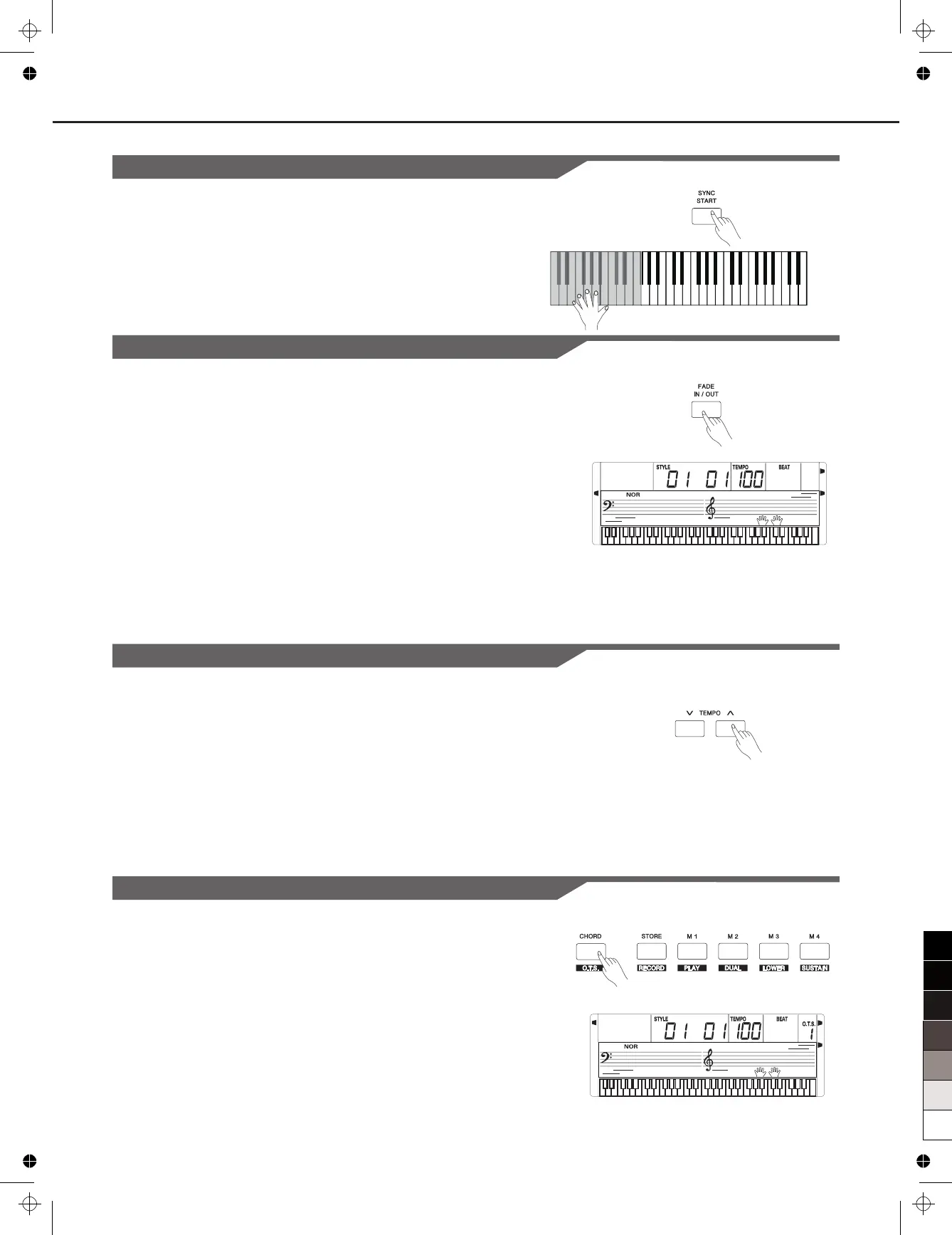
Sync Start
While the style , press the [SYNC] button. The black dots below
the tempo and the metronome flash, indicating
1. If the Chord Mode is OFF, pressing any key will automatically
begins to play the style (rhythm track).
2. If the Chord Mode is ON, pressing any key in the left-hand range of
the keyboard will automatically begins to play the style (all tracks).
stops
the style is ready to
play.
Fade In/Out
Fade In
Starting the style with fade in produces a smooth beginning, the
volume increases from low to high.
The Accompaniment Volume will change from 0 to the set value in
about 8 seconds. The keyboard volume will change from 0 to default
value at the same time.
Fade Out
Stopping the style with fade out produces a smooth ending, the volume
from high to low.
Press the [ ] button during Style playing.
The Accompaniment Volume will to 0 in about 8 seconds,
and the style stops. The keyboard volume will change from default
value to 0 at the same time.
Press the [FADE] button when Style is stopped, the fade indicator will
light up on LCD. Now press [START/STOP] button to start the style
playback, the fade indicator will flash.
decreases
FADE IN/OUT The fade
indicator will flash.
decrease
Tempo
Each style of the instrument has been programmed with a default
tempo; however, this can be changed by using the [TEMPO+] or
[TEMPO-] buttons.
1. Use the [TEMPO+] or [TEMPO-] button to change the tempo. The
value ranges from 30 to 280.
2. Hold down the [TEMPO] buttons can change the tempo quickly.
While the tempo is
change the tempo quickly.
3. Press the [TEMPO+] or [TEMPO-] buttons simultaneously to restore
the default tempo setting.
flashing on LCD, you can also use the data dial
to
One Touch Setting
When One Touch Setting is switched on, you can instantly recall all
auto accompaniment related settings including voices selection and
digital effects simply with a single touch of a button.
1.
to turns on the One Touch Setting for current style. LCD show
O.T.S. 1.
2. Press one of the [ONE TOUCH SETTING] buttons [M1]-[M4]. Voice
match the selected style can be instantly recalled.
3. Chord Mode is automatically turned on during O.T.S. mode.
4.
again to quit One Touch Setting mode, “O.T.S.” disappears.
Holding down the [SHIFT] button and then press the [O.T.S.] button
Holding down the [SHIFT] button and then press the [O.T.S.] button
FADE
A.B.C.



 To Next Page