13
Other Function
Function Menu
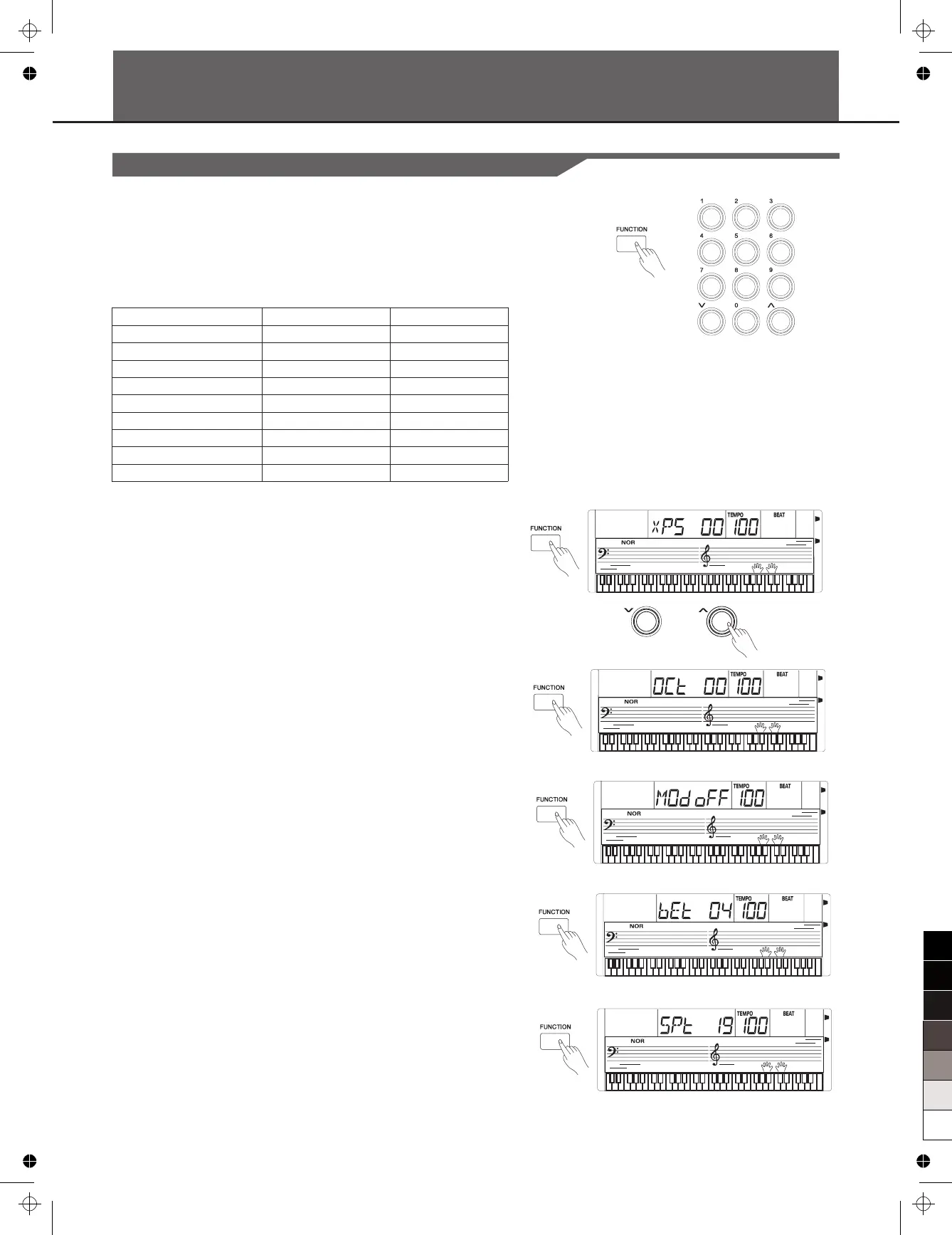
Press [FUNCTION] button to enter the . The default
option of the menu is “Transpose”. When you enter the menu next
time, . Press
[FUNCTION] button repeatedly . Use [+]/[-] button to
set the parameter.
The option and the parameters are as the follows:
function menu
it will display the same option of you last operation
to select an option
Content
Transpose
Octave
Modulation
Beat
Split Point
Tune
MIDI Receive
MIDI Transmit
Automatic Shutdown
LCD Display
xPS 00
OCt 00
Mod off
bEt 04
SPt 19
TUE 00
CHI ALL
CHo 01
PWF 30
Range
-12~0~12
-1~0~1
ON/OFF
0,2…9
1~61
-50~50
01~16,ALL
01~16
30,60,OFF
Note:
TRANSPOSE
Press the [FUNCTION] button to set the transpose. The LCD displays
the current transpose value. Use [+]/[-] button to
from –12 to +12.
Press [+] and [-] buttons simultaneously to set its default value "0".
OCTAVE
Press the [FUNCTION] button to set the octave. The LCD displays the
current octave value. Use [+]/[-] button to
from –1 to +1 octaves.
Press [+] and [-] buttons simultaneously to set its default value.
MODULATION
Press the [FUNCTION] button to set the modulation. The LCD
currently display “ . Use [+]/[-] button to set modulation ON/ OFF.
Note: This modulation effect is unavailable to percussion.
BEAT
Press the [FUNCTION] button to set the beat function, LCD displays
. Press the [+] or [-] button to change the beat
value: 0, 2, 3, 4, 5, 6, 7, 8, 9. The default value is 4.
It will automatically quit the function menu if there is no operation in 3
seconds.
set the transpose
value over the range
set the octave value over the
range
MOD”
the current beat value
SPLIT POINT
Press the [FUNCTION] button to enter SPLIT POINT sub-menu. The
LCD displays the current split point value.
Use [+/YES] / [-/NO] button to adjust the split point value from 1 to 61.
The keyboard can be also used to set the split point.
The key of the split point is the part of the left area.
The default setting is 019.



 To Next Page