H4-EN Calibration P
AGE
28/44
5
Verification of the system
If one or two traffic lights are yellow or red, the operator has to perform a verification of the
system described below.
1. Inspect the Prevent flow sensor. It should be clean, free from dust and not damaged. If
necessary, clean it carefully or replace it.
2. Verify the connection of the umbilical to the module and the connection of the Prevent
flow sensor to the umbilical.
3. Verify the calibration syringe is connected to the correct side of the Prevent Pitot tube
(honeycomb side) with the light blue rubber adapter.
4. Verify that the correct syringe volume (indicated on a label on the syringe) is the same
volume entered into the software.
5. Verify the calibration syringe is not damaged and has no leak.
Calibration syringes should ideally be checked and calibrated annually by a calibration
laboratory.
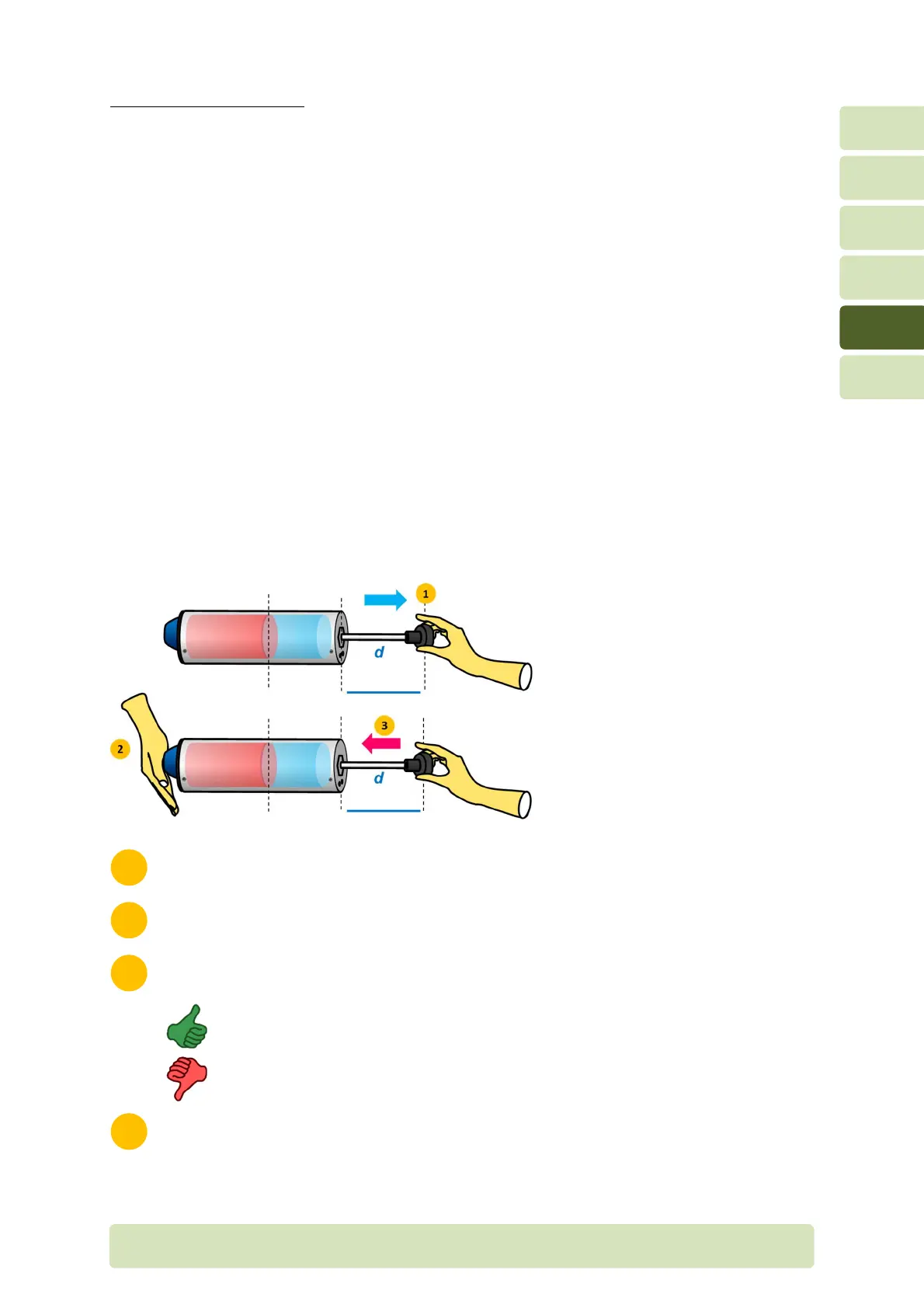
Put the syringe on a table and position the piston at the middle.
Close the syringe with the palm of your hand.
Press gently to the piston.
If the syringe has no leak, the piston should move only a few millimetres
due to the compression of the air inside the syringe.
If the syringe has a leak, the piston moves under the action of a constant
pressure on it.
Repeat the maneuver at two other positions of the piston.


 To Next Page