User Manual Thermal Unit TES Valida
Page 13 Rev. 04(12/2013)
Medite GmbH
.
Wollenweberstr. 12
.
31303 Burgdorf
.
Germany
Phone +49 5136 88 84 0
.
Fax +49 5136 88 84 55
.
info@medite.de
.
www.medite.de
5.4 Temperature controller elements and functions
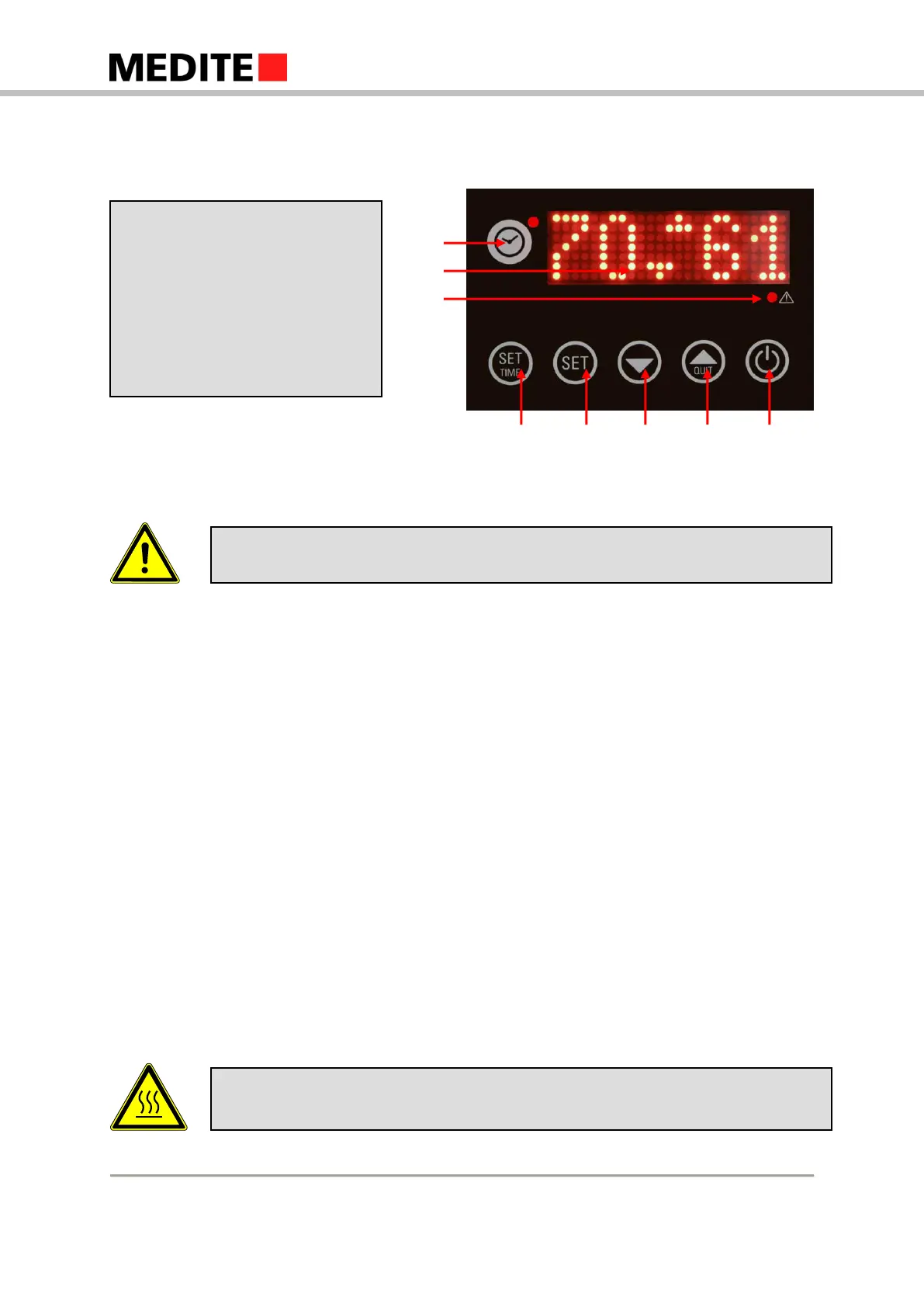
The temperature controller consists of eight elements.
Before choosing the settings, select the desired circuit (see 5.3.6 Down Key)
5.4.1 Clock Key with Light
Pressing this key switches the display to real time, again pressing toggles it to the power-on state of
the timer. After ten seconds, the display switches back to default. The power-on state of the timer is
basically for both circuits. If the key is pressed for more than two seconds, the input screen for real
time opens up and the display starts blinking. Another keypress closes the real time input mask and
opens the week day input mask.
The light on top right of the key shines when the timer is active.
5.4.2 Digital Display
The digital display shows up to five red digits. Temperature is always shown in Celsius scale.
5.4.3 Heat Warning Light
The red heat warning light is positioned right under the digital display. It starts shining when the
temperature of the surface is above 45 °C.
(1) Clock Key with Light
(2) Digital Display
(3) Heat Warning Light
(4) Set Time Key
(5) Setting Key
(6) Down Key
(7) Up Key
(8) Power Key
Be careful when the warning light shines. Surface is 45 °C or more. Serious risk of
burning!
There is always a beep when you press a key. This beep does not indicate a
successful operation. Pay attention to the time designations for each feature.


 To Next Page