12
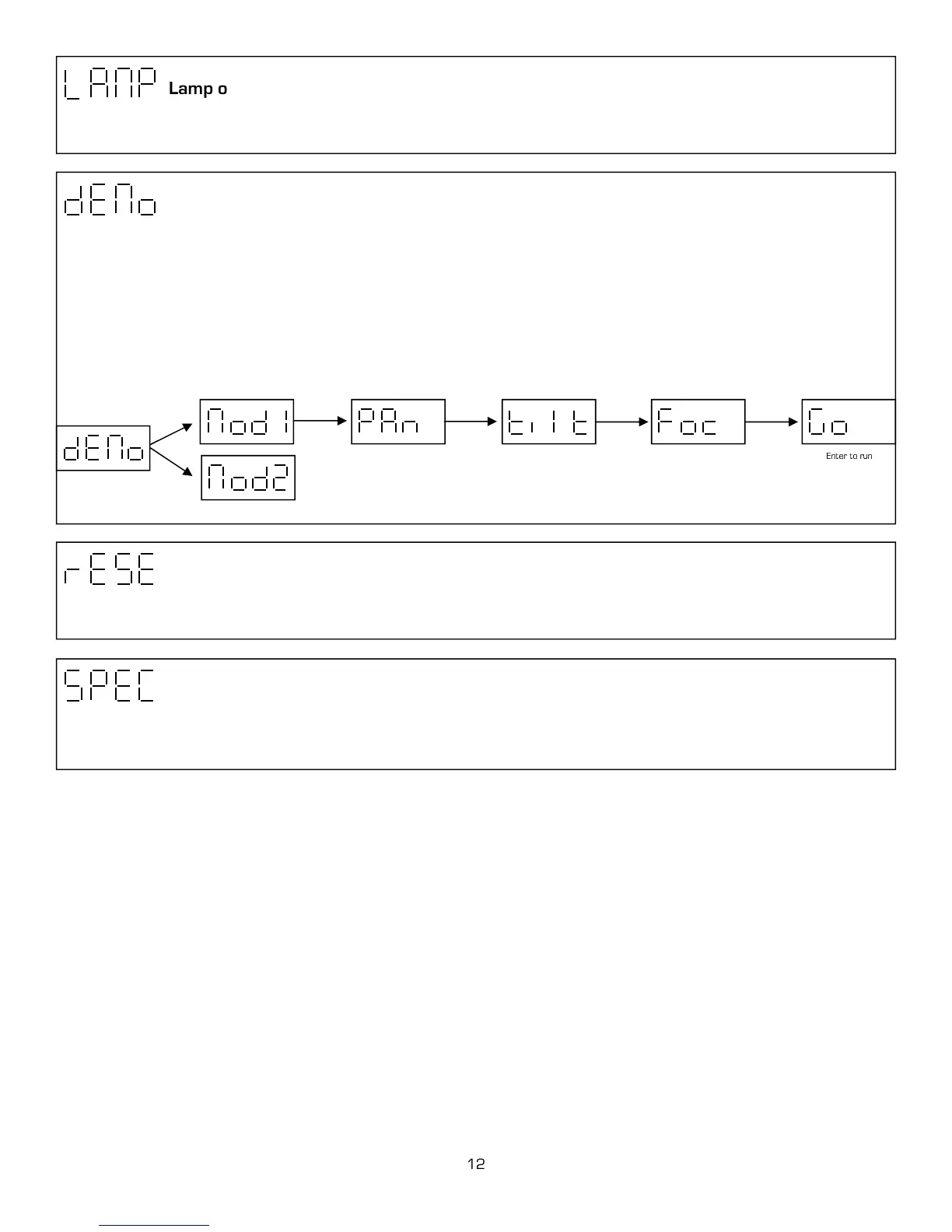
Lamp on/off
This function allows you to turn the lamp on or off. Use the up/down keys to select on to turn the lamp on and off to turn the
lamp off. Press Enter to confirm or Mode to exit and return to main menu.
Demo sequence
This function allows you to run two special demo test sequences without an external controller. Use the up / down keys to select
between (mod1) and (mod2). Mod 1 allows you to position the pan, tilt and focus. Then, you can conduct a test or demo of a
units functions with out movement. Mod 2 will run through all the functions automatically with pan and tilt. If you select mod1,
you will be able to adjust the Pan Tilt and Focus. After each function you can go up / down to desired setting press Enter to con-
firm and Mode to go back to the last option. After your personal setting have been set you can go to the (Go) function to run se-
quences. If you select demo mod2, press Enter to confirm or Mode to exit and return to main menu. Mod 2 will repeat until
mod2 is deactivated by pressing Mode.
0-255 Up/Down Enter
0-255 Up/Down Enter
0-255 Up/Down Enter
Enter to run sequence
Advance settings
This function opens up another group of advance maintenance and important settings. It is recommended that advance setting
be used by an authorized user only.
Unit Reset
This option enables the Axis 500 to index all functions and return to their standard positions. Press Enter to confirm or Mode to
exit and return to main menu.



 To Next Page