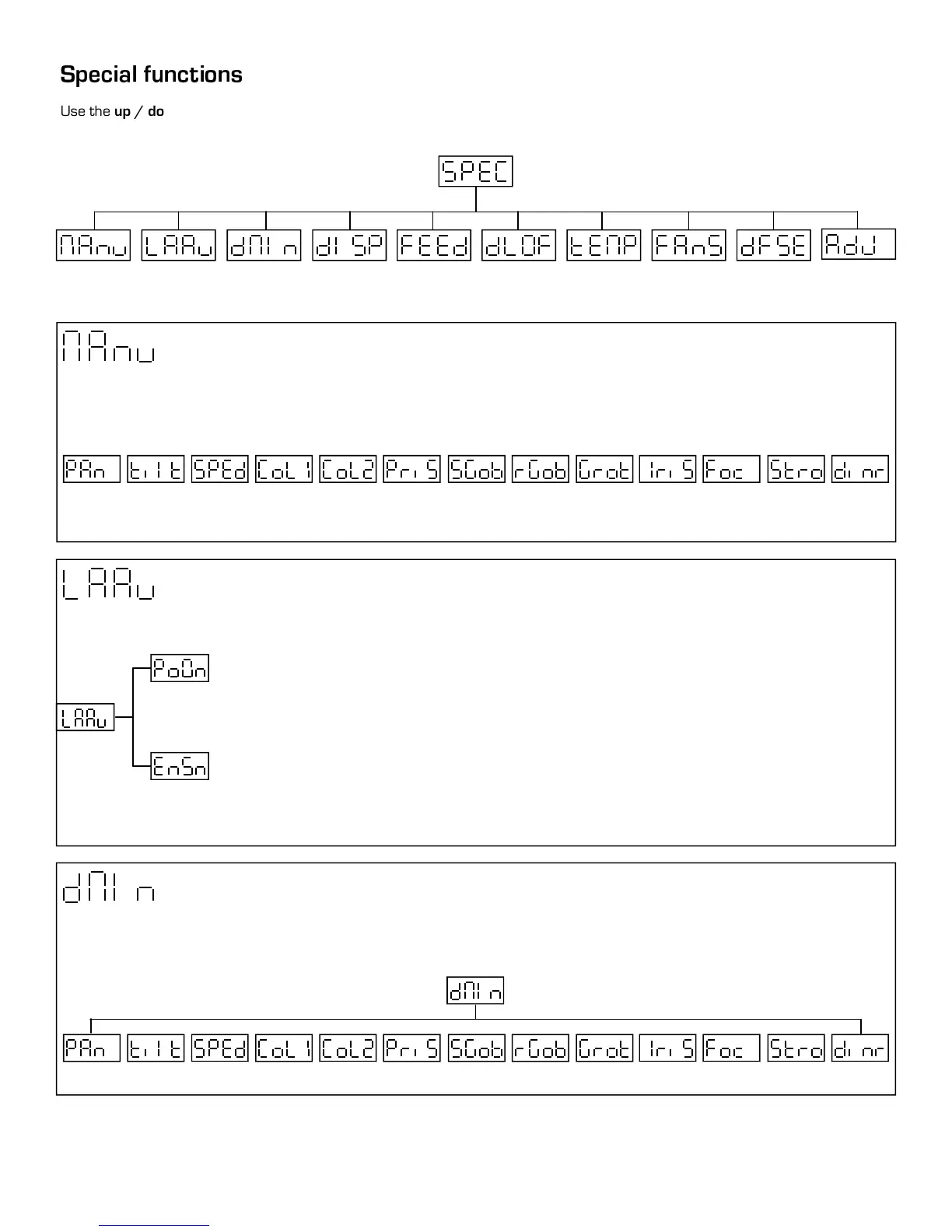
Use the up / down keys to browse through the special funcions and select one by pressing Enter.
Manual control
Lamp control
DMX values
Display options
Pan/Tilt feedback Lamp DMX Control Temperature
Fan speed
Default settings
Adjusting default
Manuel control
This function allows you to manually control each channel function. Use the up/down keys to select desired function and press
Enter to adjust the effect, or Mode to cancel and return to the main menu.
DMX values
Readout of DMX values of each channel received by the fixture. Use the up/down key to select desired channel and press Enter
to read its individual channel value or Mode to cancel and return to menu.
Open
Din1
/
Din4
Clos
Open
Str1
/
Str9
Foc1
/
Foc9
Iri1
/
Iri7
Gro1
/
Gro9
Rgo0
/
Rgo7
Sg0
/
Sg19
Hole
Pr0
/
Pr6
Co20
/
Co29
Co10
/
Co19
Colr
Spd1
/
Spd5
Til1
/
Til3
Pan1
/
Pan3
Lamp control
This function allows you to turn the lamp on after switching the fixture on and switch on/off the lamp light sensor.
Lamp on after switching the fixture on. This function allows you to turn the lamp on automatically
after switching on the fixture. Use the up/down key to set On or Off When On is selected the lamp
turns on after power was been struck, When Off is selected the lamp to stay off after power has been
turned on. Press Enter to confirm or Mode to cancel and return to the menu.
Switch on/off lamp light sensor. Use the up/down keys to select on or off if you wish to switch the
lamp sensor on or off. Press Enter to confirm or Mode to cancel and return to the menu.
Caution:
Other electrical part can be damaged if lamp sensor is left off for a long period of time.
0-255 0-255 0-255 0-255
0-255 0-255
0-255
0-255
0-255
0-255
0-255
0-255 0-255
13



 To Next Page