2.3 Firmware Upgrade
This is to upgrade or re-load the firmware to the NetAgentA unit. Firmware version is
available on the official website. Ensure to check the NetAgentA model, hardware
version for the correct firmware version (.bin)
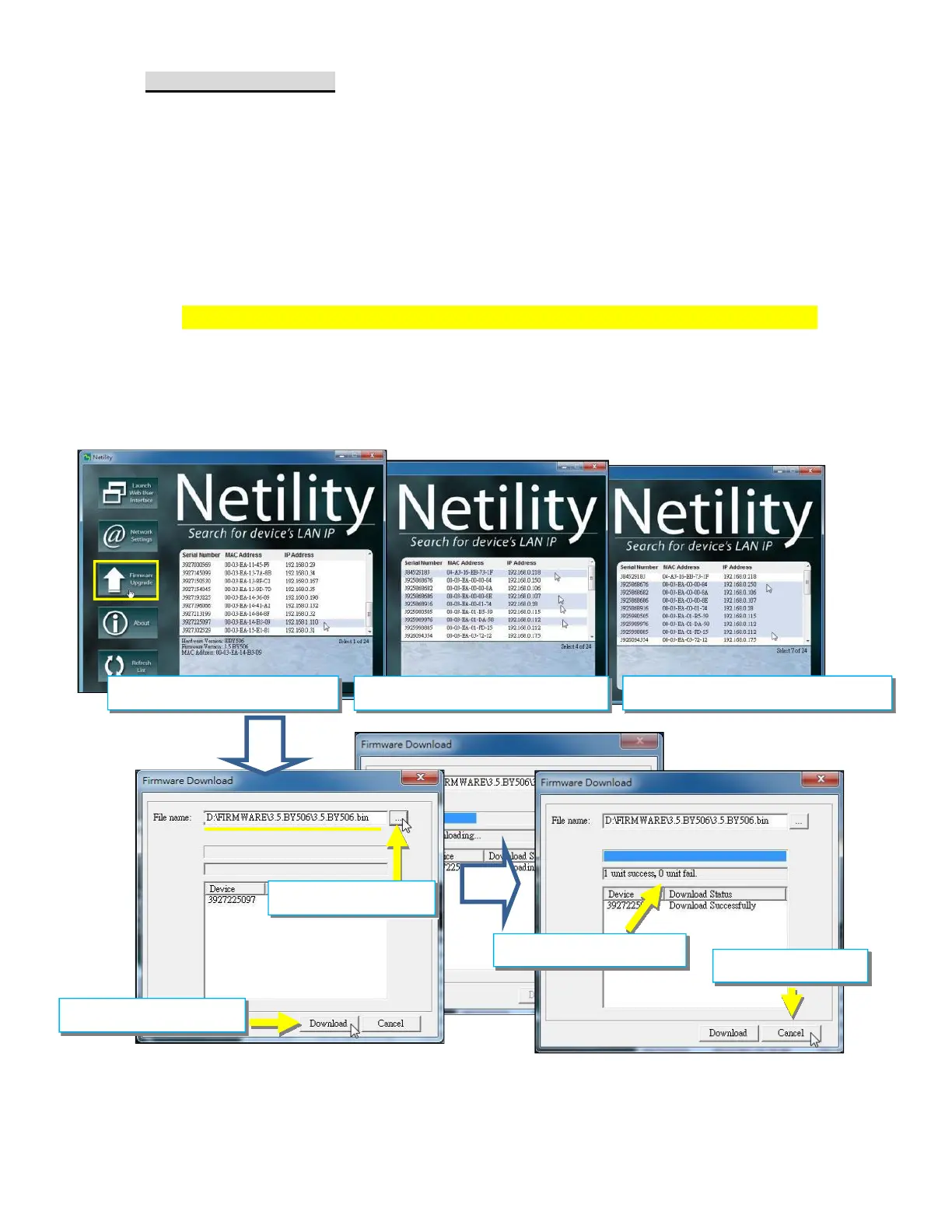
Ways to select NetAgentA for firmware upgrading
(1) Click on specific NetAgentA from the Netility list
(2) Press and hold on CTRL key then select multi NetAgentA unit from the list=>This
is to upgrade multi units at once
(3) Click on the first NetAgentA from the list, then press and hold on SHIFT key as
well as click on the last unit of the NetAgentA =>This is if all NetAgentA from the list
are same model
If any failure during firmware upgrading, please upgrade again until it is successfully
done
While upgrading, red and yellow LED would alternating flashing, or red led flashing.
DO NOT remove any power or cable to the NetAgentA. Once firmware is successfully
upgraded, NetAgentA would reboot automatically.
WARING:Please makes sure the multi NetAgentA selected are same model
Upgrade Single
Selection of Multi-NetAgentA
Upgrade consecutive
1.Select .bin file
2.Click on Download
3. Upgrade message
4. Cancel to exit



 To Next Page