MAC/MTT-OPS-1
26 FEB 2019
SECTION 2
System Description
2-18
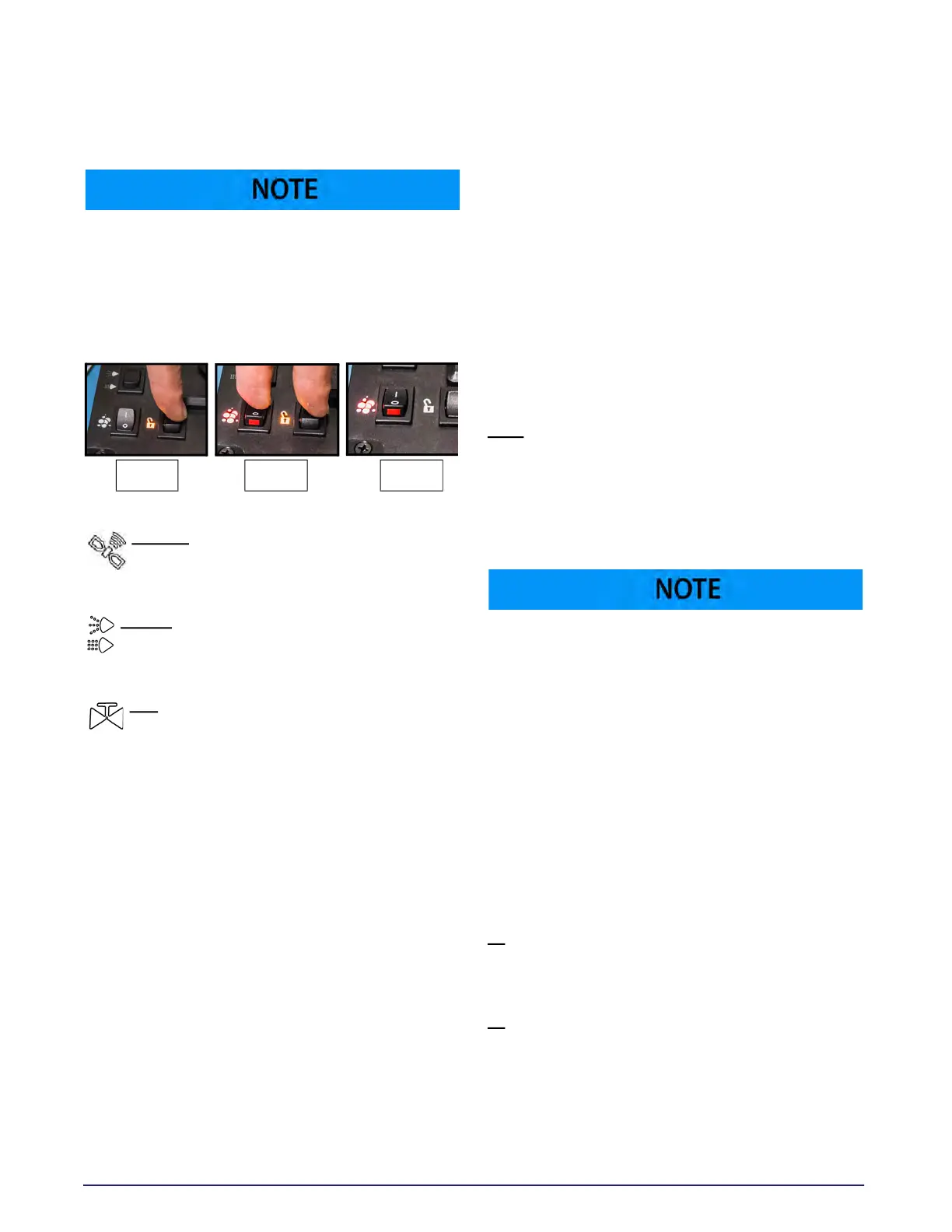
The FOAM switch is protected by the FOAM LOCK
momentary switch. In order to activate FOAM, first
press and hold the FOAM LOCK switch. While still
holding the FOAM LOCK switch, turn the FOAM
switch ON. Hold both switches in the ON position
for 1 second and then release.
J
OYSTICK – Sends requests for rotation and
elevation motion for water cannon
operation.
N
OZZLE – Sends request for adjustable nozzle
on water cannon to move from FAN/FOG to
STREAM spray patterns.
BFV
– Sends request to open or close the
water cannon butterfly valve. This butterfly
valve controls water flow to the water cannon.
Activating the BFV switch requests the water
PUMP to stay ON with NO other pressure
discharge functions activated providing that at
least the minimum water level is present in the
tank.
Ground Speed Sensing (AUTO MODE)
The MEGA ground speed sensing control system is
an independent and self-contained GPS unit that
provides speed information to the existing DiSCS.
The DiSCS logic control uses the ground speed
signal to automatically cycle and pulse spray
heads to obtain a desired lay-down of water
regardless of ground speed. This automatic control
reduces water usage and prevents over-watering
of haul roads and intersections.
Near or below 4.8 KPH/3 MPH, AUTO mode will
switch to INTERMITTENT mode and discharge
functions may operate continuously or may ramp
down the water pump to OFF. When vehicle speed
rises above 4.8 KPH/3 MPH, AUTO mode will
resume control of the system. The system warns
the operator of all malfunctioning system
functions and provides full manual control of all
spray system functions in the event of an AUTO
mode failure. All automatic system protection
features of low water level conditions, no-flow
conditions and water pump soft start/stop feature
still operate normally in the AUTO mode.
Auto Mode Extended Function Descriptions
AUTO – This function has priority over intermittent
mode. AUTO uses the speed signal from the GPS
module to operate the spray system based on F1
and F2 adjustments. Pulsed spray (rather than
continuous spray) will begin when the AUTO
function requests reduced volume.
When the chassis ignition switch is turned on, the
GPS module will attempt to make a satellite
connection. During this time, the AUTO light on
the cab control box will blink until a satellite
connection is established. If the AUTO light still
blinks when the cab control POWER switch is
turned ON, then the satellite connection has not
yet been established. Connection may take up to
10 minutes.
PWM Mode
If the AUTO switch is ON and the INTMNT switch is
OFF, then the AUTO mode is a time-based banding
mode, and is adjusted as follows:
F1
– The time for spray head ON cycle. Dial turned
counterclockwise reduces spray head ON time.
Dial turned clockwise increases ON time.
F2
– This setting dictates the vehicle speed above
which all selected discharge functions (spray
heads and pressure dump bar) are set for
maximum flow. Below this vehicle speed, “reduced
volume mode” comes into effect (see description
below), and spray heads may pulse on and off
rather than spraying continuously.
Step 1 Step 2 Step 3



 To Next Page