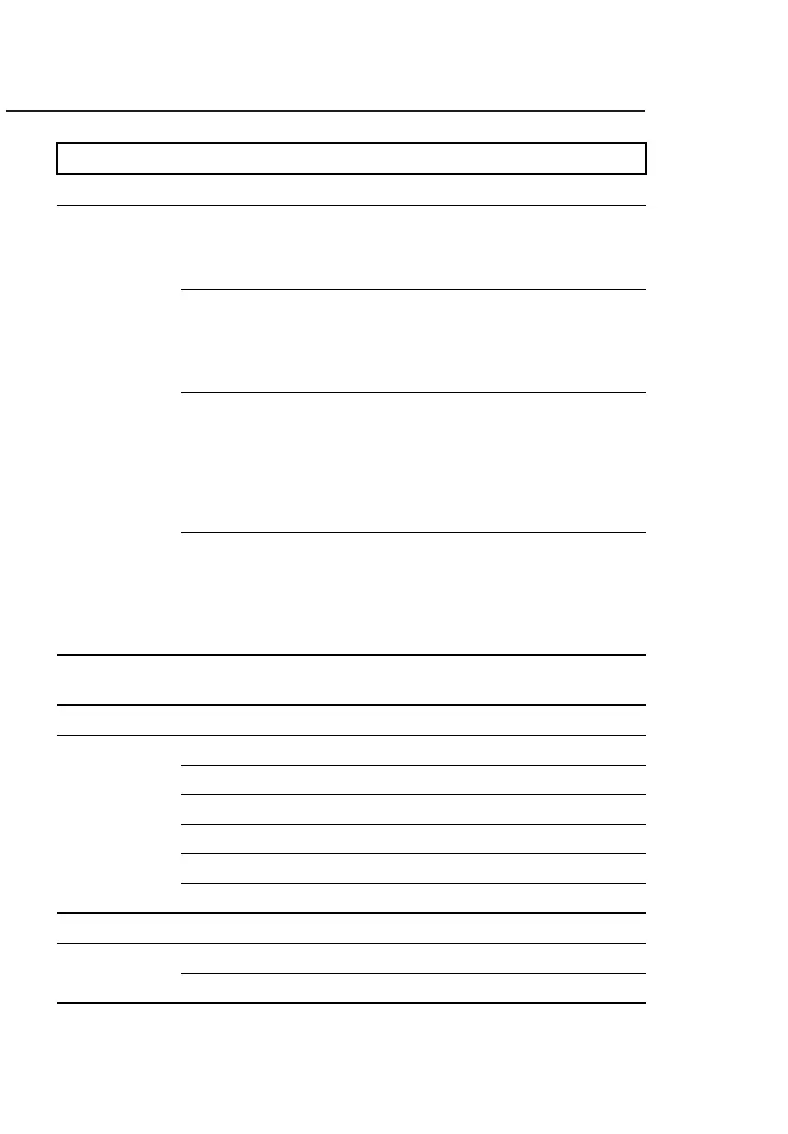
MENU SUBMENU DESCRIPTION
SETUP TEST
MANUAL Enables and configures:
Maximum current (between 50 µA and 10,000 µA
selected in steps of 10 µA);
Maximum voltage (between 3,000 and 80,000 V).
AUTO Enables and configures:
Maximum current (between 50 µA and 10,000 µA
selected in steps of 10 µA);
Test voltage (between 3,000 and 80,000 V);
Dwell time (between 15 and 1,200 sec.).
RAMP Enables and configures:
Maximum current (between 50 µA and 10,000 µA
selected in steps of 10 µA);
Test voltage (between 3,000 and 80,000 V);
Dwell time (between 15 a 1,200 sec.);
Ramp up (between 100 and 9,900 V/s);
Ramp down (between 100 and 9,900 V/s).
SVT Enables and configures:
Maximum current (between 50 µA and
10,000 µA);
Maximum voltage (between 5,000 and 80,000 V);
Time step (between 15 a 120 sec.);
Step voltage (between 1.0 and 12 kV).
LANGUAGE Allows you to change the interface language
between: English, Spanish and Portuguese.
SETTINGS
SET DATE FORMAT Selecting the date format.
SET TIME FORMAT Selecting the time format.
DATE ADJUST Setting the date.
TIME ADJUST Setting the time.
DISPLAY ADJUST Setting the display.
SYSTEM INFO Displays the firmware version and serial number.
MEMORY
USAGE Displays the percentage of internal memory used.
DELETE Deletes all records from memory.



 To Next Page