EasyManua.ls Logo

Megger MIT481/2 - Page 23

Megger MIT481/2
45 pages
Print Icon
To Next Page IconTo Next Page
To Previous Page IconTo Previous Page
Loading...
www.megger.comMIT400/2
23
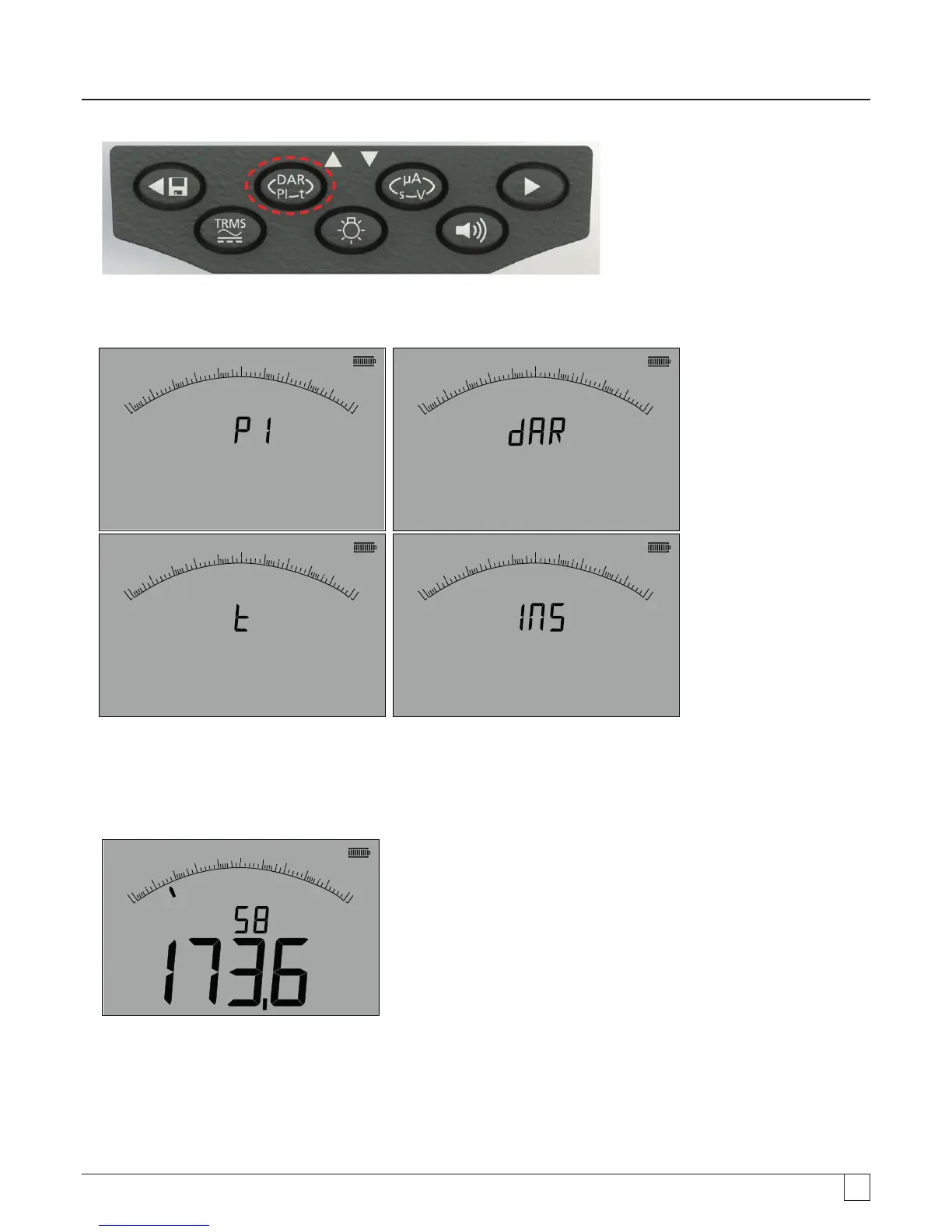
- Figure 23
The small digital readout should change from displaying the selected test range (in Volts) to PI, to DAR, T and INS, as below:
G
0
0.01
0.1
110
100
W
8
W
M
G
0
0.01
0.1
110
100
W
8
W
M
G
0
0.01
0.1
110
100
1
W
8
W
M
G
0
0.01
0.1
110
100
W
8
W
M
- Figure 24
4. Select the DAR function.
5. Press and release the TEST button to start the test. The display will show a count-down timer and the current insulation value,
as above:
G
G
0
0.01
0.1
110
100
W
8
W
M
s
- Figure 25
At the first measurement interval the MIT will display the measured value and log this in temporary memory.

Table of Contents

Related product manuals