14
Test results
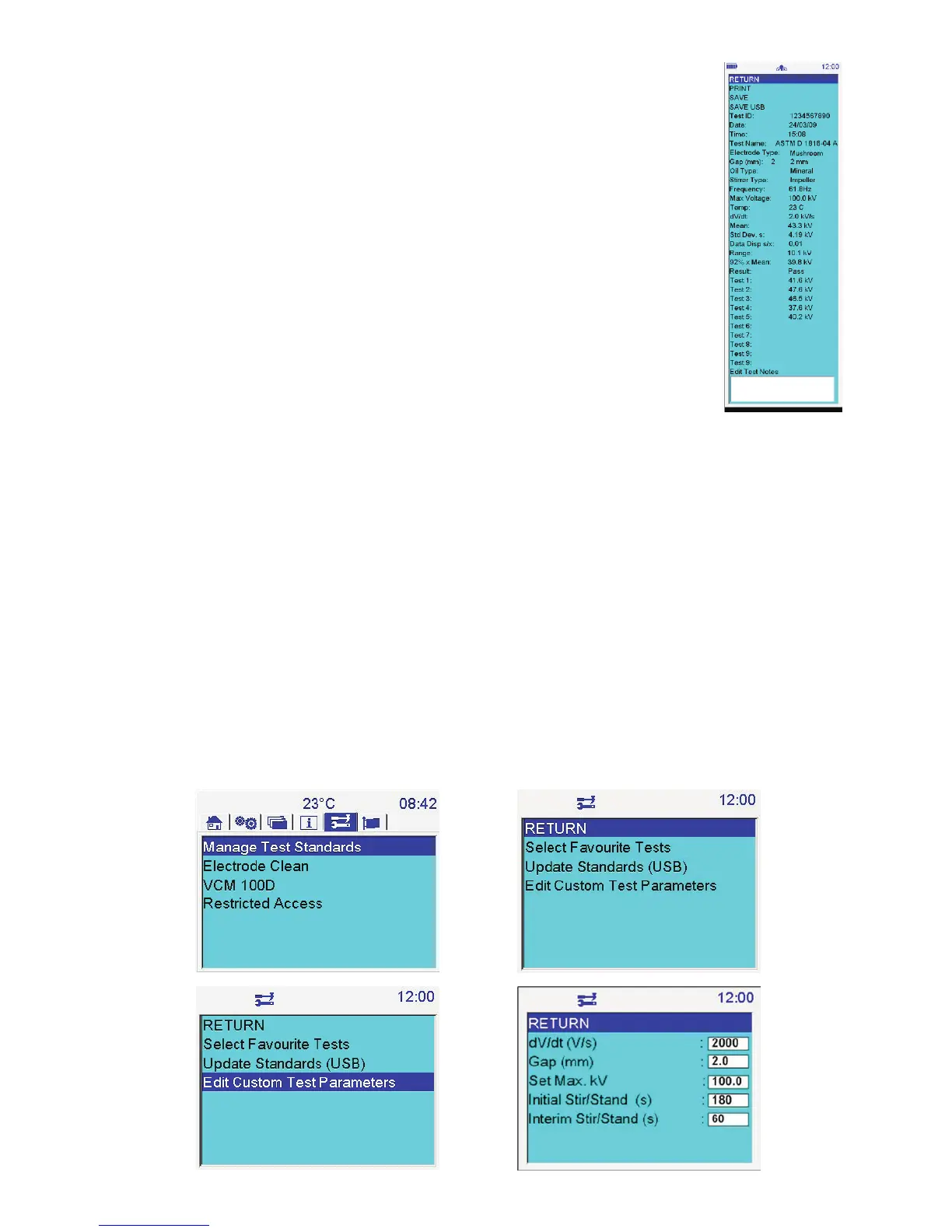
At the end of any test results are shown on the screen. A typical example is the ASTM D 1816-04A
test. This image shows the complete on-screen information presented to the user however the
screen size is naturally smaller so a slider function enables the user to navigate through the result
and print it if required.
All screen based test results accommodate 10 breakdown tests but tests with less than 10
breakdowns use only the relevant results to produce statistics i.e. statistics of mean breakdown
voltage, data dispersion, range and standard deviation.
Printing a result can be selected as default or from the PRINT function within the results window.
Custom tests
Custom tests are tests that can be defined by a user by giving the user control over the range of
parameters set in a test. Three custom tests have been pre-programmed for user definition;
Custom (5) – this test contains five successive breakdown tests
Custom (6) – this test contains six successive breakdown tests
Custom (10) – this test contains ten successive breakdown tests
Navigate to the Tools top level screen as illustrated below. Select, “Manage Test Standards” by pressing the OK button.
Go down to, “Edit Custom Test Parameters” and press the OK button. The custom parameters screen shows a set of
variables that control a breakdown test. Each variable is user settable, simply navigate down to the required setting,
press the OK button and proceed to change the value as required. For numeric entry on the OTS AF models the
decimal point can be entered by quickly pressing the digit ‘1’ twice. So to enter 2.5 mm gap setting the user enters the
following sequence:
2
1, 1
5
OK
In the customs test parameters screen ‘set max. kV’ may appear as, ‘set kV (max. xxx)’ in certain versions of firmware.
All entry fields in the custom test parameters screen are range checked to ensure it is valid. When all values are set the
user navigates back to the Tools screen via the RETURN function. The user should ensure that Custom (5) and Custom
(6) are selected as favourite tests before leaving the manage test standards screen.



 To Next Page