Preparing beverages
38
GB
7
13
11
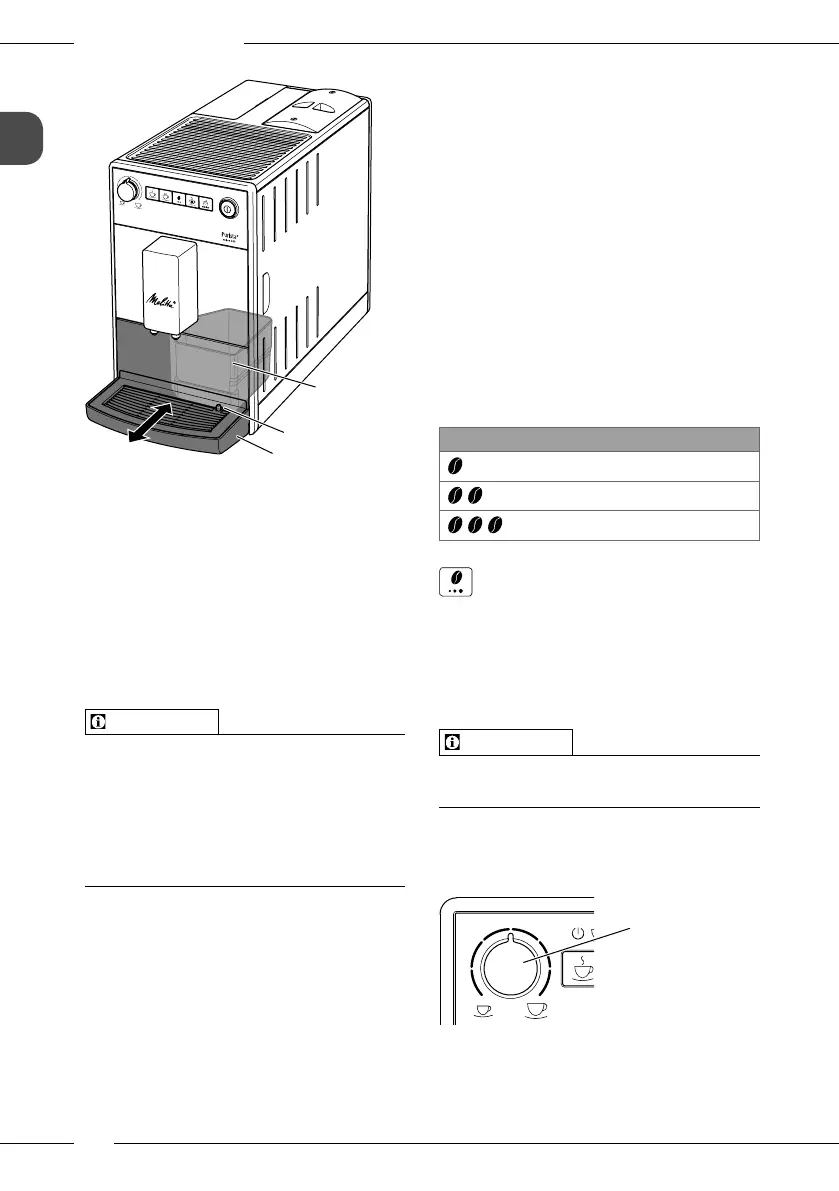
Fig. 8: Emptying the drip tray and coee
grounds container
1. Pull the drip tray (7) forwards out of the
appliance.
2. Remove the coee grounds container
(11) and empty it.
3. Empty the drip tray.
4. Insert the coee grounds container.
5. Push the drip tray into the appliance up
to the stop.
Information
If you empty the drip tray and the coee
grounds container while the appliance
is switched o, the appliance does not
register this process. Therefore, it is possi-
ble that you are requested to empty the
containers although the drip tray and the
coee grounds container are not yet full.
5 Preparing beverages
Please note:
There should always be sucient water
in the water tank. If the lling level is
too low, the appliance requests you to
rell it.
There should always also be sucient
coee beans in the bean container. If
there are no longer any coee beans
present, the appliance stops the prepa-
ration of a coee beverage.
The vessels for the beverages should be
suciently large.
The maximum coee quantity is
220ml.
5.1 Setting the coee
strength
As soon as the appliance is ready for oper-
ation, it displays the current setting of the
coee strength.
The following settings for the coee
strength are possible:
Display Coee strength
Mild
Normal
Strong
You can adjust the coee strength by
pressing the "Coee strength" button one
or more times.
You can adjust the coee strength before
the beverage is dispensed or during the
grinding process.
Information
When switching o the appliance, the last
set coee strength is stored.
5.2 Setting the coee
quantity
17
Fig. 9: Setting the coee quantity
You can set the coee quantity with the
"Coee quantity"(17) rotary regulator.


 To Next Page
 Loading...