32 D39374 | Date 08/2018
Operation and control
ON
TIMER
End 14:45
44h:44m
Holz trocknen
aufheizen
09:12h
Fr 20.10.2010 20:31
min
000°C
ALARM
of °C
max
000°C
auto off
99K
-
+
012
%rh°C
GRAPH
off
ON
LIGHT
ON
LIGHT
VACUUM
76mb
Set 50 mb
In 1
22.4
37.0
TEMP
Set
°C
°C
°C100.2
TEMP
°CSet 100.0
100,4 °C 4
3
100,1 °C 2
100,2 °C 1
ALARM
max
1029 mb
min
16
TIMER
30m04h
End
13:30 23.11.
Manual mode
12.09.2012 13:44
1 2 3 4 5 6
7 8 9 0 ABC D E FG
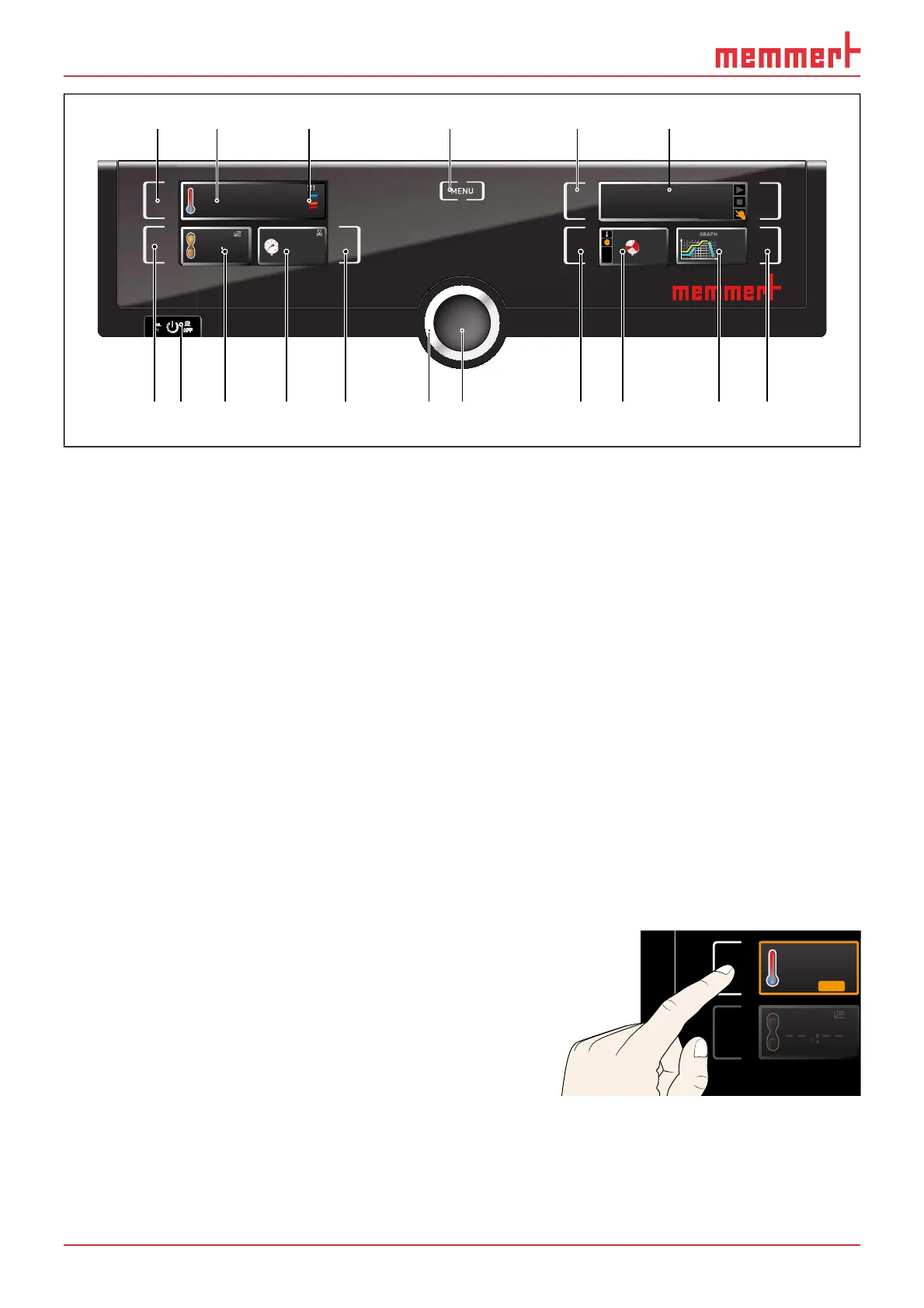
Fig. 26 ControlCOCKPIT in operating mode
1 Activation key for temperature setpoint adjustment
2 Setpoint and actual temperature display
3 Display of actual temperature and contact of the individual thermoshelves
4 Switch to menu mode (see page 48)
5 Activation key Operating mode
6 Status display
7 Activation key digital backwards counter with target time setting, adjustable from 1 minute
to 99 days
8 Main switch
9 Display digital backwards counter with target time setting, adjustable from 1 minute to 99
days
10 Setpoint and actual pressure display
11 Activation button for target pressure setting
12 Turn control for setpoint adjustment
13 Confirmation key (accepts setting made with the turn control)
14 Activation key setting the temperature and pressure monitoring
15 Display of temperature and pressure monitoring
16 Graphical representation
17 Activation key for graphical representation
5.3.2 Basic operation
In general, all settings are made according to the following pattern:
1. Activate the desired parameter (e.g.
temperature). To do so, press the cor-
responding activation key on the left
or right or the respective display. The
activated display is lined in colour, the
other displays are dimmed. The set
value is highlighted in colour.
.5°C100
TEMP
TIMER
22.4°C
TEMP
37.0°CSet



 To Next Page