60 D39374 | Date 08/2018
Menu mode
7.7 Sounds
In the SOUND display, you can define whether or not the appliance should emit acoustic
signals and, if yes, define on which events it should do so:
► on the press of a key
► at the end of a program
► On alarm
► if the door is open
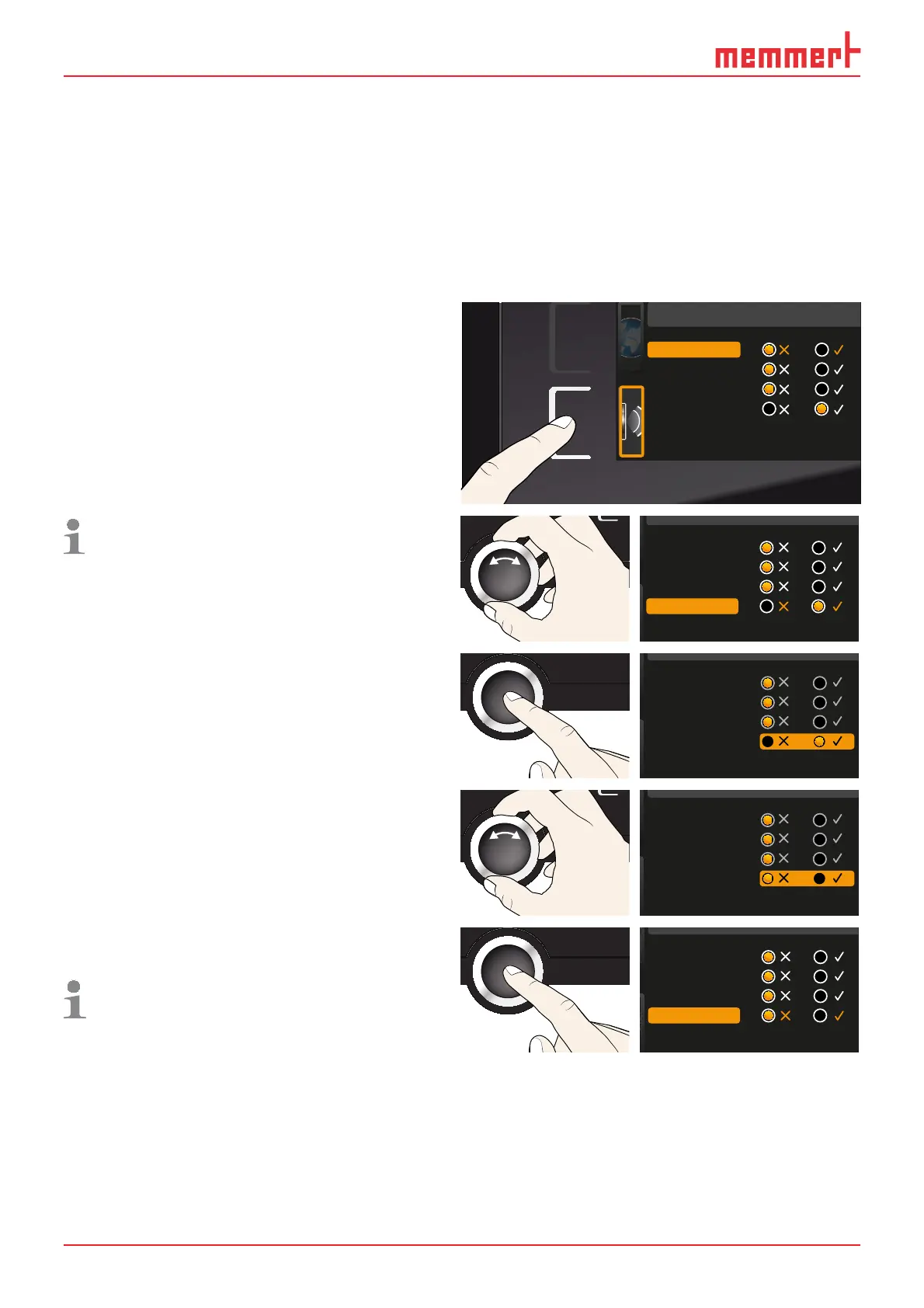
1. Activate the acoustic signal adjustment.
To do so, press the activation key on
the left side of the
SOUND display. The
display is enlarged. The first category
(in this case
Keysound) is automatical-
ly highlighted. On the right, the current
settings are shown on.
Sound
Keysound
At the end
If door open
On alarm
If you want to edit another list entry:
Turn the turn control until the respec-
tive entry – e.g.
if door open (special
configuration) – is highlighted in
colour.
Keysound
At the end
If door open
On alarm
2. Save the selection by pressing the con-
firmation key. The adjustment options
are automatically highlighted.
Keysound
At the end
If door open
On alarm
3. Select the desired setting with the turn
control.
Keysound
At the end
If door open
On alarm
4. Save the setting by pressing the confir-
mation key.
If an acoustic alarm sounds, it can be
turned off by pressing the confirmation
key.
Keysound
At the end
If door open
On alarm



 To Next Page