15
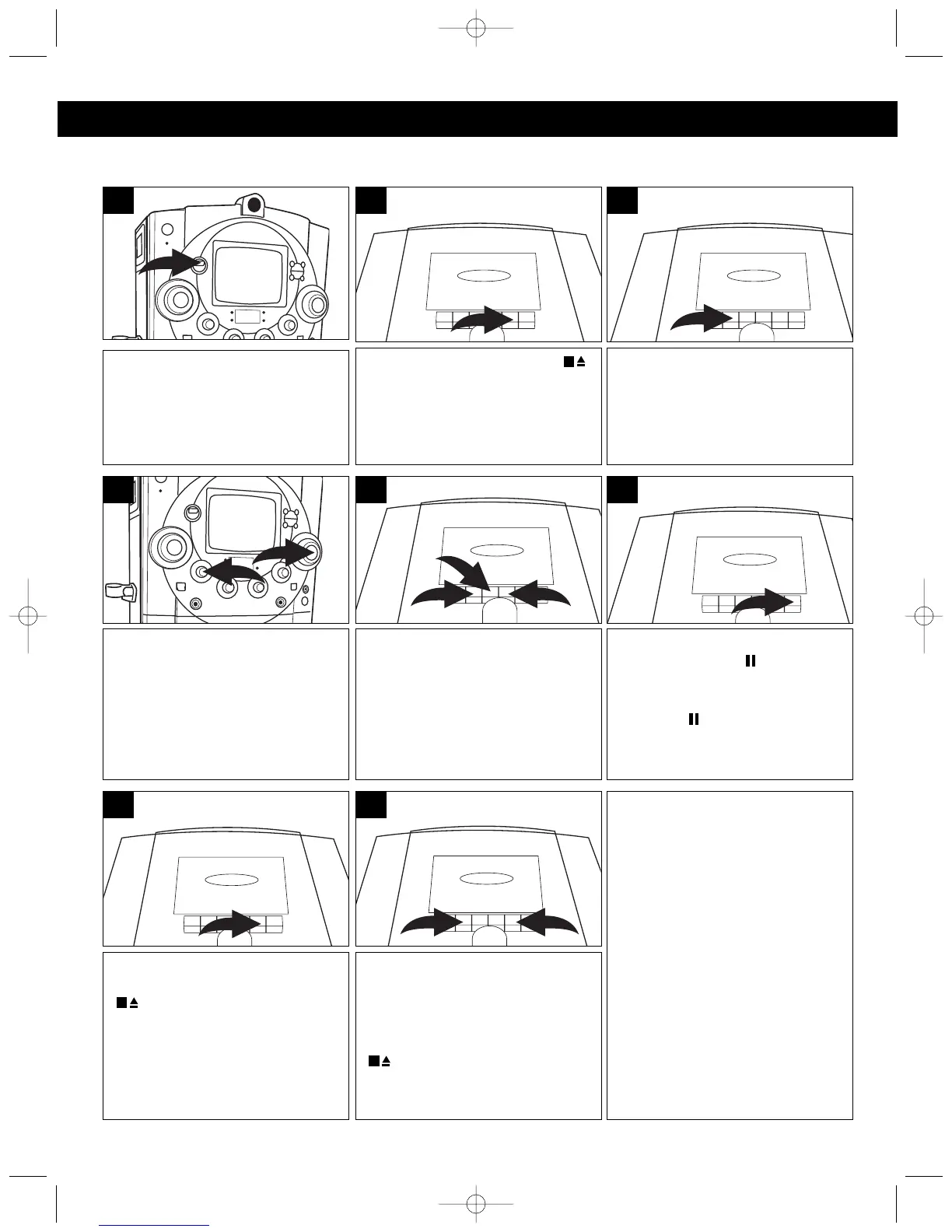
Slide the FUNCTION switch to
the TAPE position.
1
Adjust the MASTER VOLUME ❶
and TONE ❷ controls as desired.
2
1
4
Press the PLAY () button to
begin playback.
3
Press the STOP/EJECT ( )
button to open the Cassette Door
and insert a cassette with the
open end facing down. Close
cassette door.
2
To stop playback before the tape
ends, press the STOP/EJECT
() button. The PLAY ()
button is released and the tape
motor shuts off.
7
When the tape reaches the end,
the auto-stop mechanism
activates, the PLAY () button ❶
is released and the tape motor
shuts off. Press the STOP/EJECT
() button ❷ to open the
Cassette Door and remove the
tape.
2
1
8
KARAOKE:
If you would like to sing along with
a tape, simply play the tape,
insert a microphone and sing
along. When playing a karaoke
cassette tape, adjust the AUTO
VOCAL control for the best
balance between playback and
microphone levels.
To advance or rewind the tape
rapidly, press either the FFWD
() ❶ or REWIND (¥¥) ❷
button. When you reach the
desired point, press the PLAY
() button ❸ to resume normal
playback.
1
3
2
5
To pause playback momentarily,
press the PAUSE ( ) button. The
tape movement stops but the tape
motor is still running. Press the
PAUSE ( ) button again to
release pause and resume
normal playback.
6
PLAYING CASSETTE TAPES OR KARAOKE CASSETTE TAPE
OPERATION (CONTINUED)
MKS8580.O/M.QXD 8/6/03 3:09 PM Page 15




 To Next Page