- 36 -
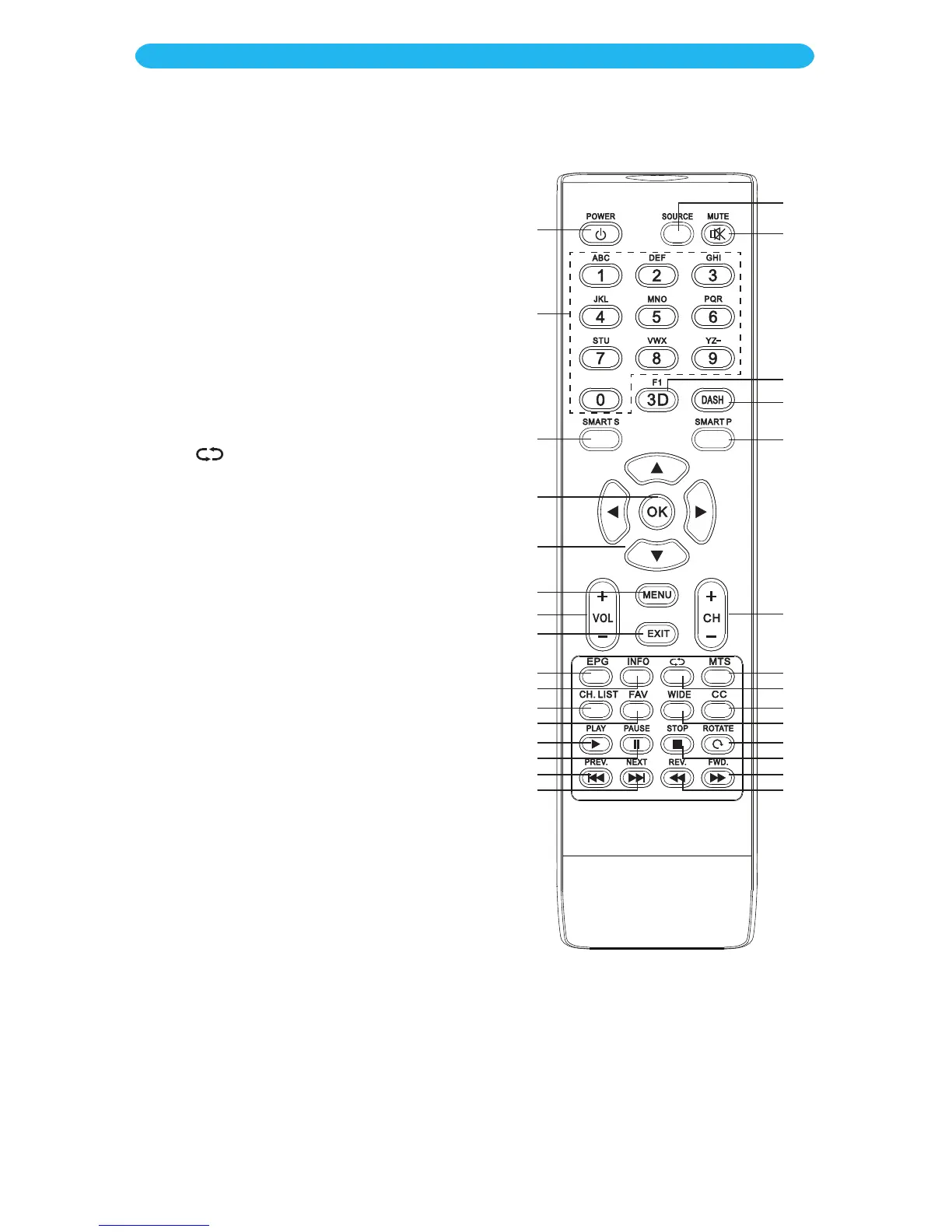
SMART Sound Button w: Press to select
the desired Sound mode.
SMART Picture Button bk: Press to select
the desired Picture mode.
EPG Button X: When viewing a digital
source, press to display the Electronic
Program Guide.
INFO Button at: Display some information
of current program in TV mode. Will show
info about the selected device when in other
modes.
Return Button bn: Press to return to the
previously selected channel.
MTS Button bm: When a stereo signal is being
broadcast, press this button to select mono
or stereo sound.
When an SAP program is received, press this
button to select mono or SAP.
When stereo, and SAP broadcast is received,
press this button to select mono, stereo or
SAP.
Press this button to show the list of audio
languages available for the current channel in
ATSC broadcasts.
CH. (Channel) LIST Button ak: Press to
display the channel list mode.
FAV (Favorite) Button al: Press to access
your Favorite Channel List.
WIDE Button bp: Press to adjust the picture
aspect ratio.
CC Button bo: Press to turn Closed Captions
On or Off.
The lower eight buttons are used when a
USB drive is inserted, described in detail on
pages 38-39.
1
2
3
9
10
11
12
13
14
15
16
23
24
25
26
27
28
29
30
22
21
20
19
18
17
7
4
5
6
8
OPERATION
Main Operation



 To Next Page